CrowdStrike Falcon Platform
CrowdStrike Falcon Platform: CrowdStrike Falcon is a cloud-native, AI-powered cybersecurity platform designed to stop breaches by protecting endpoints, cloud workloads, identity, and data.
Axoflow can collect data from Falcon in two ways:
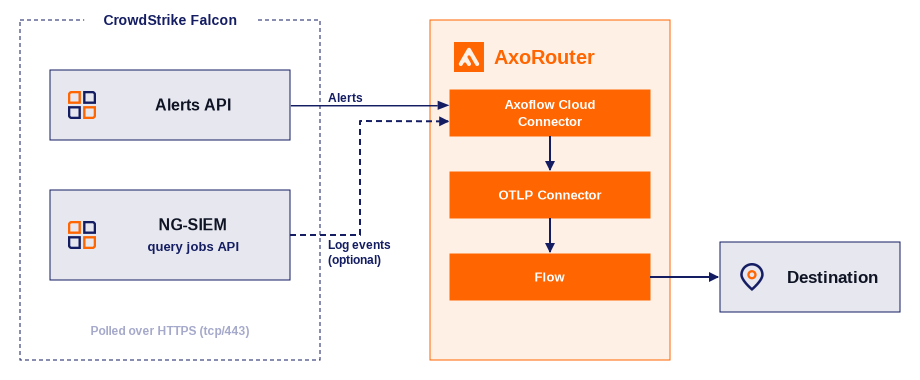
- With an Axoflow Cloud Connector that polls the Falcon APIs for alerts, and optionally runs searches on an NG-SIEM repository.
- By receiving CEF messages that Falcon sends over syslog.
Collect data with Axoflow Cloud Connector
- Create a Connector Rule on the AxoRouter that deploys an Axoflow Cloud Connector and collects the data from the Falcon APIs. Axoflow Cloud Connector is a simple container that runs on an AxoRouter instance.
- Configure a Flow on AxoConsole that processes and routes the collected data to your destination (for example, Splunk or another SIEM).
Prerequisites
-
An AxoRouter instance that:
- Was provisioned with Enable Cloudconnectors turned on.
- Can reach the API host of your Falcon cloud (for example, api.crowdstrike.com) on TCP port 443. Adjust your firewall rules and the access rules of the data source as needed.
-
You know the IP address the AxoRouter. To find it:
- Open the AxoConsole.
- Select the Routers or the Topology page.
- Select on AxoRouter instance that is going to receive the logs.
- Check the Networks > Address field.
- A CrowdStrike Falcon subscription.
- A Falcon API client , and the client ID and client secret of this client. The API client must be able to read the Alerts API. To run NG-SIEM searches, it must also be able to run query jobs.
Configure Axoflow Cloud Connector on AxoRouter
To collect data from CrowdStrike Falcon, complete the following steps.
-
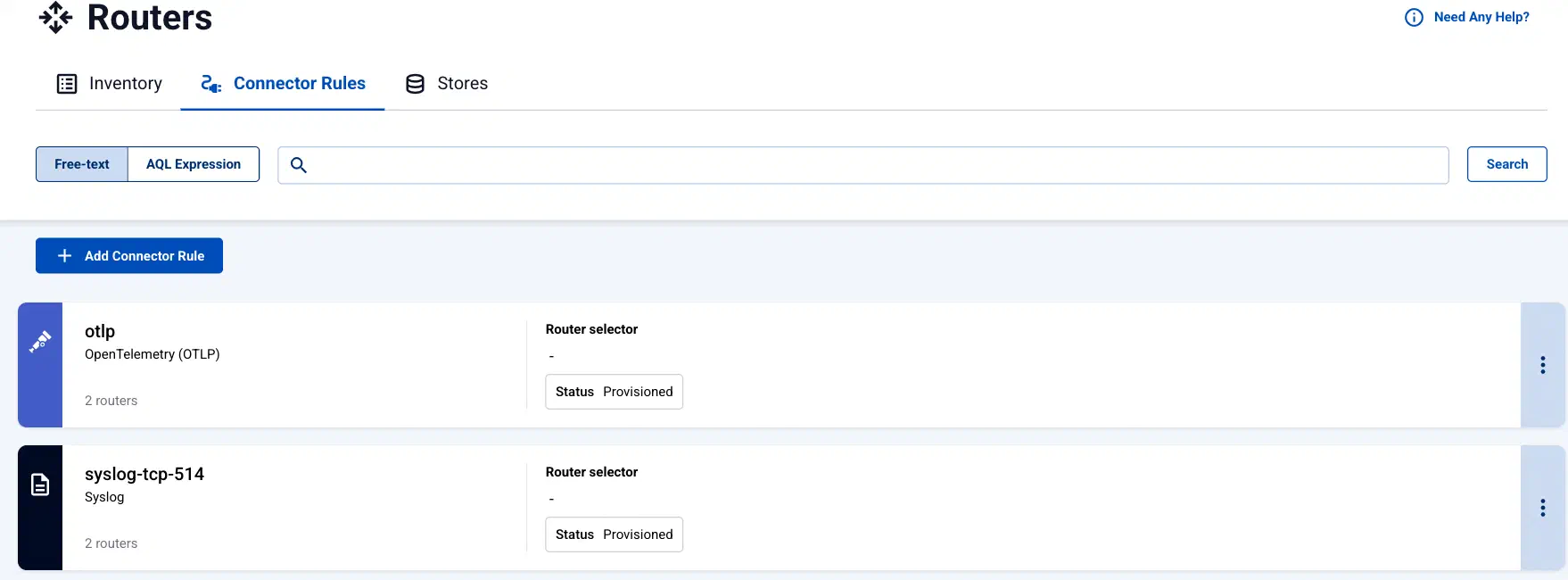
Select Routers > Connector Rules > Add Connector Rule. (Alternatively, you can select Add Connector > Add a connector rule on the Connectors page of an AxoRouter host.)
-
Select Falcon Platform.
-
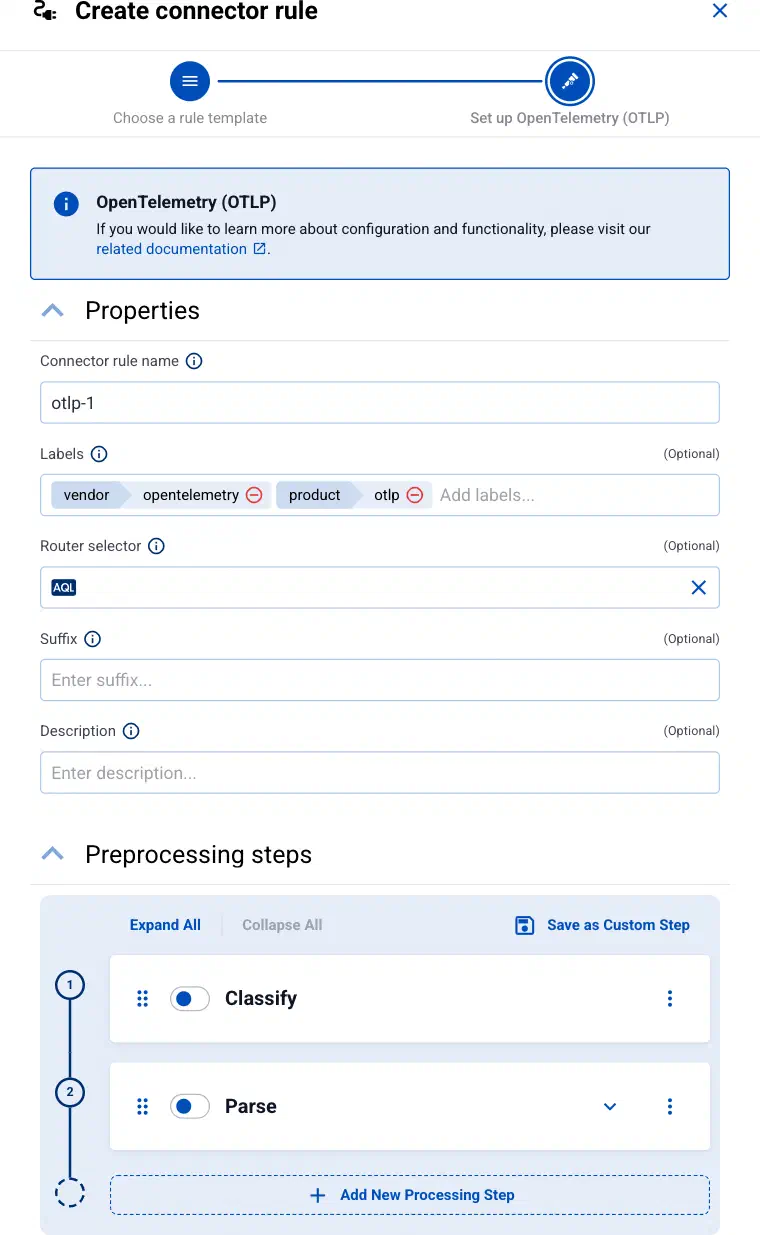
Enter a name for the connector rule into the Connector rule name field.
-
(Optional) Add labels to the connector rule. You will be able to use these labels in Flow Processing steps , for example, in the Query field of Select Messages steps. For details about the message schema and the related connector-specific fields, see the
meta.connectorobject . -
Set the Router selector for the connector rule. The selector determines which AxoRouter instances get a connector from this connector rule.
CAUTION:
Each connector rule for CrowdStrike Falcon must match exactly one AxoRouter. Use the
nameorguidAQL selector to make sure it matches only one AxoRouter. Otherwise several Axoflow Cloud Connector instances collect the same data, and Axoflow receives every message multiple times.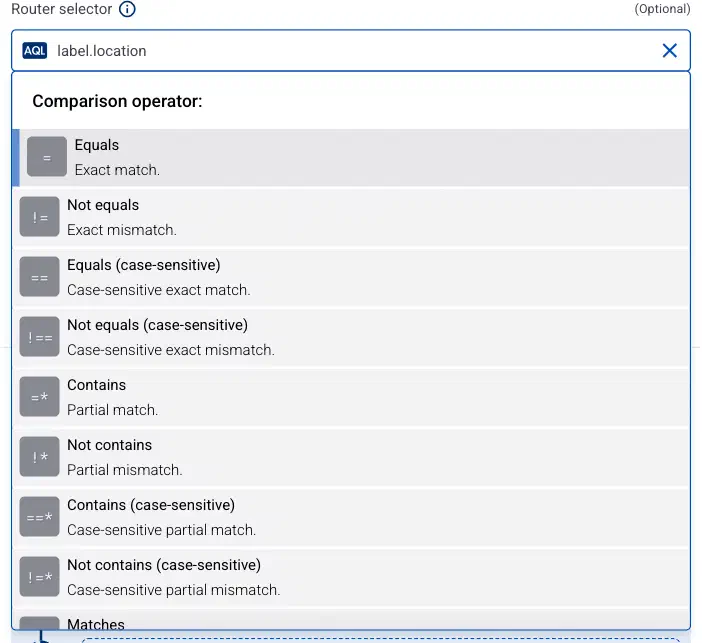
You can use any labels and metadata of the AxoRouter hosts in the Router selectors, for example, the hostname of the AxoRouter, or any custom labels .
- If you leave the router selector empty, it matches every AxoRouter instance.
- To select only a specific AxoRouter instance, set the
namefield to the name of the instance as selector. For example,name = my-axorouter. - If you set multiple fields in the selector, the selector will match only AxoRouter instances that match all elements of the selector. (There in an AND relationship between the fields.)
-
(Optional) Enter a Suffix for the connector rule. AxoConsole uses the suffix in the name of the connector instances that it creates on the AxoRouter hosts. The name of the connector instance follows the
<name-of-AxoRouter>-<suffix>schema. For example, if the name of a matching AxoRouter instance isaxorouter-1, and the suffix of the rule iscustom, the name of the connector on that AxoRouter isaxorouter-1-custom.If the Suffix field is empty, AxoConsole uses the name of the connector rule instead. For example, if the name of the connector rule is
otlp-1, the name of the connector isaxorouter-1-otlp-1. -
(Optional) Enter a description for the rule.
-
Configure how Axoflow Cloud Connector reaches the Falcon APIs.
- Client ID and Client secret: The credentials of the Falcon API client that Axoflow Cloud Connector uses to poll the platform.
- Cloud: The Falcon cloud to poll:
us-1,us-2,us-3,eu-1,us-gov-1,us-gov-2,gov-1, orgov-2. Select Autodiscover to resolve the cloud from the credentials of the API client. - Member CID: (Optional) Selects a CID if the API client has access to several of them.
-
(Optional) Select More options to change the advanced options of the connector, for example, to collect data from an NG-SIEM repository.
-
Select Add. The Axoflow Cloud Connector starts polling the Falcon APIs and forwarding the collected events to the AxoRouter instance.
-
Verify that the Axoflow Cloud Connector is running.
- Select Routers, then select the AxoRouter you added the Axoflow Cloud Connector to.
- Select Services and check that axoflow-cloudconnector.service is running without errors.
-
Create a Flow to route the data from the AxoRouter instance to a destination. You can use the Labels of this source to select its messages.
Advanced options
Select More options on the connector rule to set the following options.
-
Host override: Poll this host instead of the one that the selected cloud resolves to.
-
Poll interval: How often Axoflow Cloud Connector polls the Falcon APIs. Default value:
30s -
Initial lookback: How far back the first poll reaches when no checkpoint is stored yet. Set it to
0to collect only the events that arrive after the connector starts.Axoflow Cloud Connector checkpoints the position of the poll cursors, so after a restart it resumes the collection where the last poll stopped. The Initial lookback option applies only when there is no stored checkpoint.
-
Disable alerts poller: Don’t fetch alerts. If you enable this option, enable the NG-SIEM search option as well. Otherwise, there’s nothing to collect, and the connector rejects the configuration.
-
NG-SIEM search: Collects log events from an NG-SIEM repository using the query jobs API. Enable it to set the following options.
- Repository: The NG-SIEM repository (view) to query.
- Query string: The CQL filter that selects the events to collect. By default, the connector collects all events. Every matching event becomes a separate log record, so don’t use aggregating functions in the query.
- Search poll interval: Overrides Poll interval for the search poller, because a query job is much more expensive than a page of alerts. If you leave it empty, the search poller uses the Poll interval value.
Receive CEF data from Falcon
To onboard such a source to Axoflow, complete the generic appliance onboarding steps .
Configure Falcon to send data in CEF (Common Event Format) to Axoflow.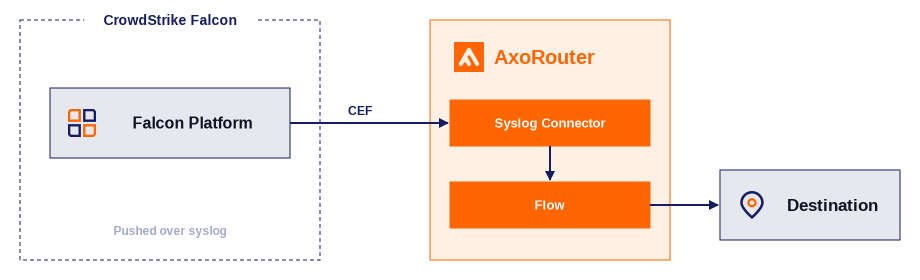
Labels
Axoflow automatically adds the following labels to data collected from this source:
| Analytics label | Message field | Value |
|---|---|---|
vendor |
meta.vendor
|
crowdstrike |
product |
meta.product
|
falcon |
service |
meta.service.name
|
The value of the deviceProcessName field of the log message, for example, Crowdstrike Streaming API. Axoflow sets this label only for CEF messages received over syslog
. |
You can use the labels as:
- labels in Customize Graph on the Analytics page ,
- in the Filter labels field during log tapping .
You can use the message fields
- in Flow Processing steps , for example, in the Query field of Select Messages steps,
- in AQL expressions in the search bars.
Sending data to Splunk
When you send the CEF data collected from this source to Splunk, Axoflow uses the following sourcetype and index settings:
| sourcetype | index |
|---|---|
crowdstrike:detections:cef, crowdstrike:event:cef, crowdstrike:source_stream:cef |
default |
Sending data to Google SecOps
When sending the data collected from this source to a dynamic Google SecOps destination
, Axoflow sets the following log type: CS_STREAM.
Sending data to Microsoft Sentinel
When sending the data collected from this source to a Microsoft Sentinel destination
, Axoflow normalizes the data and sends it to the following table: CommonSecurityLog.