Collect log files from Linux and Windows edge hosts, and look up the labels, metrics, and advanced options of the File Collector.
Edge collection rules
Create, modify, and extend the collection rules that tell edge hosts which files, journals, and Windows event channels to collect.
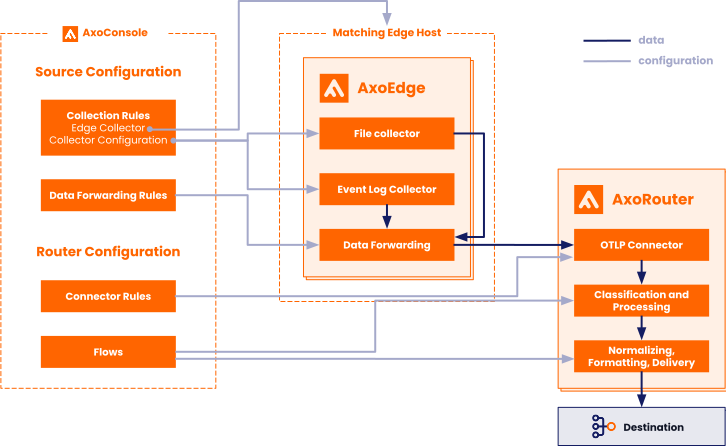
Collection rules define how edge hosts collect their local data. To collect data from non-edge sources, see AxoRouter connector rules.
- Sources are hosts that are sending data to a data aggregator, like AxoRouter.
- Edges are source hosts that are running a collector agent managed by AxoConsole, or have an Axolet agent reporting metrics from the host.
Collection rules are high-level policies that determine how data should be collected on a set of edge hosts based on dynamic host labels.
To see every collection rule configured in AxoConsole, select Sources > Collection Rules from the main menu.
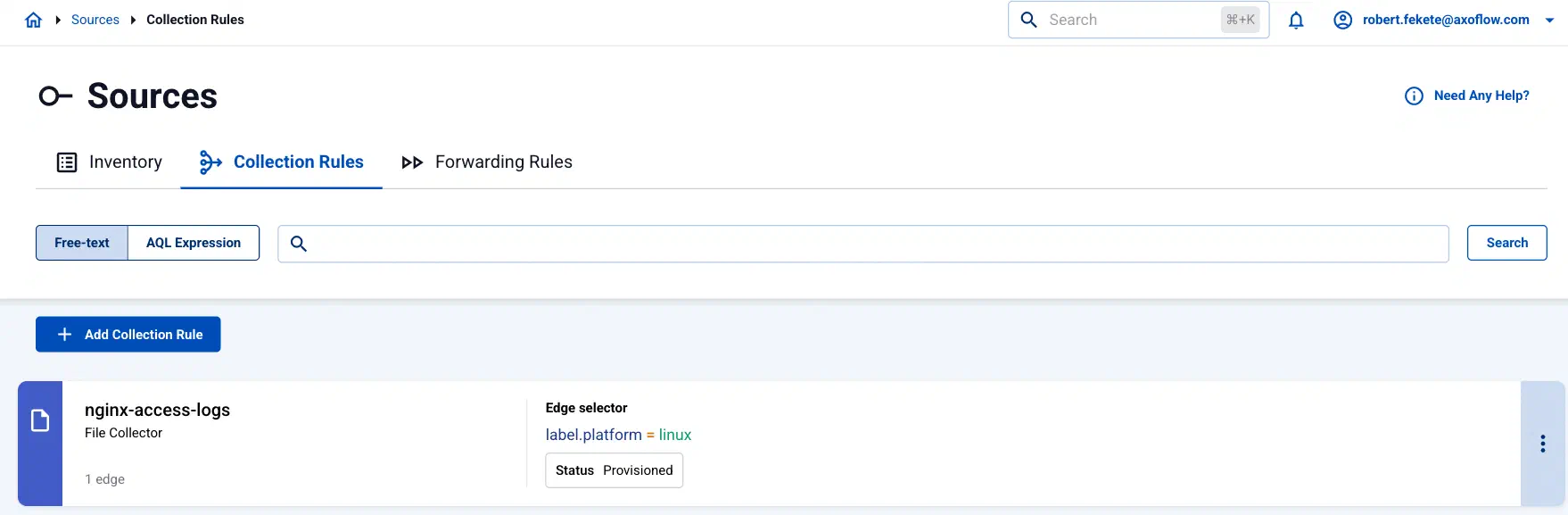
Collection rules have the following main elements:
-
the way they collect data (for example, from files, or Windows Event Logs), and other specific parameters (for example, the path and filename)
-
the edge selector, which determines the list of edge hosts that will create a collector based on that rule.
You can use any labels and metadata of the edge hosts in the edge selectors, for example, the hostname, or any custom labels. For example, using the
label.product = windowsselector will create a collector only on Windows hosts.
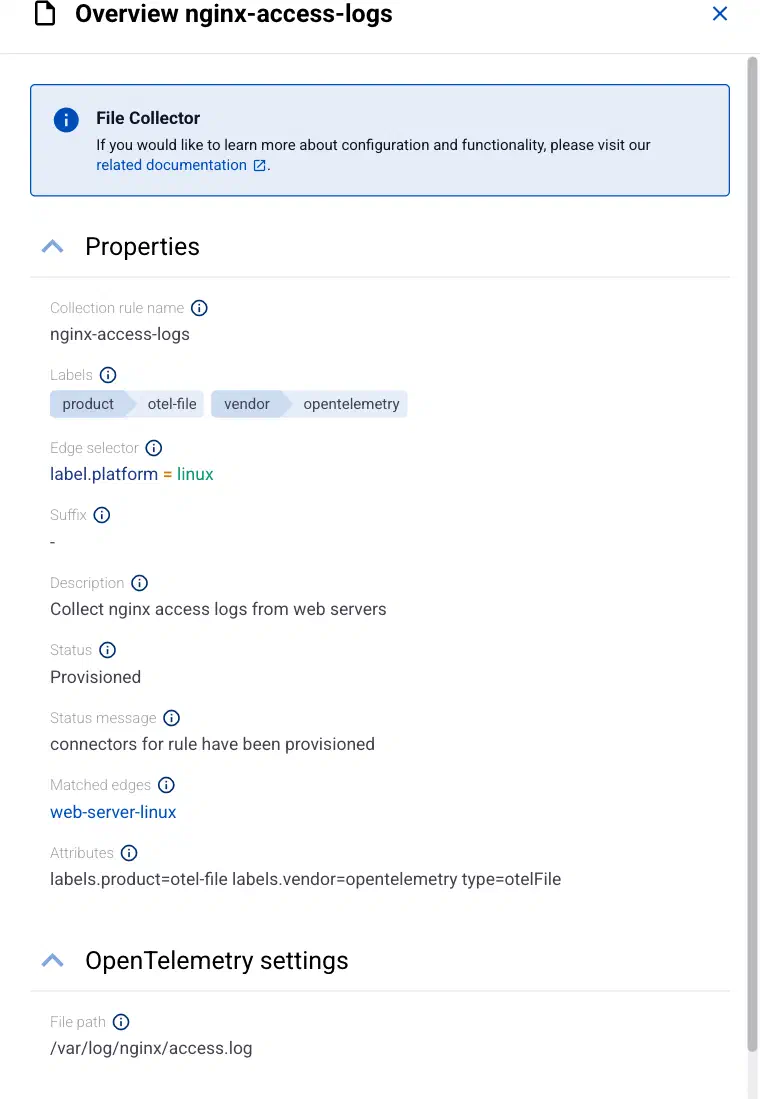
To show the details of a collection rule, select > Details on its card. The details include:
-
The list of Matched edges: the edge hosts that will have a collector based on that rule. If you select the name of a matched edge host, the Connectors page of that host opens, showing you the collectors configured for that host.
-
- Idle: The rule doesn’t match any hosts currently.
- Provisioned: Connectors based on this rule were successfully provisioned for every matching host.
- Error: Some error(s) occurred while provisioning connectors based on this rule. See the Status message field for details.
- Unknown: The rule is in an unknown state.
-
Attributes: Various significant attributes of connectors provisioned based on this rule.
Create data collection rule
To create a new collection rule, complete the following steps.
-
Select Sources > Collection Rules > Add Collection Rule. (Alternatively, you can select Add Connector > Add a data collection rule on the Connectors page of an edge host.)
-
Select the type of collector you want to create. For example, File Collector. The following collector types are available:
- File Collector (OpenTelemetry)
- Journald Collector (OpenTelemetry)
- Windows Event Log
- Windows Event Tracing (ETW)
-
Configure the collection rule.
-
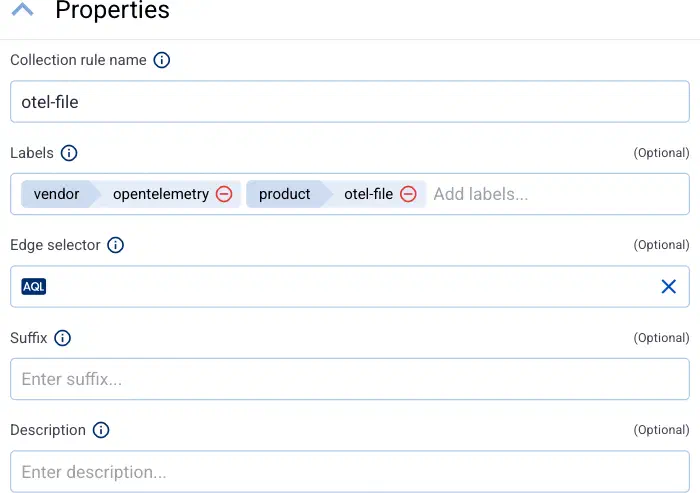
Enter a name for the collection rule into the Collection rule name field.
-
(Optional) Add labels to the collection rule.
AxoConsole automatically adds the following selectors based on the collector type:
- File Collector:
vendor = opentelemetryproduct = otel-file - Journald Collector:
vendor = opentelemetryproduct = otel-journald - Windows Event Log:
vendor = microsoftproduct = windows-event-log - Windows Event Tracing:
vendor = microsoftproduct = windows-event-tracing
You can use these metrics labels as:
- labels in Customize Graph on the Analytics page
- in the Filter labels field during log tapping
- in Flow Processing steps, for example, in the Query field of Select Messages steps.
For edge-related metrics, see the metrics beginning with
edge_connector - File Collector:
-
Set the Edge selector for the collection rule. The selector determines which edge hosts will have a collector based on this collection rule.
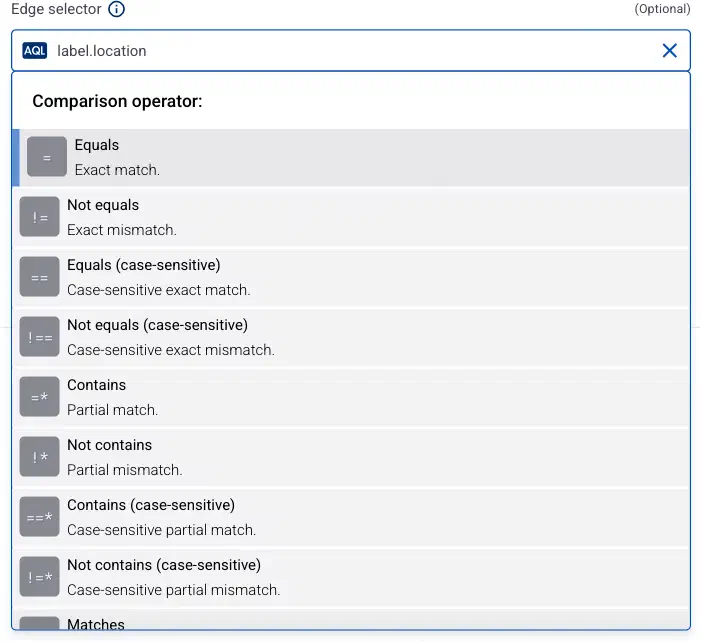
- Only edge hosts will match the rule.
- If you leave the edge selector empty, the rule matches every edge host.
- To select only a specific host, set the
namefield to the name of the host as selector. - If you set multiple fields in the selector, the collection rule will apply only to edge hosts that match all elements of the selector. (There in an AND relationship between the fields.) For example,
label.location = us-east-1 AND label.product = windows
-
AxoConsole automatically adds the following selectors based on the collector type:
- Journald Collector:
label.platform = linux - Windows Event Log:
label.platform = windows - Windows Event Tracing:
label.platform = windows
- Journald Collector:
-
(Optional) Enter a Suffix for the collection rule. AxoConsole adds the suffix to the name of the collector instances that it creates on the edge hosts. For example, if the name of a matching edge host is
edge-host-1, and the suffix of the rule isotel-file-collector, the name of the collector on that host isedge-host-1-otel-file-collector.If the Suffix field is empty, AxoConsole uses the name of the collection rule instead.
-
(Optional) Enter a description for the rule.
-
-
Configure the options specific to the collector type. For details, see the specific pages:
- File Collector (OpenTelemetry)
- Journald Collector (OpenTelemetry)
- Windows Event Log
- Windows Event Tracing (ETW)
-
Select Add. Based on the collection rule, Axoflow automatically creates collectors on the edge hosts that match the Edge selector.
CAUTION:
Make sure to configure data forwarding rules for your edge hosts to transfer the collected data to the OpenTelemetry connector of an AxoRouter.
Modify collection rule
To modify an existing collection rule, complete the following steps.
Note
- You cannot directly modify the collector of an edge host, only via modifying a collection rule.
- Modifying a collection rule affects every edge host that matches the Edge selector of the rule.
- To apply an existing collection rule to a new edge host, you can:
- Add a label to the edge host so the Edge selector of the collection rule matches the new host, and/or
- Change the Edge selector of the collection rule to match the new host.
-
Find the collection rule you want to modify:
- Select Sources > Collection Rules from the main menu, then select > Edit on the card of the collection rule you want to modify.
- Alternatively, find the edge host whose collector you want to modify on the Topology page, then select Connectors. Find the collector you want to modify, then select > Edit connector rule.
-
Modify the configuration of the collection rule as needed.
CAUTION:
The changes are applied immediately after you click Update. Double-check your changes to avoid losing data.
-
Select Update.
Add edge host to existing collection rule
To add an edge host to an existing collection rule, you have two options, depending on the Edge selector of the collection rule:
- Modify the Edge selector field of the collection rule to include the new edge host.
- Modify the labels of the edge host so it matches the edge selector of the collection rule.
File Collector
Journald Collector
Collect systemd journal entries from Linux edge hosts, and look up the labels, metrics, and advanced options of the Journald Collector.
Windows Event Log
Collect Windows Event Log channels from Windows edge hosts, and look up the labels, metrics, and advanced options of the collector.
Windows Event Tracing
Collect Event Tracing for Windows (ETW) events from Windows edge hosts, and look up the labels, metrics, and advanced options.