AxoRouter high availability
You can deploy multiple AxoRouter instances as a high availability cluster so the data pipeline keeps accepting logs even when an AxoRouter host fails. There are two main approaches: a load balancer in front of the cluster, or a shared virtual IP managed by keepalived.
Load balancer in front of the cluster
Sources connect to a load balancer, which forwards traffic to one of the AxoRouter hosts. If a host fails, the load balancer routes traffic to the remaining healthy hosts.
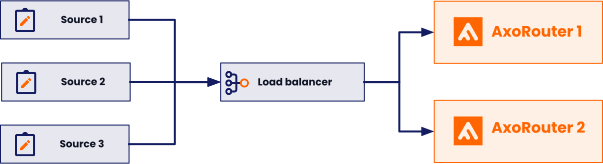
This approach reuses an existing load balancer if you already have one, but requires the load balancer to support all relevant protocols (for example, syslog over TCP or TLS).
Virtual IP managed by keepalived
Sources connect to a virtual IP address that floats across the AxoRouter hosts. keepalived uses VRRP to elect a primary node, which holds the virtual IP. If the primary node fails, keepalived moves the virtual IP to a backup node, and the sources keep reaching AxoRouter without changing their destination address.
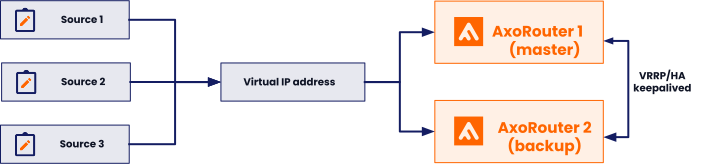
This approach doesn’t depend on external load balancer infrastructure and suits on-prem deployments well.
Cluster sizing and topology
The hosts running AxoRouter can be physical or virtual machines. The recommended layout depends on which you choose:
- Physical machines: Install two machines with a dedicated HA link between them to keep the HA traffic separate from the production traffic.
- Virtual machines: Set up three VMs with a dedicated (and guaranteed bandwidth) HA link (HA VLAN) spanning across them, to keep the HA traffic separate from the production traffic.
A cluster targeting highly reliable services should ideally consist of at least three nodes to avoid split-brain situations. In a split-brain situation, both nodes think that they are the last surviving node (for example, during a network failure) and bring up their services, leading to several problems.
The setups described here use fewer than the ideal number of nodes for cost reasons. Dedicated HA links provide an additional channel for HA communication independently of the production traffic, and significantly reduce the risk of split-brain scenarios.
For step-by-step instructions to deploy a keepalived-based cluster with a VRRP-managed virtual IP, see Set up AxoRouter high availability with keepalived.