Windows Event Tracing
Collect logs from Event Tracing for Windows (ETW).
Prerequisites
This collector can be deployed to edge hosts running Axoflow agent for Windows.
Add new ETW Collector
To create a new collection rule that collects Event Tracing data from edge hosts, complete the following steps:
-
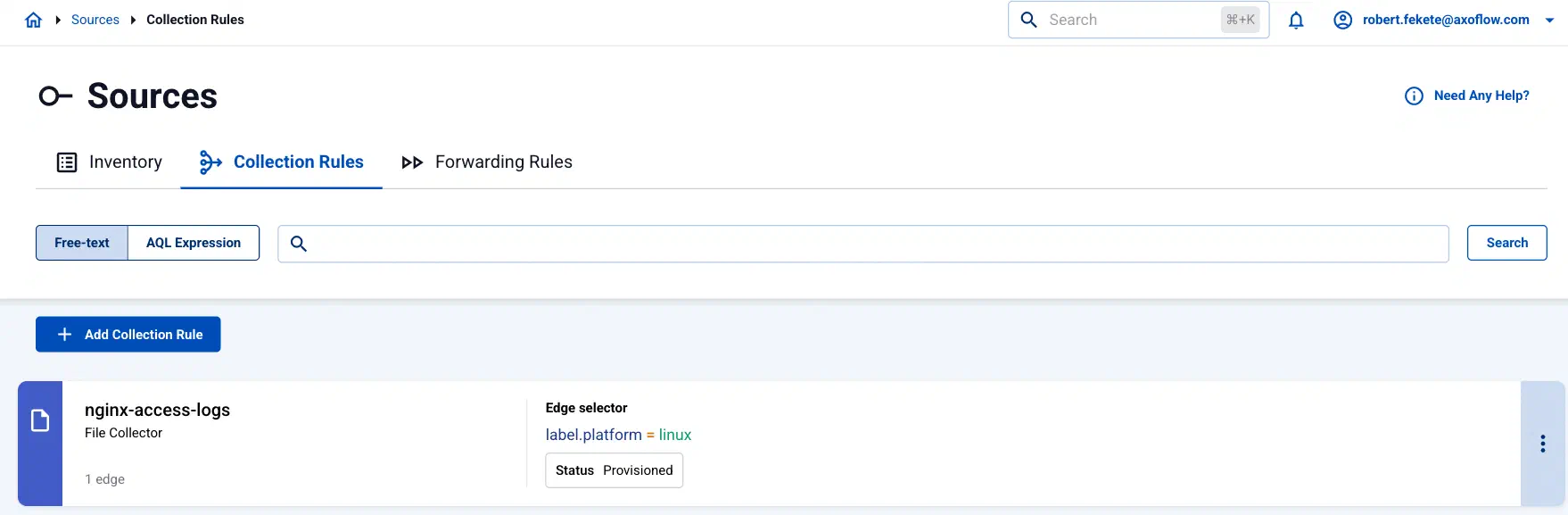
Select Sources > Collection Rules > Add Collection Rule. (Alternatively, you can select Add Connector > Add a data collection rule on the Connectors page of an edge host.)
-
Select Windows Event Tracing.
-
Configure the collection rule.
-
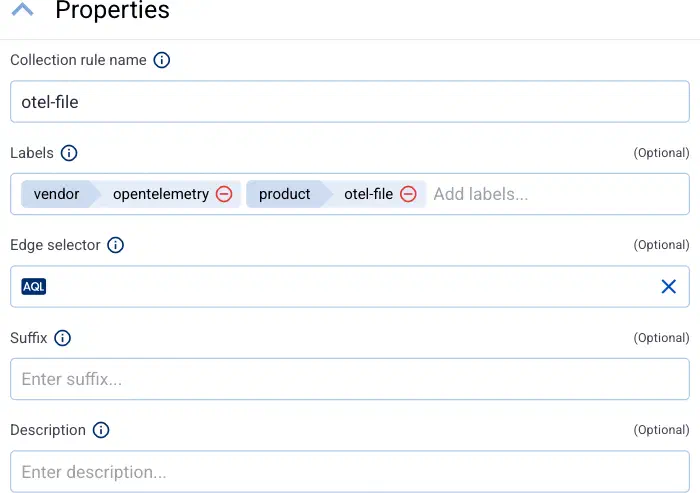
Enter a name for the collection rule into the Collection rule name field.
-
(Optional) Add labels to the collection rule.
AxoConsole automatically adds the following selectors based on the collector type:
- File Collector:
vendor = opentelemetryproduct = otel-file - Journald Collector:
vendor = opentelemetryproduct = otel-journald - Windows Event Log:
vendor = microsoftproduct = windows-event-log - Windows Event Tracing:
vendor = microsoftproduct = windows-event-tracing
You can use these metrics labels as:
- labels in Customize Graph on the Analytics page
- in the Filter labels field during log tapping
- in Flow Processing steps, for example, in the Query field of Select Messages steps.
For edge-related metrics, see the metrics beginning with
edge_connector - File Collector:
-
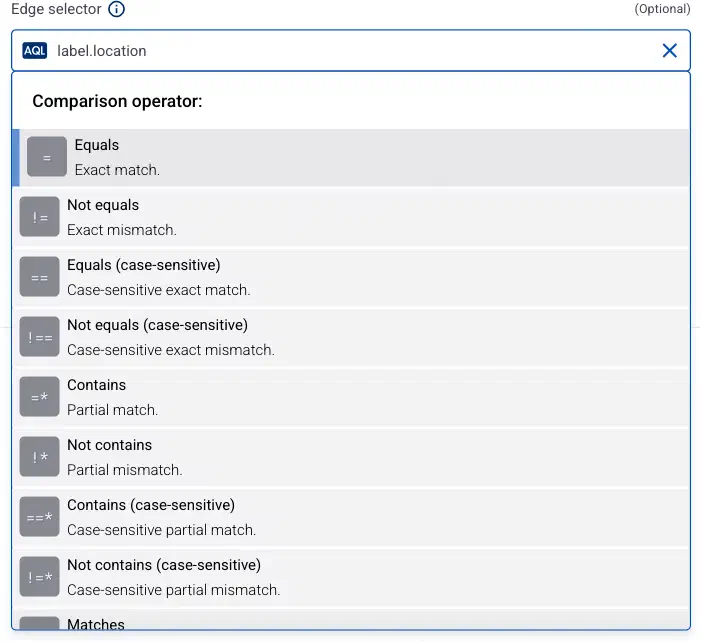
Set the Edge selector for the collection rule. The selector determines which edge hosts will have a collector based on this collection rule.
- Only edge hosts will match the rule.
- If you leave the edge selector empty, the rule matches every edge host.
- To select only a specific host, set the
namefield to the name of the host as selector. - If you set multiple fields in the selector, the collection rule will apply only to edge hosts that match all elements of the selector. (There in an AND relationship between the fields.) For example,
label.location = us-east-1 AND label.product = windows
-
AxoConsole automatically adds the following selectors based on the collector type:
- Journald Collector:
label.platform = linux - Windows Event Log:
label.platform = windows - Windows Event Tracing:
label.platform = windows
- Journald Collector:
-
(Optional) Enter a Suffix for the collection rule. AxoConsole adds the suffix to the name of the collector instances that it creates on the edge hosts. For example, if the name of a matching edge host is
edge-host-1, and the suffix of the rule isotel-file-collector, the name of the collector on that host isedge-host-1-otel-file-collector.If the Suffix field is empty, AxoConsole uses the name of the collection rule instead.
-
(Optional) Enter a description for the rule.
-
-
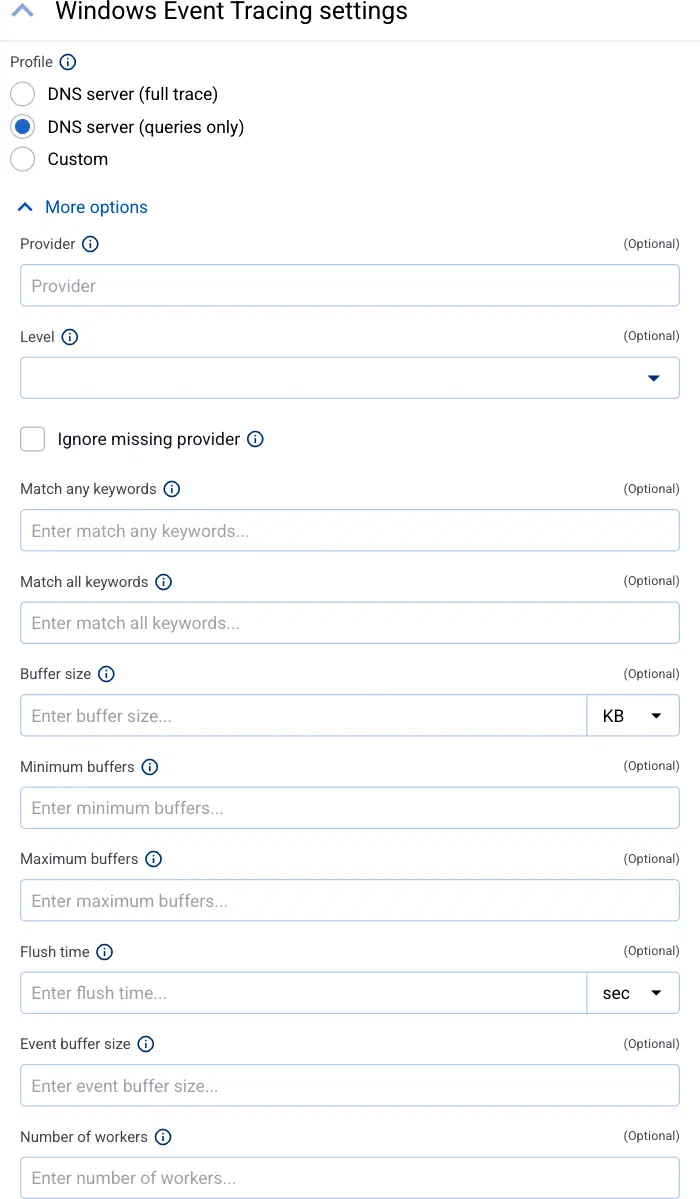
Select the configuration profile to use. The following profiles are available:
- DNS server (full trace): A pre-defined profile for collecting every available DNS server traces.
- DNS server (queries only): A pre-defined profile for collecting only DNS queries.
- Custom: Use a fully-customized configuration.
-
(Optional) If needed, set advanced options under More options.
Note that if you set an advanced option when using a pre-defined profile, your changes override the related default setting of the pre-defined profile.
-
Select Add. Based on the collection rule, Axoflow automatically creates collectors on the edge hosts that match the Edge selector.
CAUTION:
Make sure to configure data forwarding rules for your edge hosts to transfer the collected data to the OpenTelemetry connector of an AxoRouter.
Note When using Log tapping, ETW events look a bit weird: the body of these events is empty. That’s normal, the reason for that is that everything is sent as metadata.
Related metrics
You can use these metrics labels as:
- labels in Customize Graph on the Analytics page
- in the Filter labels field during log tapping
- in Flow Processing steps, for example, in the Query field of Select Messages steps.
| label | Value |
|---|---|
| edge_connector_name | The name of the collector that collected the message. |
| edge_connector_type | windowsEventTracing |
| edge_connector_label_ | Labels set by the collector. By default: vendor:microsoft, product:windows-event-tracing |
| edge_connector_rule_id | The ID of the Collector Rule resource in Axoflow that created the collector. |
| edge_flow_name | The name of the data forwarding rule that sent the message. |
Advanced options
Note that if you set an advanced option when using a pre-defined profile, your changes override the related default setting of the pre-defined profile.
-
Provider: The provider to subscribe to, for example,
Microsoft-Windows-DNSServerfor DNS logs. For a complete list, open a command prompt on the edge host and runlogman query providers.Note that provider name is case sensitive. Alternatively, you can use the GUID of the provider as well, in the following format:
{9e814aad-3204-11d2-9a82-006008a86939}. If you’re manually setting the provider, consider enabling the Ignore missing provider option as well. -
Level: Log level of trace events to be included. Specifying a log level means that all higher priority log levels will be collected as well. Possible values are (starting with the highest priority):
critical,error,warning,information,verbose. -
Ignore missing provider: Continue working if the specified provider is missing from the host.
CAUTION:
If this option is disabled and the provider is missing, the all other connectors of the agent can stop, not just the ETW connectors.
-
Match any keywords: Collect only traces that match at least one of the specified keywords of the provider. Note that these keywords are not literal strings, but bitmasks that correspond to the specific provider. To match on multiple keywords, you have to add the bitmasks of the corresponding keywords.
-
Match all keywords: Collect only traces that match all of the specified keywords of the provider. Note that these keywords are not literal strings, but bitmasks that correspond to the specific provider. To match on multiple keywords, you have to add the bitmasks of the corresponding keywords.
-
Buffer size: Buffer size allocated for each ETW trace session, in kilobytes. Minimum is 4, maximum is 16384.
-
Minimum buffers: Minimum number of buffers allocated for each ETW trace session. Note that the minimum and maximum buffers behave like hints to the ETW subsystem and aren’t guaranteed to be allocated as specified.
-
Maximum buffers: Maximum number of buffers allocated for each ETW trace session. Note that the minimum and maximum buffers behave like hints to the ETW subsystem and aren’t guaranteed to be allocated as specified.
-
Flush time: How often, in seconds, any non-empty trace buffers are flushed.
0will enable a default timeout of1second. -
Event buffer size: Number of ETW events the ETW receiver stores in memory for processing.
-
Number of workers: Number of workers that process ETW events.