Advanced installation options
When installing AxoRouter, you can set a number of advanced options if needed for your environment. Setting the advanced options in the AxoConsole automatically updates the one-liner command that you can copy and run.
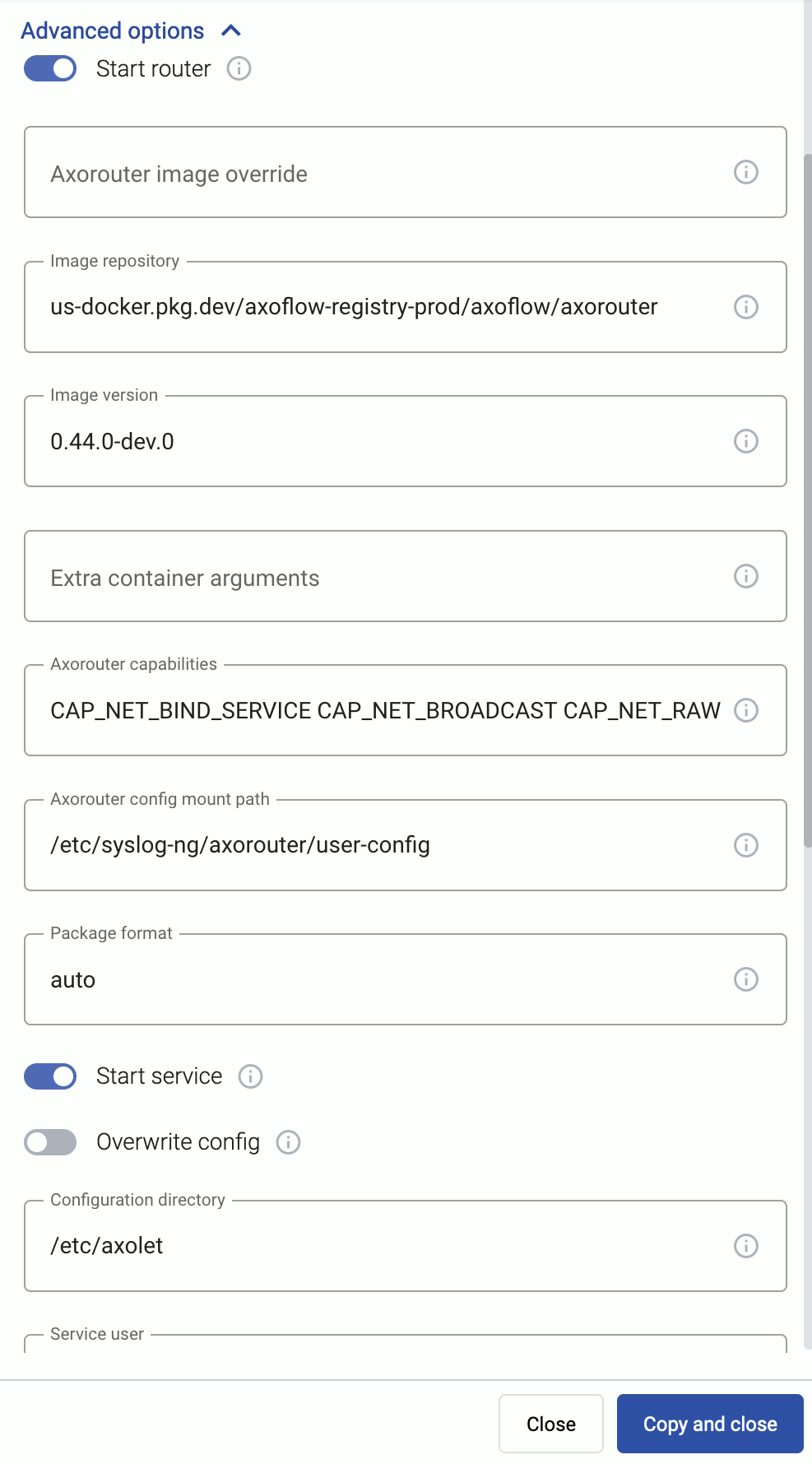
Alternatively, before running the one-liner you can use one of the following methods:
-
Set the related environment variable for the option. For example:
export AXO_USER=syslogng export AXO_GROUP=syslogng -
Set the related URL parameter for the option. For example:
curl -fLsH 'X-AXO-TOKEN:random-generated' 'https://<your-tenant-id>.cloud.axoflow.io/setup.sh?type=AXOROUTER&platform=LINUX&user=syslogng&group=syslogng' | sh
Proxy settings
Use the HTTP proxy, HTTPS proxy, No proxy parameters to configure HTTP proxy settings for the installer. To avoid using the proxy for the Axolet service, enable the Avoid proxy parameter as well. Lowercase variable names are preferred because they work universally.
Installation options
You can pass the following parameters to the installation script as environment variables, or as URL parameters.
sudo would mask environment variables of the calling shell. Either start the whole procedure from a root shell, or let the install script call sudo when it needs to. In other words: don’t add the sudo command to the provisioning command.
AxoRouter capabilities
| Default value: | CAP_NET_BIND_SERVICE CAP_NET_BROADCAST CAP_NET_RAW CAP_SYSLOG CAP_BPF |
| Environment variable | AXO_AXOROUTER_CAPS |
| URL parameter | axorouter_caps |
Description: Capabilities added to the AxoRouter container.
AxoRouter config mount path
| Default value: | /etc/axorouter/user-config |
| Environment variable | AXO_AXOROUTER_CONFIG_MOUNT_INSIDE |
| URL parameter | axorouter_config_mount_inside |
Description: Mount path for custom user configuration.
AxoRouter image override
| Default value: | us-docker.pkg.dev/axoflow-registry-prod/axoflow/axorouter |
| Environment variable | AXO_IMAGE |
| URL parameter | image |
Description: Deploy the specified AxoRouter image.
Extra container arguments
| Default value: | empty string |
| Environment variable | AXO_PODMAN_ARGS |
| URL parameter | extra_args |
Description: Additional arguments passed to the AxoRouter container.
Image repository
| Default value: | us-docker.pkg.dev/axoflow-registry-prod/axoflow/axorouter |
| Environment variable | AXO_IMAGE_REPO |
| URL parameter | image_repo |
Description: Deploy AxoRouter from a custom image repository.
Image version
| Default value: | Current Axoflow version |
| Environment variable | AXO_IMAGE_VERSION |
| URL parameter | image_version |
Description: Deploy the specified AxoRouter version.
Package format
| Default value: | auto |
| Available values: | auto, dep, rpm, tar, none |
| Environment variable | AXO_INSTALL_PACKAGE |
| URL parameter | install_package |
Description: File format of the installer package.
Start router
| Default value: | true |
| Available values: | true, false |
| Environment variable | AXO_START_ROUTER |
| URL parameter | start_router |
Description: Start AxoRouter after installation.
Axolet parameters
API server host
| Default value: | |
| Environment variable | |
| URL parameter | api_server_host |
Description: Override the host part of the API endpoint for the host.
Avoid proxy
| Default value: | false |
| Available values: | true, false |
| Environment variable | AXO_AVOID_PROXY |
| URL parameter | avoid_proxy |
Description: If set to true, the value of the *_proxy variables will only be used for downloading the installer, but not for the axolet service itself. If set to false, the Axolet service will use the variables from the installer.
Axolet capabilities
| Default value: | CAP_SYS_PTRACE CAP_SYS_CHROOT |
| Available values: | Whitespace-separated list of capability names with CAP_ prefix. |
| Environment variable | AXO_CAPS |
| URL parameter | caps |
Description: Ambient Linux capabilities the axolet service will use.
Configuration directory
| Default value: | /etc/axolet |
| Environment variable | AXO_CONFIG_DIR |
| URL parameter | config_dir |
Description: The directory where the configuration files are stored.
HTTP proxy
| Default value: | empty string |
| Environment variable | AXO_HTTP_PROXY |
| URL parameter | http_proxy |
Description: Use a proxy to access AxoConsole from the host.
HTTPS proxy
| Default value: | empty string |
| Environment variable | AXO_HTTPS_PROXY |
| URL parameter | https_proxy |
Description: Use a proxy to access AxoConsole from the host.
Initial labels
| Default value: | ‘product=axorouter,vendor=axoflow’ |
| Environment variable | AXO_INITIAL_LABELS |
| URL parameter | initial_labels |
Description: Comma-separated list of key=value labels. These labels will be suggested for the host when you add the source to AxoConsole. For example, product=windows,team=windows,vendor=microsoft
No proxy
| Default value: | empty string |
| Environment variable | AXO_NO_PROXY |
| URL parameter | no_proxy |
Description: Comma-separated list of hosts that shouldn’t use proxy to access AxoConsole from the host.
Overwrite config
| Default value: | false |
| Available values: | true, false |
| Environment variable | AXO_CONFIG_OVERWRITE |
| URL parameter | config_overwrite |
Description: If set to true, the configuration process will overwrite existing configuration (/etc/axolet/config.json). This means that the agent will get a new GUID and it will require approval on the AxoConsole.
Service group
| Default value: | root |
| Environment variable | AXO_GROUP |
| URL parameter | group |
Description: Name of the group and Axolet will be running as. It should be either root or the group syslog-ng is running as.
Service user
| Default value: | root |
| Environment variable | AXO_USER |
| URL parameter | user |
Description: Name of the user Axolet will be running as. It should be either root or the user syslog-ng is running as. See also Run axolet as non-root.
Start service
| Default value: | true |
| Available values: | true, false |
| Environment variable | AXO_START |
| URL parameter | start |
Description: Start axolet agent at the end of installation. Use false for preparing golden images. In this case axolet will generate a new GUID on the first boot after cloning the image.
WEC parameters
These parameters are related to the Windows Event Collector server that can be run on AxoRouter. For details, see Windows Event Collector (WEC).
WEC image override
| Default value: | `` |
| Environment variable | WEC_IMAGE |
| URL parameter | wec_image |
Description: Deploy the specified WEC image.
WEC Image repository
| Default value: | us-docker.pkg.dev/axoflow-registry-prod/axoflow/axorouter-wec |
| Environment variable | AXO_WEC_IMAGE_REPO |
| URL parameter | wec_image_repo |
Description: Deploy the Windows Event Collector server from a custom image repository.
WEC Image version
| Default value: | Current Axoflow version |
| Environment variable | AXO_WEC_IMAGE_VERSION |
| URL parameter | wec_image_version |
Description: Deploy the specified Windows Event Collector server version.
AxoStore parameters
These parameters are related to the AxoStore that can be run on AxoRouter. For details, see Storage.
AxoStore enable
| Default value: | true |
| Available values: | true, false |
| Environment variable | AXO_AXOSTORE_ENABLED |
| URL parameter | axostore_enabled |
Description: Install AxoStore for this AxoRouter deployment.
AxoStore Image repository
| Default value: | us-docker.pkg.dev/axoflow-registry-prod/axoflow/axostore |
| Environment variable | AXO_AXOSTORE_IMAGE_REPO |
| URL parameter | axostore_image_repo |
Description: Deploy the AxoStore from a custom image repository.
AxoStore Image version
| Default value: | Current Axoflow version |
| Environment variable | AXO_AXOSTORE_IMAGE_VERSION |
| URL parameter | axostore_image_version |
Description: Deploy the specified AxoStore version.
AxoStore storage directory
| Default value: | /var/lib/clickhouse |
| Environment variable | AXOSTORE_MOUNT |
| URL parameter | N/A |
Description: The directory where the AxoStores are stored. Make sure that there’s sufficient disk space, especially for long-time retention and/or high data volume.