

Getting Data into XSIAM the Right Way: A Deep Dive with Axoflow
A SIEM operates optimally with structured (preferably normalized), schema-optimized data. For broader Telemetry/Observability use cases, this higher-quality data typically (though not always) originates from the application itself. On the other hand, security logging historically does not follow any defined schema, and the event format is simply what the security device vendors choose to emit. There have been attempts at standard schemas and protocols, but for all intents and purposes the “free for all” in the security logging space has not changed in decades. Historically devices and early pipelines simply forwarded the security data “as is” in whatever format the vendor chose, and the SIEM was tasked with cleaning up the mess. Some of the older, well-established SIEMs attempted to handle the most common formats of most common appliances, but building, and more importantly maintaining, this “repository” from the ground up has proven to be very difficult. As a result, getting data in (GDI) often involves heavy appliance and/or SIEM configuration from administrators and security practitioners, with the scale, performance, and maintenance issues that go with it. Rinse and repeat for the last 20 years!
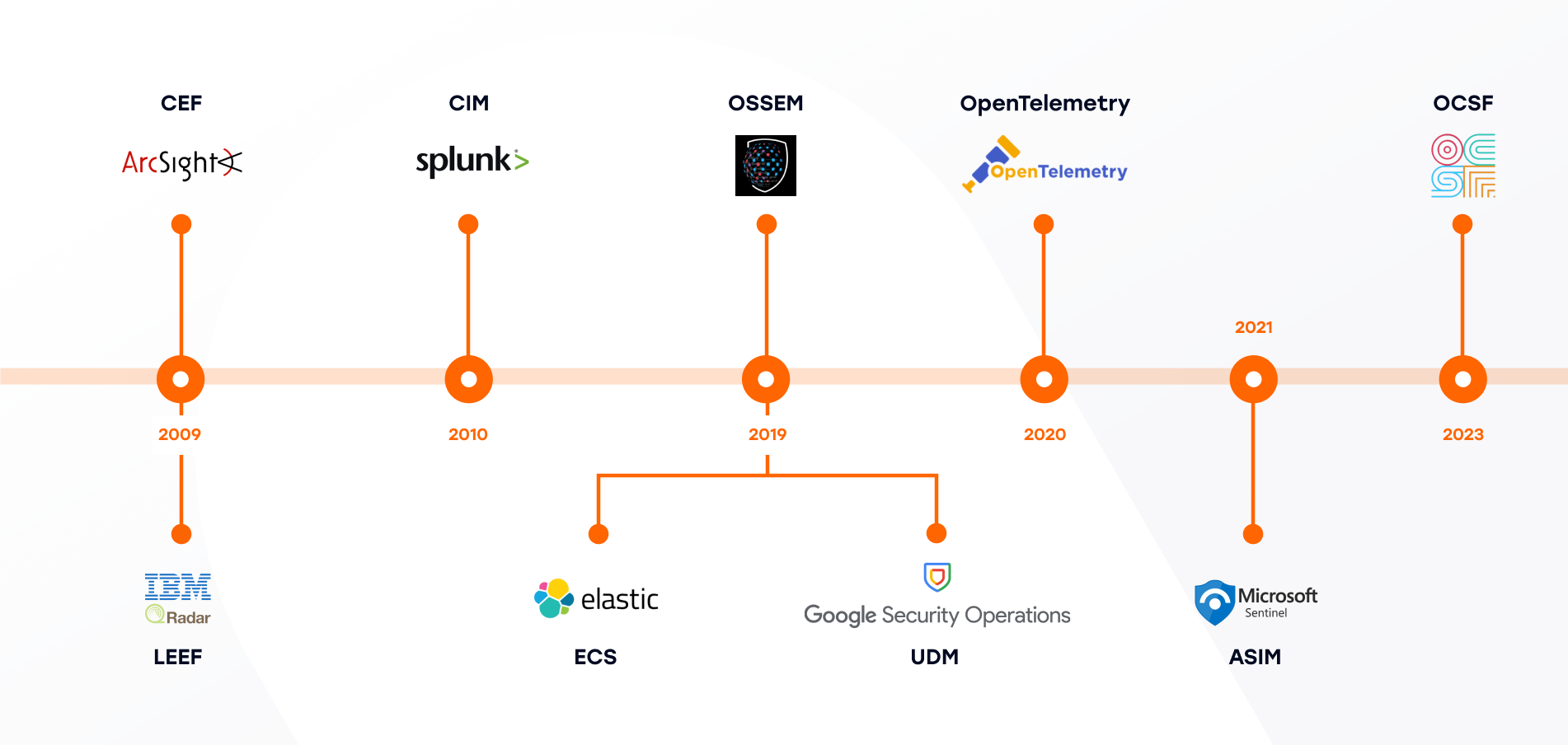
- Common Event Format (CEF), 2009, ArcSight: CEF is a SIEM log envelope, a text-based event format with a standard header and key/value extension fields, typically transported over syslog.
- Log Event Extended Format (LEEF), 2009, IBM: A QRadar-oriented readable event format with predefined and extensible name/value attributes.
- Common Information Model (CIM), 2010, Splunk: CIM is a search-time normalization model: Shared semantic model implemented as data models, tags, and normalized field names, mainly for search-time consistency in Splunk.
- Elastic Common Schema (ECS), 2019, Elastic: ECS is a field set and naming guidance for logs, metrics, and security/observability data.
- Open Source Security Events Metadata (OSSEM), 2019, Community: Community-led documentation and standardization of security event logs, including data dictionaries and a common data model.
- Unified Data Model (UDM), 2019, Google: Google SecOps’ standard structured schema for normalized security events, stored alongside raw logs.
- OpenTelemetry Semantic Conventions, 2020, OpenTelemetry: Standard attribute names that give consistent meaning to telemetry across traces, metrics, logs, and resources.
- Azure Sentinel Information Model (ASIM), 2021, Microsoft: Normalization schema/parsers for source-agnostic hunting and detections in Sentinel.
- Open Cybersecurity Schema Framework (OCSF), 2023: Open, vendor-agnostic cybersecurity schema framework intended to standardize security data across tools and vendors.
A chief reason for this state of affairs centers on the fact that no one entity has chosen to “own” the task of delivering quality data to the SIEM. For the appliance vendor, logging is not the focus, but rather performance and efficiency of processing huge numbers of events per second is top of mind. The SIEM vendor views GDI as a hassle, and often defers the “dirty work” to the field team, the integrator, and most often the users themselves.
Enter Security Data Pipelines. These take on this dropped responsibility and take care of getting data out from appliances and into SIEMs in the most optimal way possible.
Best practices have been encapsulated in these products, and the best ones have a solid understanding of not only the data sources, but also the destinations they support, and what data formats and delivery mechanisms are best suited for efficient operation of the analytics platforms. A key part of this understanding is not only getting the format correct for incoming data, but also matching this data to the underlying schema utilized by the SIEM. This matching process may necessitate configuration on the SIEM itself, as not all schema mapping can be done independently in the pipeline. In summary, a pipeline must not only have a complete understanding of the characteristics of the device traffic, but also a deep understanding of (and integration with) the destinations to which that data is sent.
Overview of XSIAM as an Axoflow Destination
Cortex XSIAM is a “next gen SIEM” offering from Palo Alto Networks that aims to provide a centralized platform for the ingestion, normalization, and analysis of security data, as well as the orchestration of the response to the threats presented by that data. Let’s take a look at how XSIAM works, and Axoflow optimizes the operation of Cortex XSIAM – keeping the thoughts in the introductory section above in mind.
XSIAM has a number of methods of collecting data, highlighted in the diagram below:
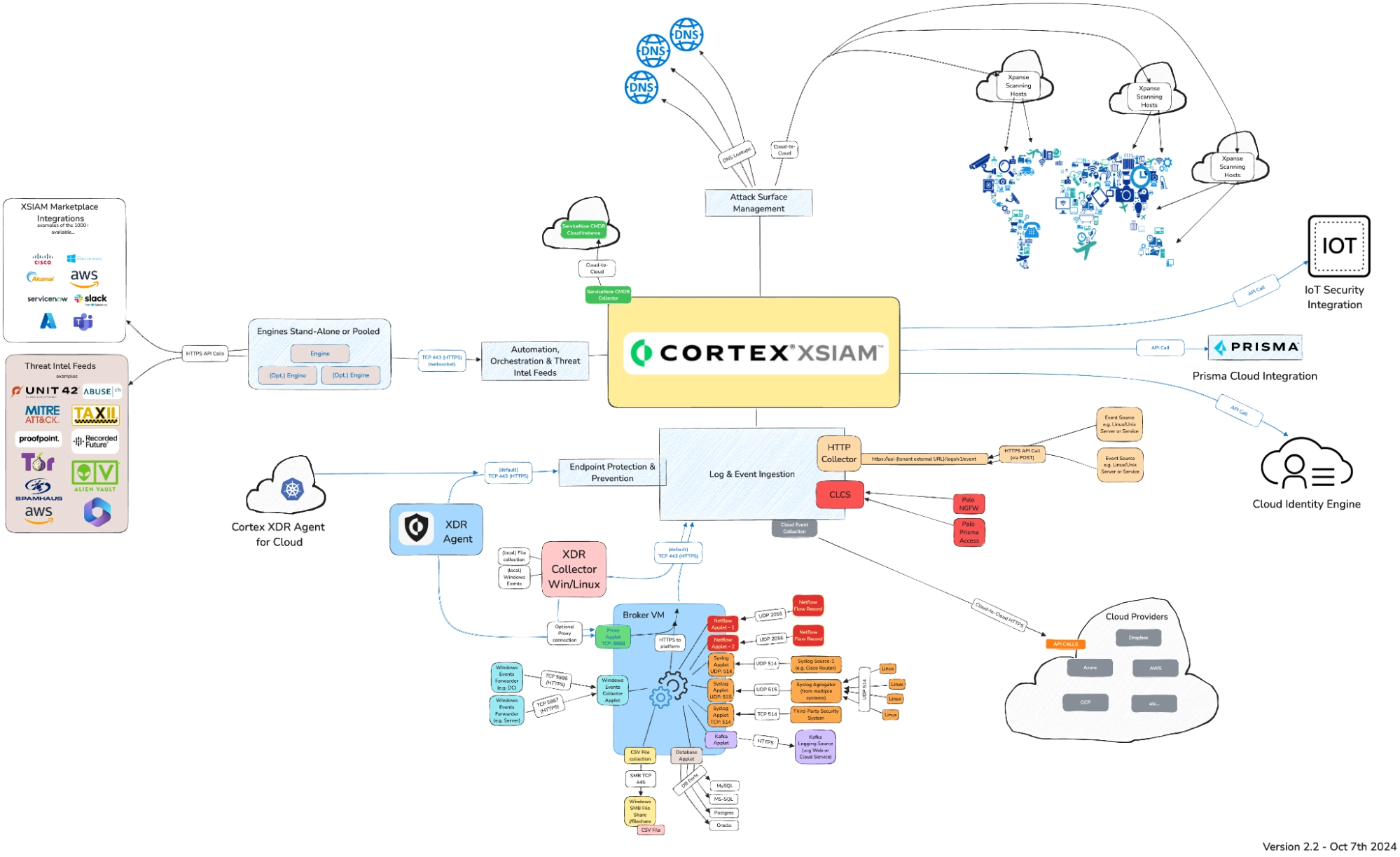
Though this looks quite busy, there are really just a few methods of sending data to XSIAM:
- TCP connection over port 443, which is handled by a “Broker VM” to handle common protocols such as syslog, Windows WEF/WEC, Databases, flat files, etc.
- A Windows and Linux agent which can communicate directly with the Log Ingestion Engine or via the Broker VM
- Cloud Log Collection Service (CLCS), which is used to collect in the native XDM schema from Palo Alto devices and services
- Outbound API calls from the Log Ingestion engine to cloud services (Azure, AWS, GCP).
- An HTTP event collection service with a published API that allows posting events in CEF, LEEF, or JSON formats (with some restrictions which we’ll highlight below).
We can see that XSIAM has a number of methods for ingesting data. These are not alternatives, but rather different mechanisms for different sources. It is clear there is not a single, unified ingestion method for all data sources, though one comes close: the HTTP endpoint. Axoflow evaluated the different possibilities and chose the HTTP endpoint utilizing the LEEF format (the orange block above the red CLCS block in the diagram above) for the following reasons:
- No Broker VM needed.
- Fast ingest including multiple connections and batching.
- It needs only one source in XSIAM.
- A batch of logs can contain logs from various vendors and products (LEEF).
- Much of the data can be processed automatically by XSIAM’s parsers.
Though Axoflow utilizes the original XSIAM parsers whenever possible, they do not always work as one would expect. In addition, there is one missing key feature in XSIAM: There is no direct way of sending in the data in their native XDM schema in the event that the built-in parsers do not suffice.
This is where a deep understanding of the operation of the destination SIEM is invaluable. Axoflow provides a workaround to this limitation, by sending the XDM in an additional field and writing a user-defined modeling rule (in the SIEM itself) to extract it. The result is controlled, high quality (schema-mapped) data in the SIEM, which can be processed by all the security features of the SIEM.
XSIAM XDM Overview
To properly utilize the capabilities of XSIAM, one must ensure that the data “lands” in XSIAM properly normalized. In some of the collection methods (particularly the “native” ones like CLCS) this happens automatically. Other producers must arrange for this on their own.
One can simply use the Broker VM for much of this data collection as well. However, this presents some challenges for those wishing to send to other destinations, as well as optimizing the data for cost and other reasons. XSIAM default integrations might require a very specific log format from each device which is not always doable to change, especially in large environments where you would need to reconfigure thousands of endpoints. Therefore, Axoflow uses the HTTP Collector, and normalizes the data in preparation for the ultimate destination for the data – in an XDM data structure.
XSIAM HTTP Collector Overview
The XSIAM HTTP Collector provides these options when configuring an input:
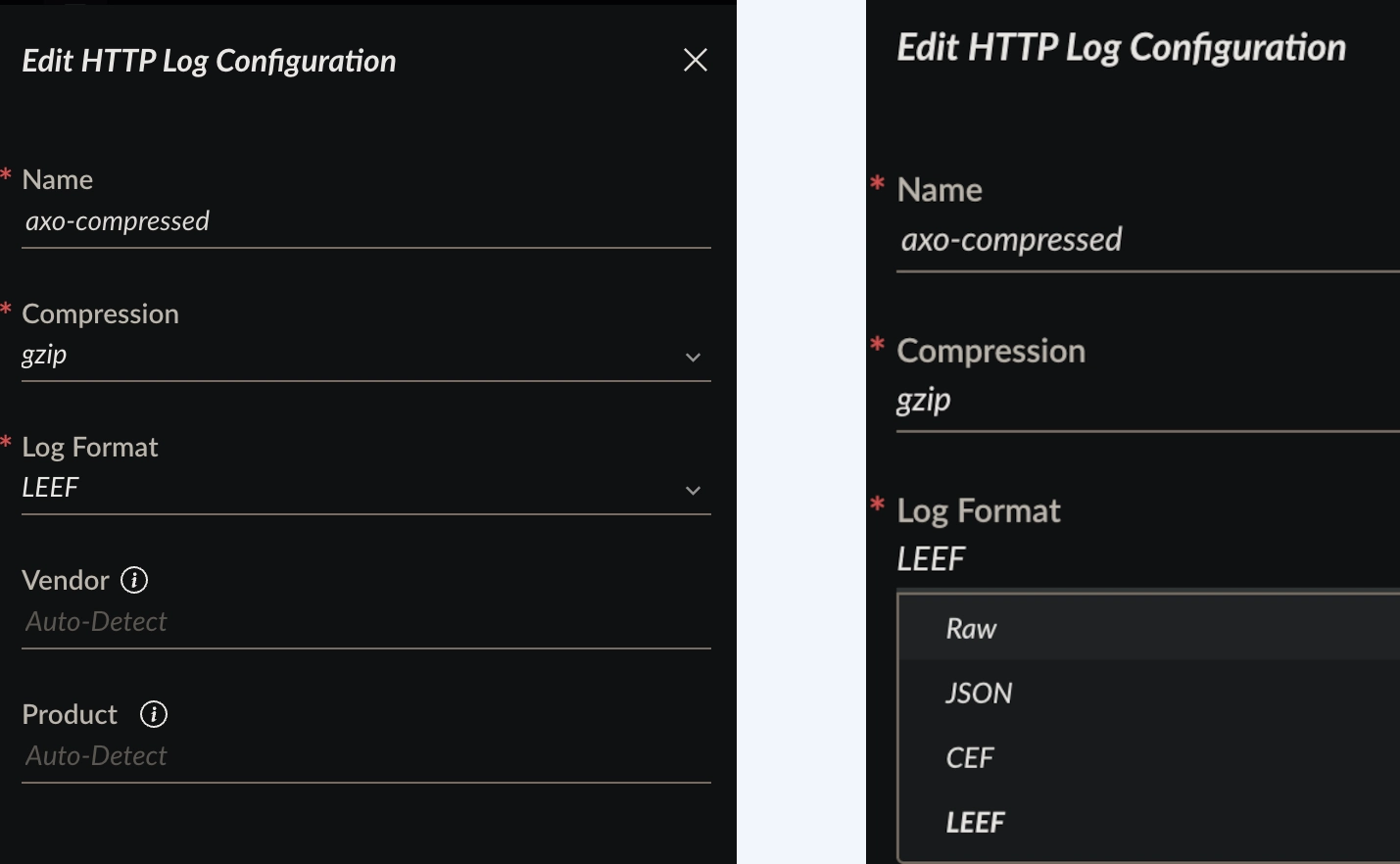
Note, in particular, the choices for vendor and product. In the case of CEF and LEEF input, these can be embedded in the respective fields contained in the CEF/LEEF payload, allowing XSIAM to use these fields automatically when ingesting into the dataset. However, the JSON format does not provide this auto-classification, which makes things a bit more complicated. For this reason, Axoflow uses the LEEF input method, even though the payload we are sending is indeed JSON.
Enter Axoflow!
Axoflow significantly reduces the burden of properly crafting the LEEF payload for ingestion into XSIAM. It is simple to include the XDM normalization in any data flow by adding just a single processing step:
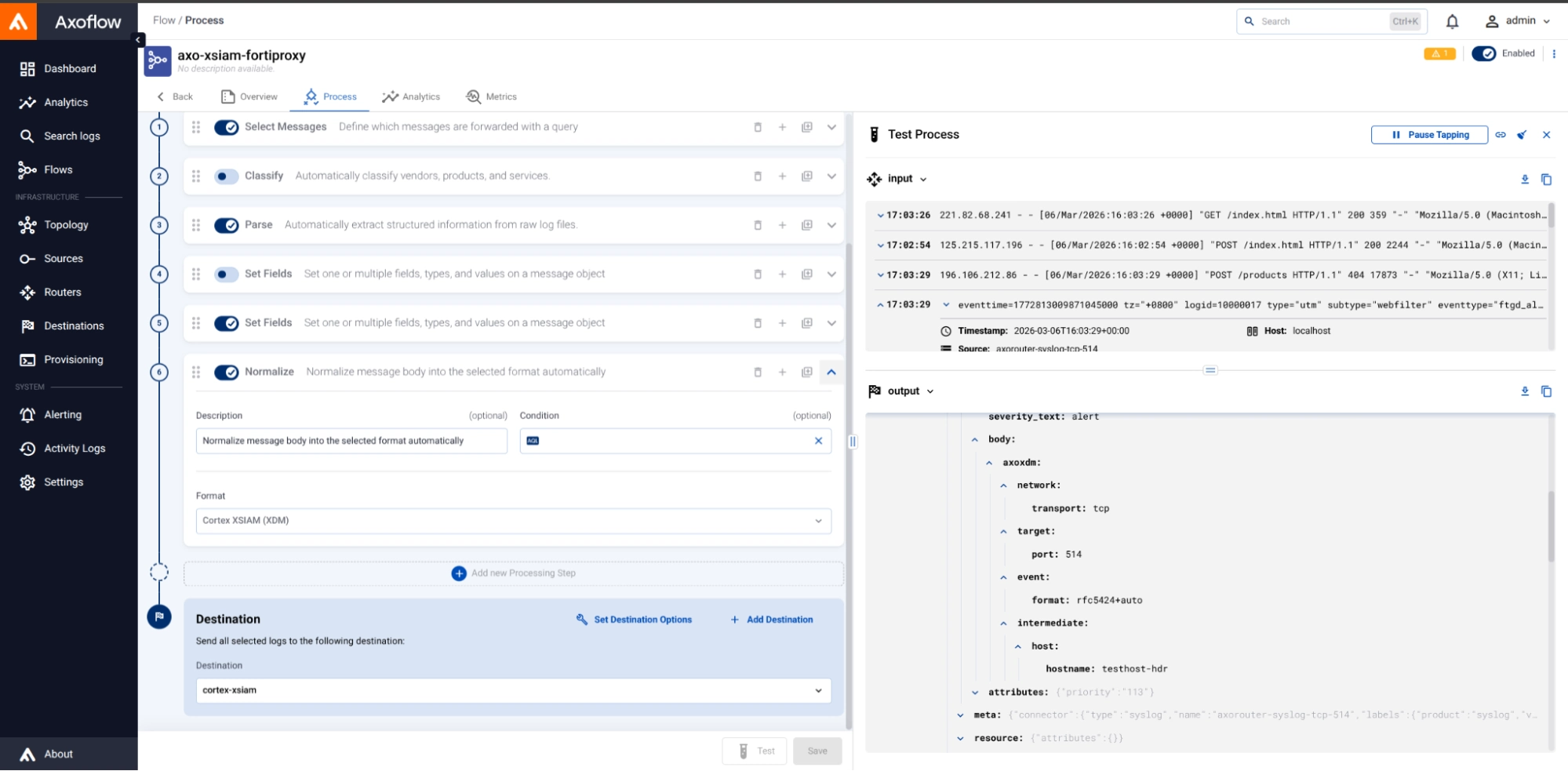
In this example, we are normalizing the incoming Fortinet data stream (“Input”) into a normalized JSON structure that is normalized to the XDM schema (“Output”) in the lower right. The complexities of crafting this by hand, and wrapping it into a LEEF envelope for consumption by the HTTP Collector, is eliminated with Axoflow’s automation.
XDM user rule
Axoflow realizes that data preparation for certain destinations must include specific destination configurations as well as those that are done in the pipeline to parse and otherwise curate the data. Each destination is different, and Axoflow’s complete end-to-end understanding of what it takes to support a destination will make your GDI life much simpler, with the resultant data much more optimized. In the case of XSIAM, we’ll discuss next what is needed to translate the data from the Axoflow pipeline into a fully XDM-compliant data model.
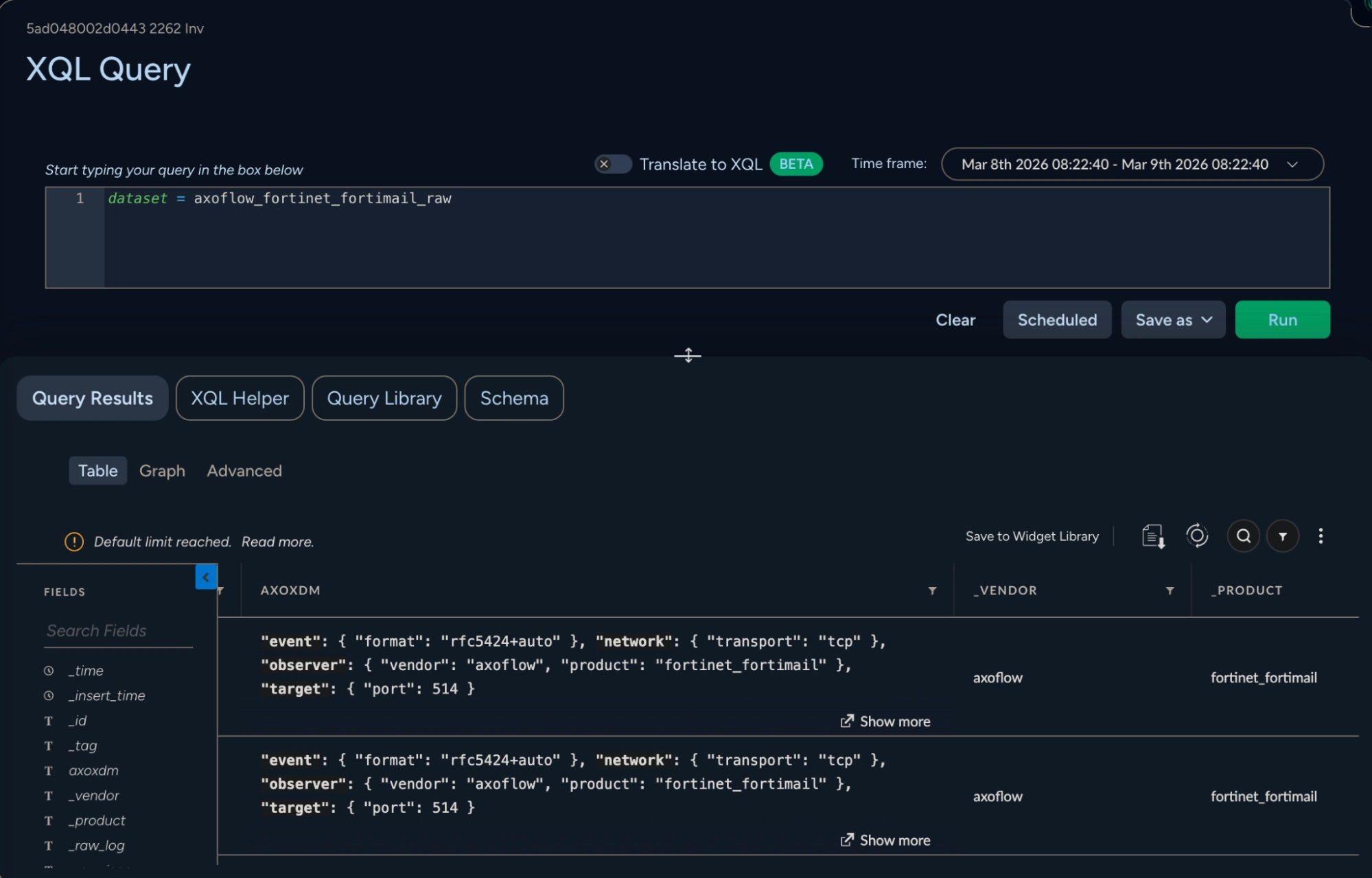
Once the data is normalized by Axoflow, it appears in raw form in a dataset called vendor_product_raw, with vendor and product being determined at ingest time from the LEEF envelope. This is the only thing that is automatic on the XSIAM side; further mapping to the schema requires that a User Rule be created. Note, however, that we have extended this vendor/product naming scheme, and have prepended the dataset name with axoflow_. This is because XSIAM integration packs allow the discarding of logs that match a particular <vendor>_<product> name, which we need to prevent (so that our follow-on mapping to the final XDM data model can take place). This dataset contains the XDM-normalized data in a column called AXOXDM as shown above. In order to render this normalized data properly in XSIAM, a user rule is needed to map this JSON-formatted column to the final XDM schema. Below is an example of the user rule for Fortinet Fortimail:
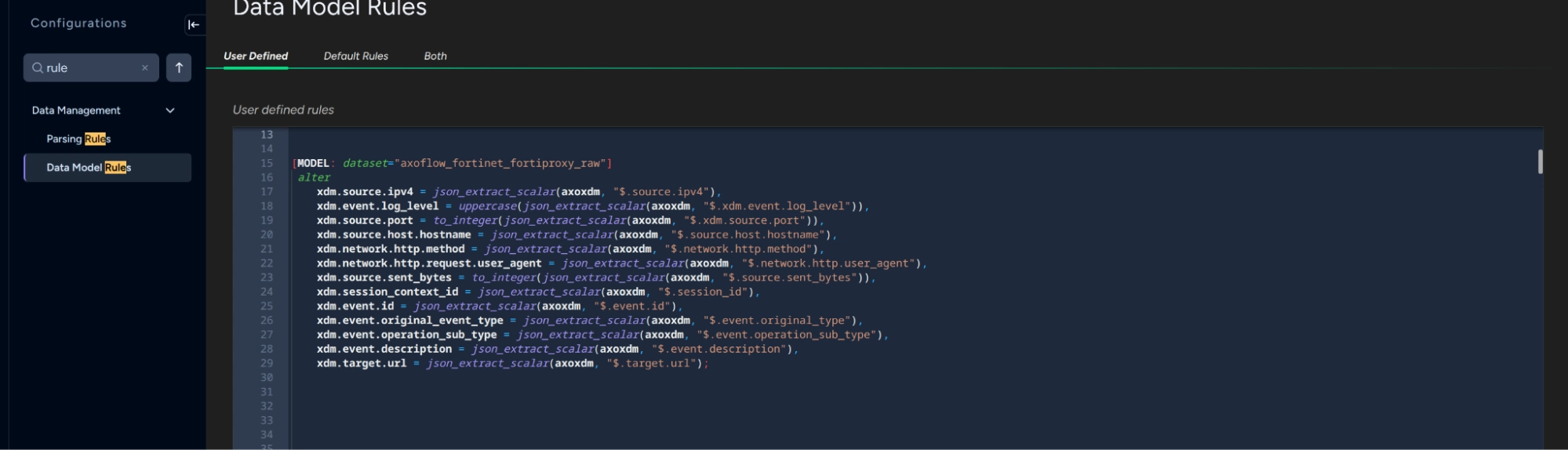
In this view, the mapping between the JSON elements of the axoxdm column and those needed for XDM is highlighted.
Let’s look at the Cortex console!
Once the data model is created via the user rule above, it can be used in a simple query that includes the datamodel directive. For example, here's the result of the datamodel dataset = axoflow_fortinet_fortiproxy_raw query:
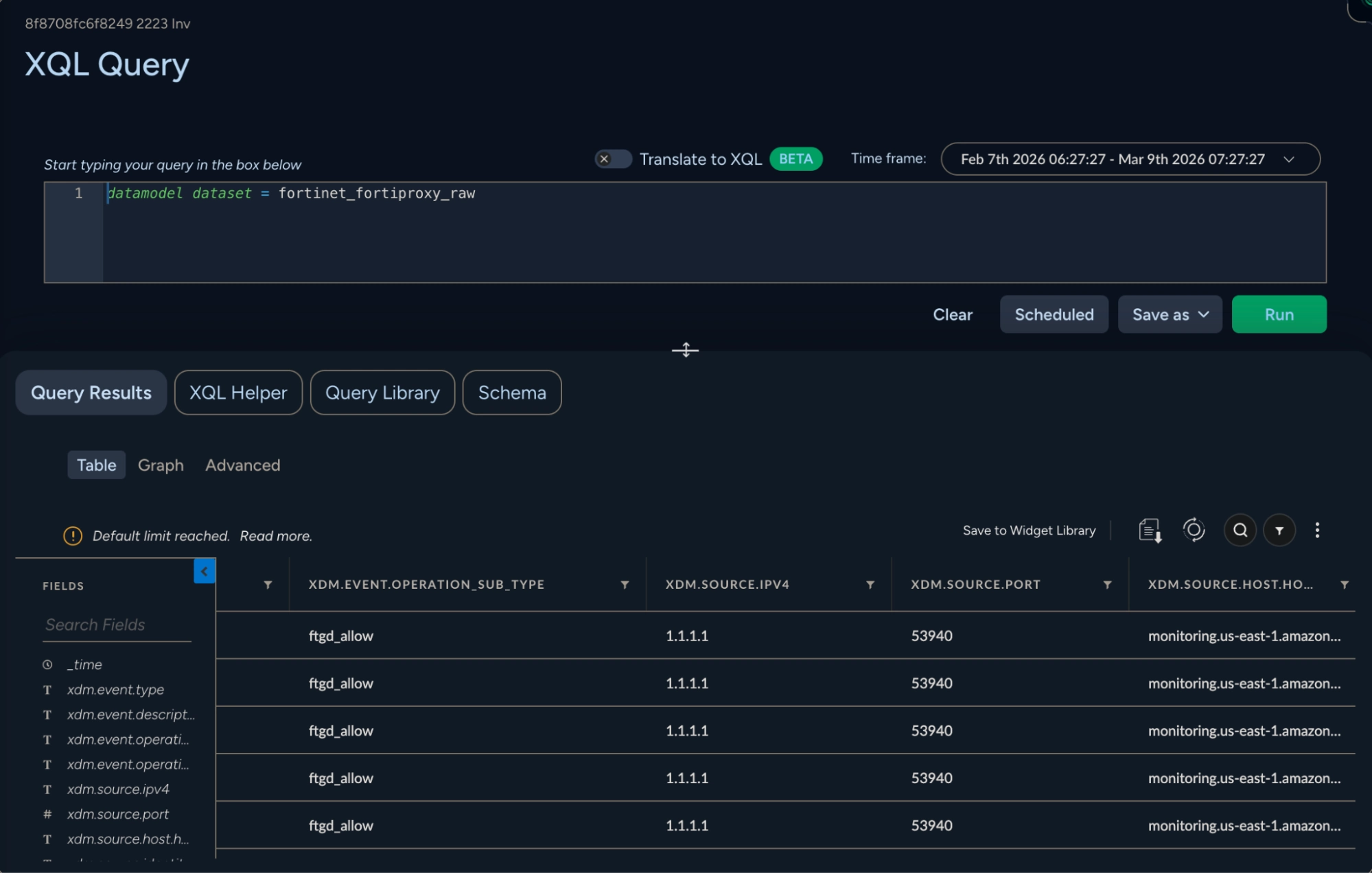
Here the fields of the original device are rendered in an XDM-compatible view. At this point, the data can be used in XSIAM dashboards and orchestration responses.
Conclusion
The challenge of getting high-quality, properly normalized data into a SIEM is not new — it has plagued security teams for decades. As platforms like Cortex XSIAM raise the bar for what a modern SIEM can do, the importance of clean, schema-mapped data becomes even more critical. A powerful analytics engine is only as good as the data that feeds it. If you want to dive deeper into how Axoflow can help you with that, let’s get in touch and talk about your XSIAM architecture!


Follow Our Progress!
We are excited to be realizing our vision above with a full Axoflow product suite.
Sign Me UpFighting data Loss?

Book a free 30-min consultation with syslog-ng creator Balázs Scheidler