
How to Cut SIEM Costs 30- 85% Without Losing Detection Coverage
Your SIEM bill unexpectedly jumped last quarter. CloudTrail is flooding your environment with 200GB of logs per day, and license alerts are hitting your inbox every week. Your manager wants 50% cost reduction by the end of the quarter, but every approach you have tried has fallen short.
You tried sampling, hoping to cut ingestion by 80%. That one malicious AssumeRole API call buried in a thousand benign DescribeInstances calls? You sampled it out. Your SIEM never saw it. The breach went undetected for three weeks. Your team reverted to 100% ingestion, and costs climbed right back up.
Index-time filtering did not help either. You dropped storage costs, but the ingestion meter had already ticked. Data tiering helped retrieval performance, but you were still paying to ingest everything before moving it to cheaper storage.
This guide explains why each of those approaches fails structurally, what actually works, and how to know whether your environment is a good candidate for the approach that does.
Why SIEM Costs Spiral Out of Control
Cloud adoption drives massive log growth. AWS CloudTrail can generate tens to hundreds of gigabytes per day in mid-sized environments, depending on usage. Add VPC Flow Logs tracking every network packet, Kubernetes audit logs capturing every pod creation and service change, Windows Event Logs recording every login attempt and registry modification, and you are looking at 500GB to 1TB per day total.
Security teams want full visibility into potential threats. DevOps teams need operational insights. Compliance frameworks require retention of every event. Everyone's logs flow to the SIEM because that is how the infrastructure was built. Result: ingestion volume grows year over year as teams add more services and monitoring tools.
Most SIEMs charge by ingestion volume measured in gigabytes per day. Splunk, Microsoft Sentinel, and Google SecOps all use per-GB pricing models with commitment tiers. For 200GB per day in Splunk, you are looking at $30K to $60K per month, depending on contract and deployment model. Microsoft Sentinel, with pay-as-you-go rates, runs approximately $4-5 per GB as of early 2026, with lower effective rates through commitment tiers. License alerts hit when you exceed your commitment tier, triggering overage penalties, often 50-100% markup over contracted rates, or forcing an upgrade to the next tier.
The core problem is the 80/20 split. In many environments, operational logs account for 60-90% of the total volume. CloudTrail DescribeInstances API calls are generated every five seconds by monitoring tools. VPC Flow Logs capture health checks between load balancers and backend services. Kubernetes readiness probes check the pod status every ten seconds. Windows Event Log ID 5156 records every connection allowed by Windows Filtering Platform: chatty, benign, and billed at the same rate as your most critical security events.
Security-relevant logs are critical but rare. A CloudTrail AssumeRole event with suspicious cross-account access patterns. VPC Flow Logs showing communication to unusual destination IPs. Kubernetes audit logs capture unauthorized pod creation. Windows Event ID 4624 is showing login attempts from geographies where your users do not operate.
Traditional SIEM architecture forces you to ingest the full 100% before filtering any of it. You pay before you decide what matters.
Where the Real Cost Reduction Lives
The question is not "what percentage of my logs can I drop?" That framing is dangerous. You cannot predict which events matter until you know the nature of the attack. Any approach that starts by deciding what to throw away is working backwards.
The better question: "Which specific, identifiable categories of events can I route away from my SIEM without reducing detection coverage?"
There are three categories where the answer is clear.
Known-good automation identities. In most AWS environments, a handful of monitoring roles, backup automation accounts, and load balancer health checks generate the majority of CloudTrail volume. If two or three known-good service accounts (your Datadog monitoring role, your backup automation role, your load balancer health check) account for 60% of your CloudTrail ingestion, that volume is a filtering opportunity, not a detection surface. These events are predictable, repetitive, and have no security value.
Health check and readiness traffic. VPC Flow Logs capture every connection between load balancers and backends. Kubernetes readiness probes fire every ten seconds. Windows Event Log ID 5156 records every allowed connection. Have you ever investigated one of these events that was not already correlated with another alert? Most teams have not. If you are ingesting them at full volume for real-time detection, you are likely overinvesting.
Per-event noise within events you keep. Even for events that do reach your SIEM, most contain redundant fields, empty values, protocol overhead, and security-irrelevant metadata. Stripping connection-start messages that duplicate connection-end data, transforming verbose Windows XML to compact formats, removing unused fields: this reduces volume without touching the event itself.
The savings come from being precise about what is noise, not from assuming a percentage. Your environment is different from every other environment. Pull your SIEM's source report, identify the specific automation identities and health check patterns driving your volume, and start there.
Why Traditional Cost Reduction Approaches Fail
Sampling breaks detections. The logic sounds reasonable: ingest every tenth event, extrapolate trends, cut ingestion by 90%. But security is not about trends. It is about outliers. Malicious events are rare by definition.
Sample 10% of CloudTrail logs, and you will miss the one AssumeRole API call that indicates lateral movement during an active breach. Sample VPC Flow Logs, and you lose visibility into the C2 beacon that fired every 30 minutes between compromised hosts. Teams that try sampling inevitably discover the gap during an incident. The pattern is predictable: cost savings look great for weeks, then incident response surfaces a critical event that fell through the sample. A CreateAccessKey API call indicating credential theft. An AssumeRole from an unusual principal. Events your SIEM never saw because the sampler discarded them. By the time the team discovers the blind spot, they have weeks of missing coverage. They revert to 100% ingestion within days.
Detection rules assume 100% visibility. Your correlation searches look for patterns: five failed login attempts followed by one successful login within ten minutes. Sample those events, and the pattern breaks. False negatives spike. Your SOC team loses trust in alerts because they know the data is incomplete.
Index-time filtering solves the wrong problem. Many SIEMs offer this capability: ingest everything, then filter before indexing into searchable storage. Splunk's props.conf, Sentinel's transformation rules, Google SecOps filtering. The pitch is appealing, but the licensing meter ticks at ingestion time, not indexing time.
Here is the concrete math. You ingest 200GB per day of CloudTrail logs. Your index-time filter identifies that 80% are operational noise and drops them before indexing. You are left with 40GB per day in searchable indexes, which genuinely helps storage costs and search performance. But you already paid Splunk's licensing fee for 200GB per day. Index-time filtering optimizes retrieval. It does not touch the biggest cost driver.
Note: Microsoft Sentinel does support ingestion-time transformations that can reduce billable ingestion volume when configured correctly. But this requires deliberate pipeline architecture to realize consistently, and most deployments do not fully exploit it.
Data tiering follows the same logic. Hot data on fast SSDs, warm data on magnetic disks, cold data in object storage. Splunk SmartStore, Sentinel retention policies, Google SecOps cold tier. All useful for reducing storage costs as data ages. None of it touches the ingestion meter that already ticked on day one.
The root problem is architectural. If you want to reduce SIEM costs, you need to filter before SIEM ingestion, not after.
The Pipeline-First Approach
The pipeline-first architecture inverts the traditional flow. Instead of sending logs directly to your SIEM, logs flow through a data curation pipeline first. The pipeline classifies events by security relevance, filters operational noise, normalizes formats, and enriches events with context. Only security-relevant logs reach your SIEM. Operational logs route to low-cost storage where they remain available for compliance and investigation, but do not consume SIEM licensing.
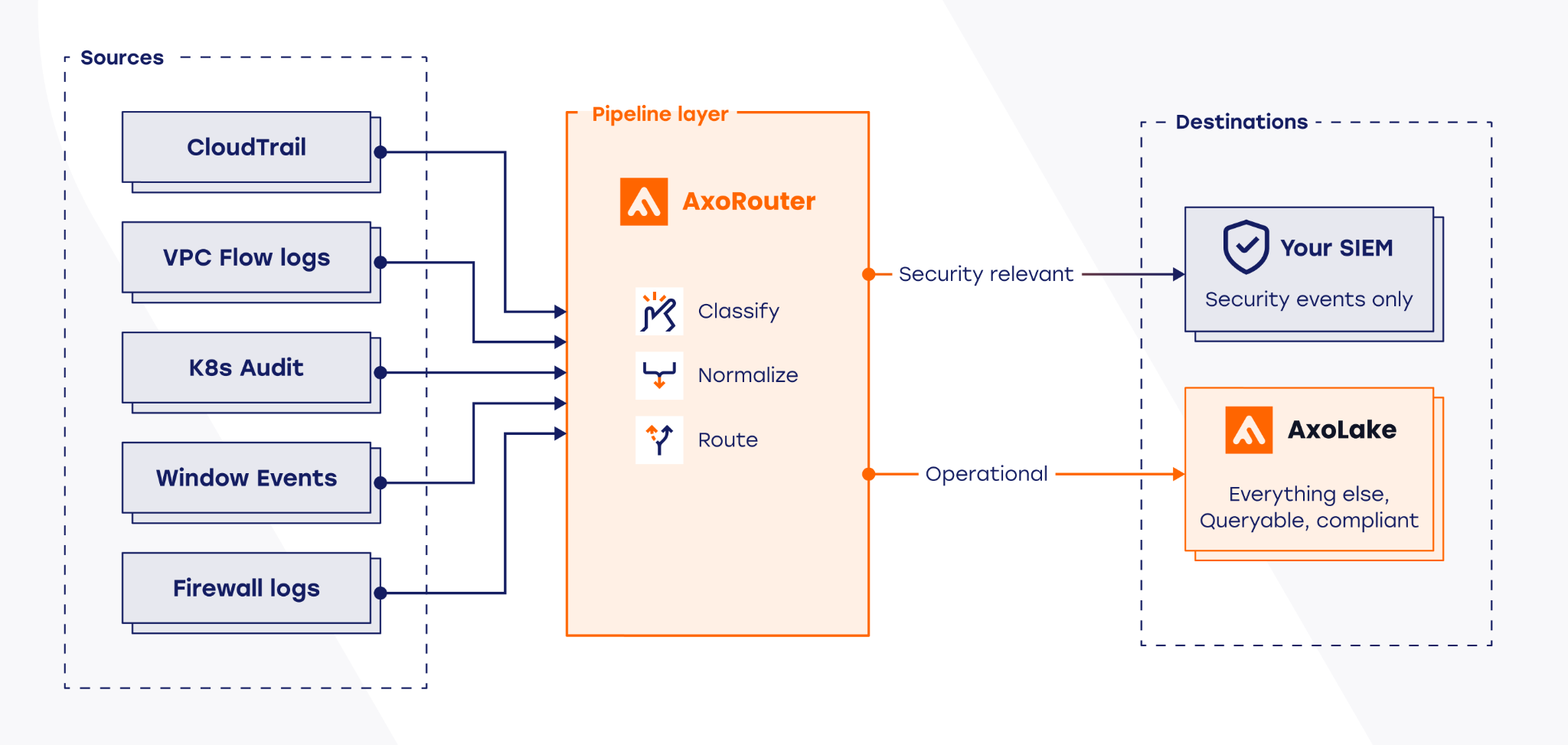
AxoRouter sits between your log sources and your SIEM. CloudTrail events, VPC Flow Logs, Kubernetes audit data, Windows Event Logs: all route through AxoRouter before reaching Splunk, Microsoft Sentinel, or Google SecOps. AxoRouter automatically classifies incoming events against a maintained database of hundreds of log types, normalizes them to OCSF (Open Cybersecurity Schema Framework), or Elastic Common Schema (ECS) depending on destination, and routes them to the right destination. The classification database is continuously maintained by Axoflow as vendors change formats. Your team does not write or maintain parsing rules for supported products.
Security-relevant events route to your SIEM. Operational noise routes to AxoLake, a tiered security data lake combining a fast hot tier with S3-compatible cold storage. Events in AxoLake are retained for compliance and available for investigation, but do not tick the SIEM licensing meter.
For environments with remote sites or unreliable connectivity, AxoStore provides edge-embedded queryable storage inside AxoRouter itself, storing events locally. For environments with remote sites or unreliable connectivity, AxoRouter's built-in disk-buffer ensures no events are lost when destinations are unavailable, storing them to disk and replaying them in order when connectivity restores. AxoStore adds edge-embedded queryable storage for local troubleshooting, investigations, and running detection or AI models at the edge.
The cost savings mechanism is straightforward. You are ingesting 200GB per day. Those 160GB route to AxoLake at object storage pricing, roughly $0.023 per GB per month for S3 Standard in us-east-1 as of February 2026, or about $110 per month for that volume. The remaining 40GB per day of security-relevant CloudTrail events route to Splunk. Your Splunk license now meters 40GB per day instead of 200GB per day. At mid-tier pricing, that is $8K per month instead of $40K per month: an 80% reduction in CloudTrail-related SIEM costs for one log source. Multiply across your top five sources, and the total reduction typically falls between 50-85% depending on your operational-to-security ratio.
Schema normalization solves the vendor lock-in problem that most teams do not think about until they are already mid-migration. If you normalize logs to Palo Alto/Cortex XSIAM XDM, you are locked into Palo Alto. Migrate to Microsoft Sentinel and you spend months rewriting parsers and detection rules.
AxoRouter normalizes to both OCSF (Open Cybersecurity Schema Framework) and Elastic Common Schema (ECS), selected per destination. OCSF is an open standard backed by AWS, Splunk, IBM, and Palo Alto Networks. ECS is widely adopted across Elastic-based environments, and many enterprises find it easier to work with for certain use cases. Since AxoRouter handles the conversion, your team normalizes once and routes to any destination. Your detection rules key off standardized fields, which remain consistent regardless of which SIEM sits downstream.
The Trade-offs You Need to Understand
The fundamental question with any filtering approach is whether you are filtering noise or signal. Get it wrong, and you have created the exact blind spot you were trying to avoid, except now you are paying less to have it.
Pipeline-first architectures introduce a specific risk that deserves honest treatment: if AxoRouter's classification routes a security-relevant event to AxoLake instead of your SIEM, that event will not trigger your detection rules. It will be available in AxoLake for investigation, but only after you know to look for it.
The classification database is continuously maintained by Axoflow, but no classification system is perfect. Edge cases exist. Novel attack patterns may not match known-good operational signatures cleanly.
This means three things for how you should deploy:
- First, raw logs should be retained in AxoLake before any filtering decision is finalized. This preserves the ability to re-examine events that were routed away from the SIEM during the early tuning period and during any future incident investigation.
- Second, validation testing is not optional. Before routing any log source to production, inject known-bad events: simulated AssumeRole from an unauthorized IAM principal, CreateAccessKey from a role that should not have that permission. Confirm these events reach your SIEM and trigger your existing detection rules. Run this test on every new source you add to the pipeline, not just during initial deployment.
- Third, classification logic should be treated as part of your detection engineering lifecycle. When you add a new log source, when a vendor changes their log format, or when you onboard a new cloud service, review whether your routing rules still reflect the current threat model. The pipeline is not a set-and-forget system.
Real-World Results
Healthcare: $180K annual savings, zero detections lost. A mid-sized healthcare organization was ingesting 150 GB per day across AWS telemetry, VPC Flow Logs, Kubernetes audit data from EKS clusters, and application logs. Splunk license alerts were hitting weekly, and the SOC manager had a mandate from finance: reduce costs by 30% within 90 days or begin a risky migration to a lower-cost SIEM.
They piloted Axoflow on their existing cloud log pipeline, starting with high-volume AWS operational data. Instead of replacing collectors or sending everything into Splunk first, the team used the pipeline to identify which event categories were routine infrastructure noise and which were actually relevant for detection. That let them route low-value operational data away from the SIEM while preserving the security-relevant events their detections depended on.
After validation confirmed zero detection loss, the routing rules went into production. Within 30 days, total Splunk licensing fell 30%, saving $180K annually. Analysts also spent less time filtering out repetitive infrastructure activity and more time investigating meaningful security events.
Government: SIEM migration with zero data loss. A large government organization was migrating from legacy Splunk infrastructure to Google SecOps as part of a broader cloud modernization initiative. Their primary pain point was infrastructure complexity: 100+ legacy syslog-ng servers deployed across critical infrastructure, each requiring manual configuration updates. Schema changes took weeks to propagate. Audit gaps were inevitable when configurations drifted.
AxoRouter replaced the entire point-to-point syslog infrastructure. Security logs flowed simultaneously to both Splunk and Google SecOps during the migration window, a dual-write architecture that enabled phased cutover without gaps. Operational logs routed to AxoLake for compliance retention. Results: 40% log volume reduction to Google SecOps by filtering operational noise at the pipeline layer. Configuration management simplified through centralized control. Zero data loss during migration.
Industrial: 85% infrastructure reduction. A globally deployed critical infrastructure operator was managing 100+ legacy syslog-ng servers across geographically distributed sites. 100+ independent servers meant manual configuration files, weeks to propagate schema changes, and human error creating audit compliance gaps.
The team migrated to a centralized AxoRouter deployment. Centralized configuration meant changes deployed in minutes rather than weeks. Edge buffering at remote sites ensured zero data loss during connectivity issues. OCSF normalization provided consistent schema across all destinations regardless of source format.
Results: 85% infrastructure reduction, from 100+ syslog servers to the AxoRouter platform. Audit compliance gaps eliminated through centralized configuration enforcement. Zero data loss during migration via AxoStore edge replay. Note: the 85% figure measures server consolidation, not cost reduction percentage.
How to Implement Pipeline-First Cost Reduction
Step 1: Audit your top 10 log sources by volume. Open your SIEM ingestion dashboard and sort by daily volume. For most teams, the top 10 sources drive the majority of total costs. Note the daily volume in gigabytes and the estimated cost per source. This is your reduction opportunity map.
Step 2: Identify reduction opportunities per source. Data reduction is not just about dropping entire events. There are two layers.
The first is event-level filtering: routing operational events (like CloudTrail DescribeInstances or VPC Flow Log health checks) away from the SIEM to cheaper storage. These events have no security value and represent the most obvious savings.
The second opportunity is per-event data reduction: removing redundant fields, empty values, protocol overhead, and security-irrelevant metadata from events you do keep. For firewall logs, this can mean stripping connection-start messages that duplicate connection-end data. For Windows events, this means transforming verbose XML to compact formats and eliminating frequent but unused event types.
Both levers compound. If your ratios look different from industry benchmarks, trust your own data.
Step 3: Run a pilot on one source. Start with your highest-volume source. Route your log stream through AxoRouter to a test SIEM index separate from production. Review the classification output. Identify edge cases where operational event types could indicate security issues in your specific environment. Define routing rules that account for those cases.
Step 4: Validate before going to production. Inject known-bad events and confirm they reach your production SIEM and trigger existing detection rules. Run a side-by-side comparison between your pilot index and production index for the same time window. Detection coverage should be identical. Event volume in the pilot should reflect your estimated operational-to-security ratio.
Step 5: Deploy and measure. Track four metrics for 30 days: SIEM ingestion volume before and after, license consumption in your billing dashboard, detection coverage via continued test event injection, and investigation speed via MTTR. Adjust classification rules based on what you observe.
Rollout timeline. 30-day pilot validates cost savings and detection coverage for one source. 90-day rollout scales to your top five sources, which typically represent 80% of total SIEM ingestion. Six-month optimization phase fine-tunes classification rules and expands to remaining sources.
AxoRouter supports cloud environments via managed service, on-premises infrastructure via Kubernetes and Helm charts, and air-gapped environments.
What to Expect
If your logs run 70% operational and 30% security, common for CloudTrail and Kubernetes audit, expect 50-70% SIEM cost reduction. If your logs run 85% operational and 15% security, common for VPC Flow Logs and verbose Windows Event Logs, expect 70-85% reduction. If your environment is already lean, the savings will be proportionally smaller.
The pipeline-first approach is not universally appropriate. Early-stage security programs that lack baseline visibility should focus on coverage before optimization. Environments where the operational-to-security ratio is genuinely low will see modest gains that may not justify the operational overhead of managing pipeline classification logic.
For environments with high telemetry volume, cloud-native infrastructure, compliance retention requirements, or active SIEM migration projects, the savings are real and the detection risk is manageable with proper validation.
Conclusion
Your SIEM bill is high because you are ingesting 100% of logs before deciding what matters for security. Sampling breaks detections. Index-time filtering optimizes retrieval but not ingestion. Data tiering reduces storage costs but leaves the ingestion meter untouched.
The pipeline-first approach filters before the meter ticks. Operational noise routes to low-cost storage. Security-relevant events reach your SIEM. Your detection coverage stays intact because classification happens at the event level, not through statistical sampling.
The results are verified: a healthcare team cut Splunk costs 30% and saved $180K annually with zero detection loss. A government organization migrated SIEMs without security gaps or data loss. An industrial operator consolidated 100+ syslog servers into a single managed pipeline.
Ready to see whether your environment is a good candidate? Start with the diagnostic questions in this guide, then run a two-week pilot on your highest-volume log source. The math will tell you whether it is worth expanding.
About Axoflow: Axoflow builds the Security Data Layer for modern SOC teams. From the creators of syslog-ng, trusted in critical infrastructure since 1998.
Learn more: Healthcare Case Study | AxoRouter Documentation | OCSF Schema Standard

Follow Our Progress!
We are excited to be realizing our vision above with a full Axoflow product suite.
Sign Me UpFighting data Loss?

Book a free 30-min consultation with syslog-ng creator Balázs Scheidler