This is the multi-page printable view of this section. Click here to print.
AxoRouter
1 - Install AxoRouter on Kubernetes
To install AxoRouter on a Kubernetes cluster, complete the following steps. For other platforms, see AxoRouter.
Prerequisites
Kubernetes version 1.29 and newer
Minimal resource requirements
- CPU: at least
100m - Memory:
256MB - Storage:
8Gi
Network access
The hosts must be able to access the following domains related to the AxoConsole:
-
When using AxoConsole SaaS:
<your-tenant-id>.cloud.axoflow.io: HTTPS traffic on TCP port 443, needed to download the binaries for Axoflow software (like Axolet and AxoRouter).kcp.<your-tenant-id>.cloud.axoflow.io: HTTPS (mutual TLS) traffic on TCP port 443 for management traffic.telemetry.<your-tenant-id>.cloud.axoflow.io: HTTPS (mutual TLS) traffic on TCP port 443, where Axolet sends the metrics of the host.us-docker.pkg.dev: HTTPS traffic on TCP port 443, for pulling container images (AxoRouter only).
-
When using an on-premise AxoConsole:
-
The following domains should point to AxoConsole IP address to access Axoflow from your desktop and AxoRouter hosts:
your-host.your-domain: The main domain of your AxoConsole deployment.authenticate.your-host.your-domain: A subdomain used for authentication.idp.your-host.your-domain: A subdomain for the identity provider.
-
The AxoConsole host must have the following Open Ports:
- Port 80 (HTTP)
- Port 443 (HTTPS)
-
-
When installing Axoflow agent for Windows or Linux:
github.com: HTTPS traffic on TCP port 443, for downloading installer packages.
Install AxoRouter
-
Open the AxoConsole.
-
Select Provisioning.
-
Select the Host type > AxoRouter > Kubernetes. The one-liner installation command is displayed.
-
Open a terminal and set your Kubernetes context to the cluster where you want to install AxoRouter.
-
Run the one-liner, and follow the on-screen instructions.
Current kubernetes context: minikube Server Version: v1.28.3 Installing to new namespace: axorouter Do you want to install AxoRouter now? [Y] -
Register the host.
-
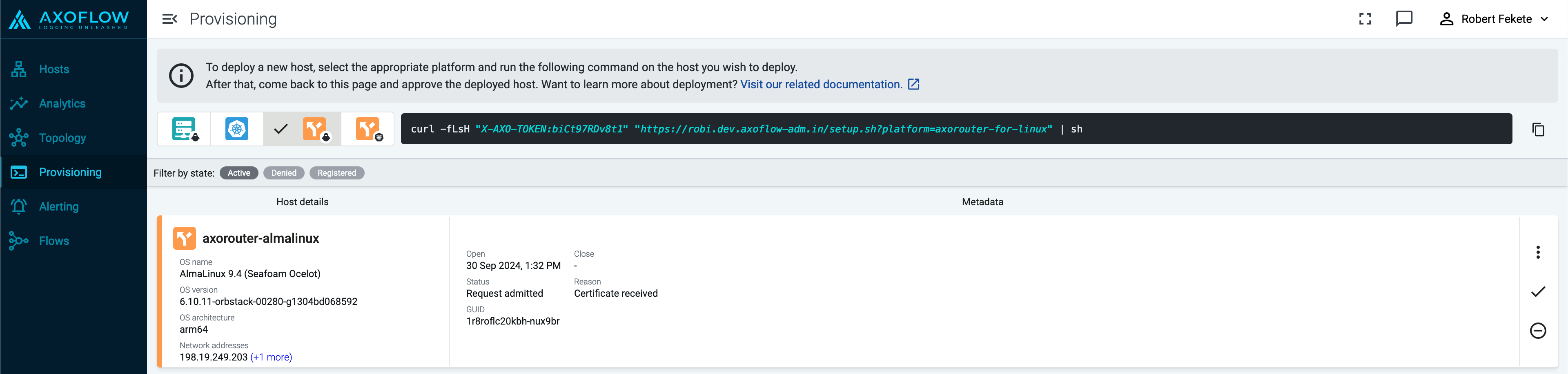
Reload the Provisioning page. There should be a registration request for the new AxoRouter deployment. Select ✓.
-
Select Register to register the host. You can add a description and labels (in
label:valueformat) to the host. -
If the primary IP address (the first IP address shown in the Network addresses section on the Routers page for each AxoRouter) is not accessible from your edge hosts, set a Network address override (IP address or an FQDN) that’s accessible. Otherwise, data forwarding from edge hosts will fail.
-
Select the Topology page. The new AxoRouter instance is displayed.
-
Create a flow
- If you haven’t already done so, create a new destination.
-
Create a flow to connect the new AxoRouter to the destination.
-
Select Flows.
-
Select Add Flow.
-
Enter a name for the flow, for example,
my-test-flow.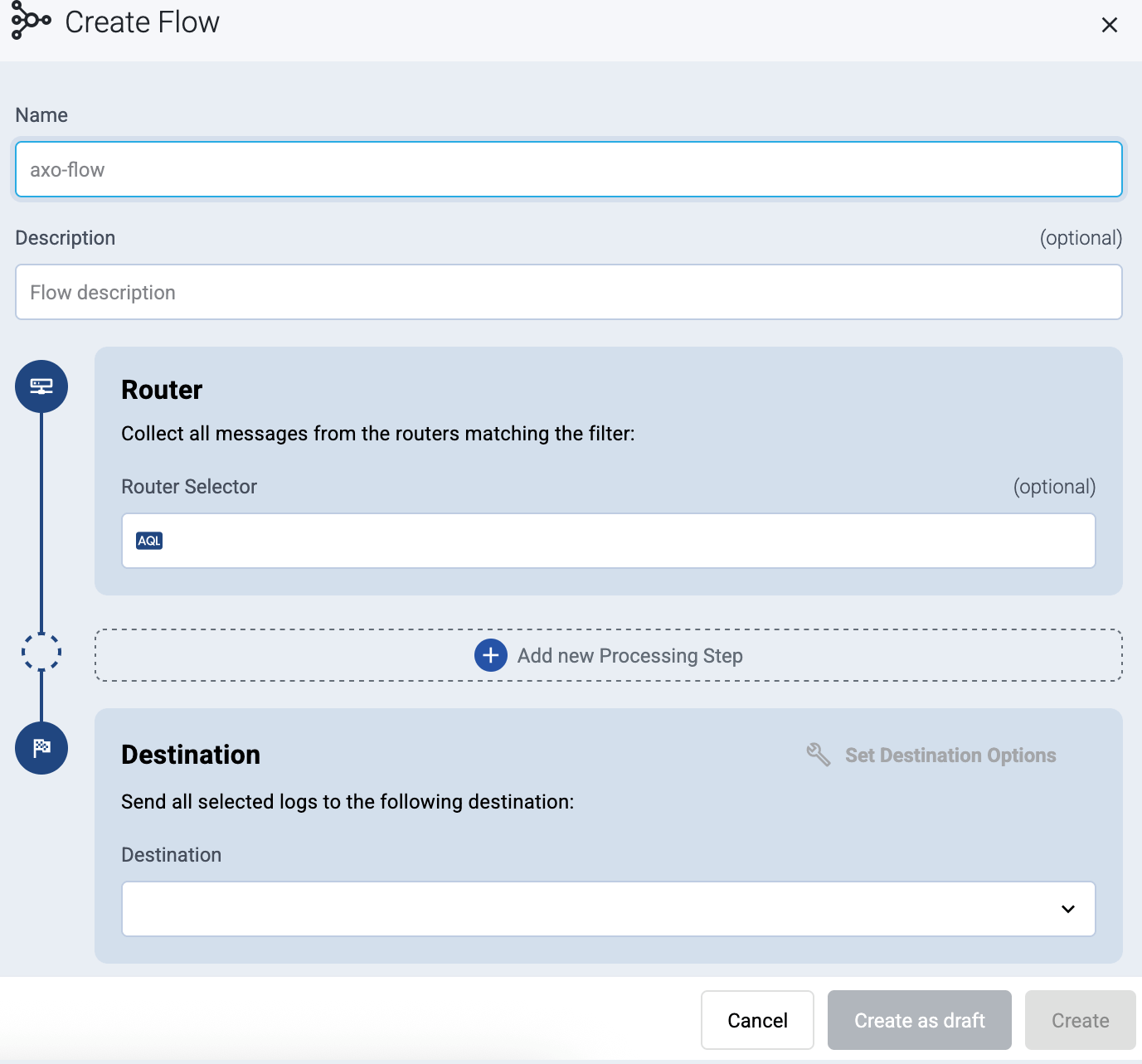
-
In the Router Selector field, enter an expression that matches the router(s) you want to apply the flow. To select a specific router, use a name selector, for example,
name = my-axorouter-hostname.You can use any labels and metadata of the AxoRouter hosts in the Router selectors, for example, the hostname of the AxoRouter, or any custom labels.
- If you leave the Router Selector field empty, the selector will match every AxoRouter instance.
- To select only a specific AxoRouter instance, set the
namefield to the name of the instance as selector. For example,name = my-axorouter. - If you set multiple fields in the selector, the selector will match only AxoRouter instances that match all elements of the selector. (There in an AND relationship between the fields.)
-
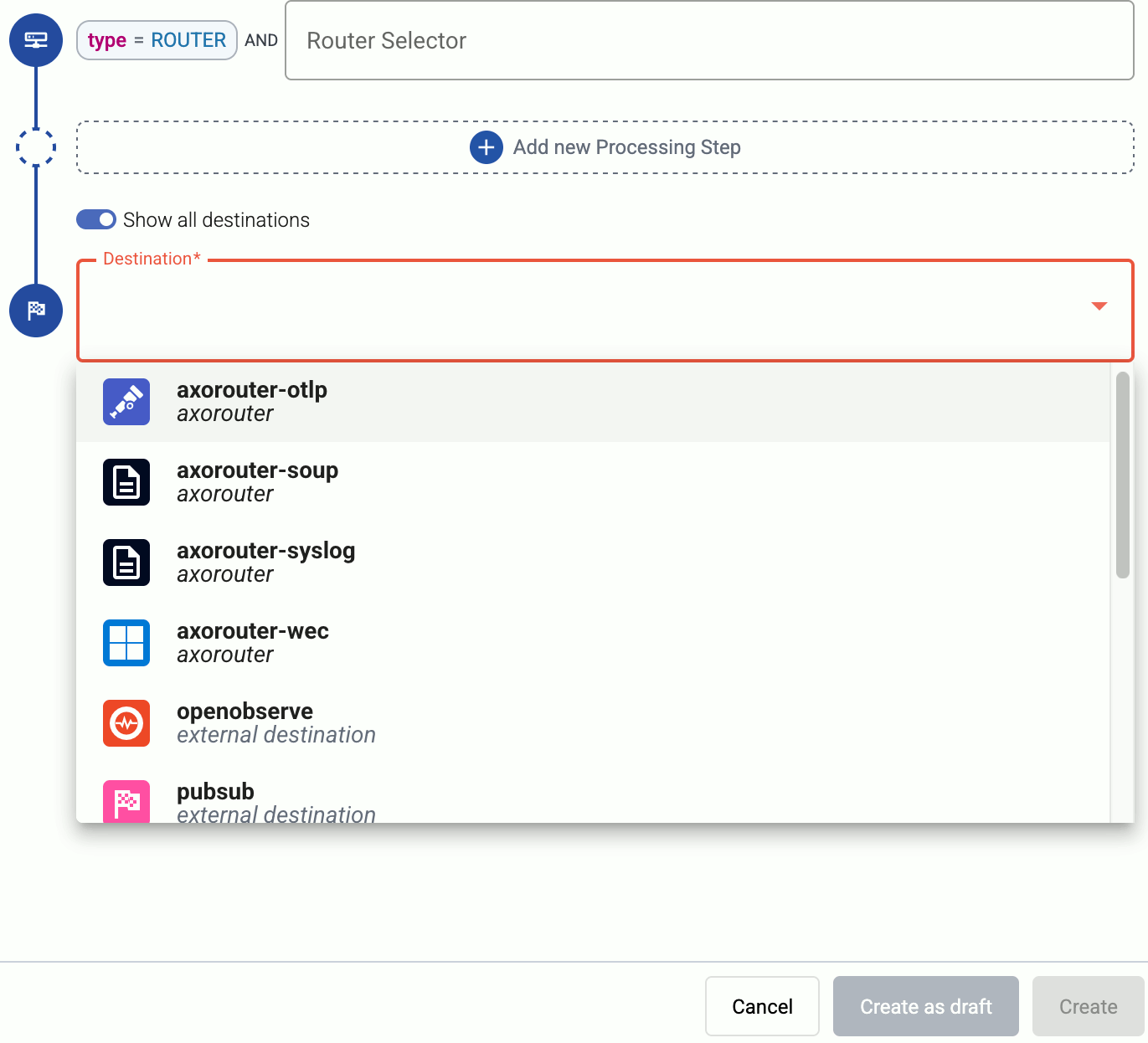
Select the Destination where you want to send your data. If you don’t have any destination configured, you can select + Add in the destination section to create a new destination now. For details on the different destinations, see Destinations.
- If you don’t have any destination configured, see Destinations.
- If you’ve already created a store, it automatically available as a destination. Note that the Router Selector of the flow must match only AxoRouters that have the selected store available, otherwise you’ll get an error message.
- If you want to send data to another AxoRouter, enable the Show all destinations option, and select the connector of the AxoRouter where you want to send the data.
-
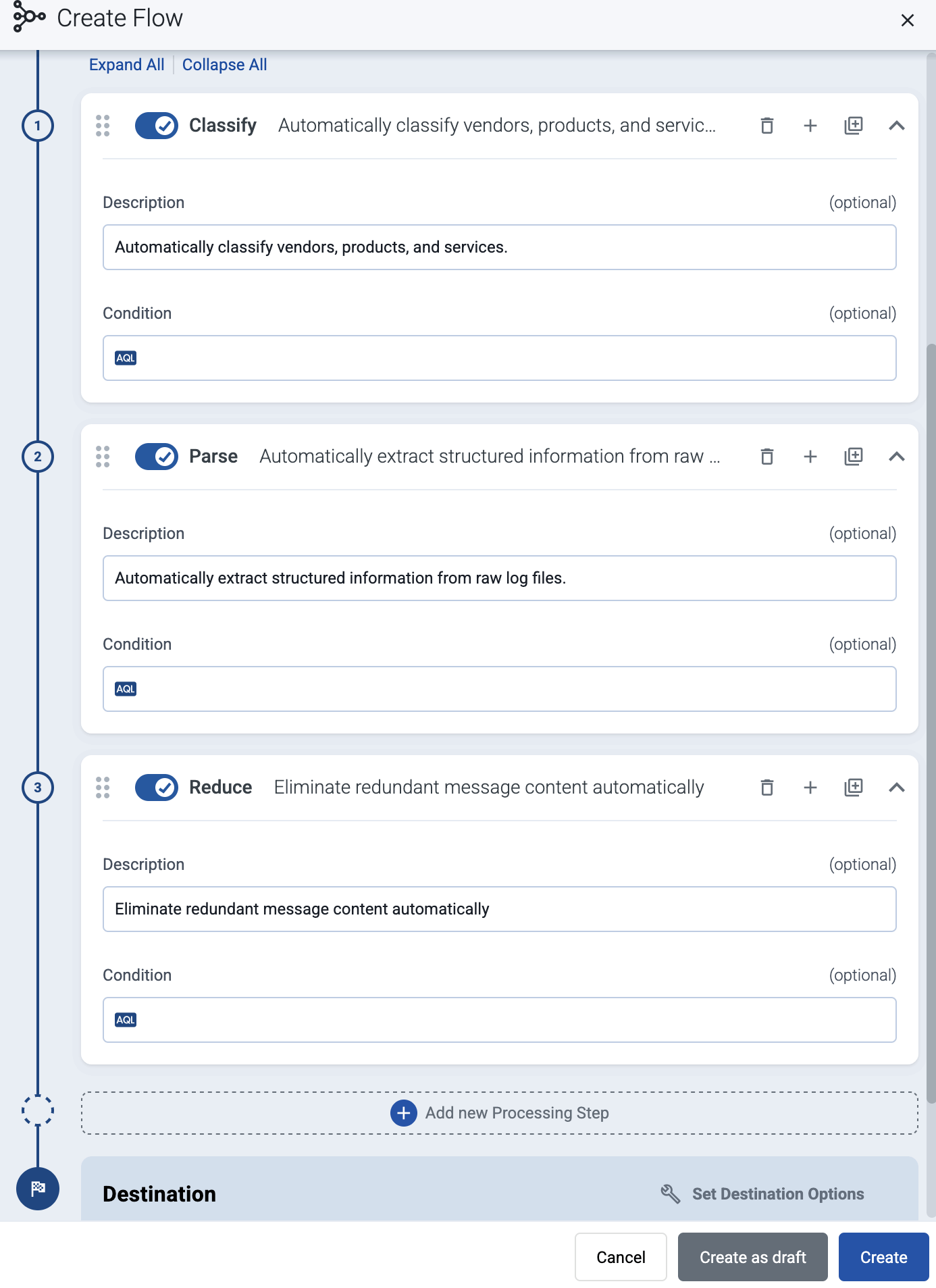
(Optional) To process the data transferred in the flow, select Add New Processing Step. For details, see Processing steps. For example:
- Add a Classify, a Parse, and a Reduce step, in that order, to automatically remove redundant and empty fields from your data.
- To select which messages are processed by the flow, add a Select Messages step, and enter a filter into the AQL Expression field. For example, to select only the messages received from Fortinet FortiGate firewalls, use the
meta.vendor = fortinet AND meta.product = fortigatequery. - Save the processing steps.
-
Select Add.
-
The new flow appears in the Flows list.

-
Send logs to AxoRouter
By default, AxoRouter accepts data on the following ports (unless you’ve modified the default connector rules):
- 514 UDP and TCP for RFC3164 (BSD-syslog) and RFC5424 (IETF-syslog) formatted traffic. AxoRouter automatically recognizes and handles both formats.
- 601 TCP for RFC5424 (IETF-syslog) and RFC3164 (BSD-syslog) formatted traffic. AxoRouter automatically recognizes and handles both formats.
- 6514 TCP for TLS-encrypted syslog traffic.
- 4317 TCP for OpenTelemetry log data.
To receive data on other ports or other protocols, configure other connector rules for the AxoRouter host.
For TLS-encrypted syslog connections, create a new connector rule or edit an existing one, and configure the keys and certificates needed to encrypt the connections. For details, see Syslog.
Upgrade AxoRouter
AxoConsole raises an alert for the host when a new AxoRouter version is available. To upgrade to the new version, re-run the one-liner installation command you used to install AxoRouter, or select Provisioning > Select type and platform to create a new one.
1.1 - Advanced installation options
When installing AxoRouter, you can set a number of advanced options if needed for your environment. Setting the advanced options in the AxoConsole automatically updates the one-liner command that you can copy and run.
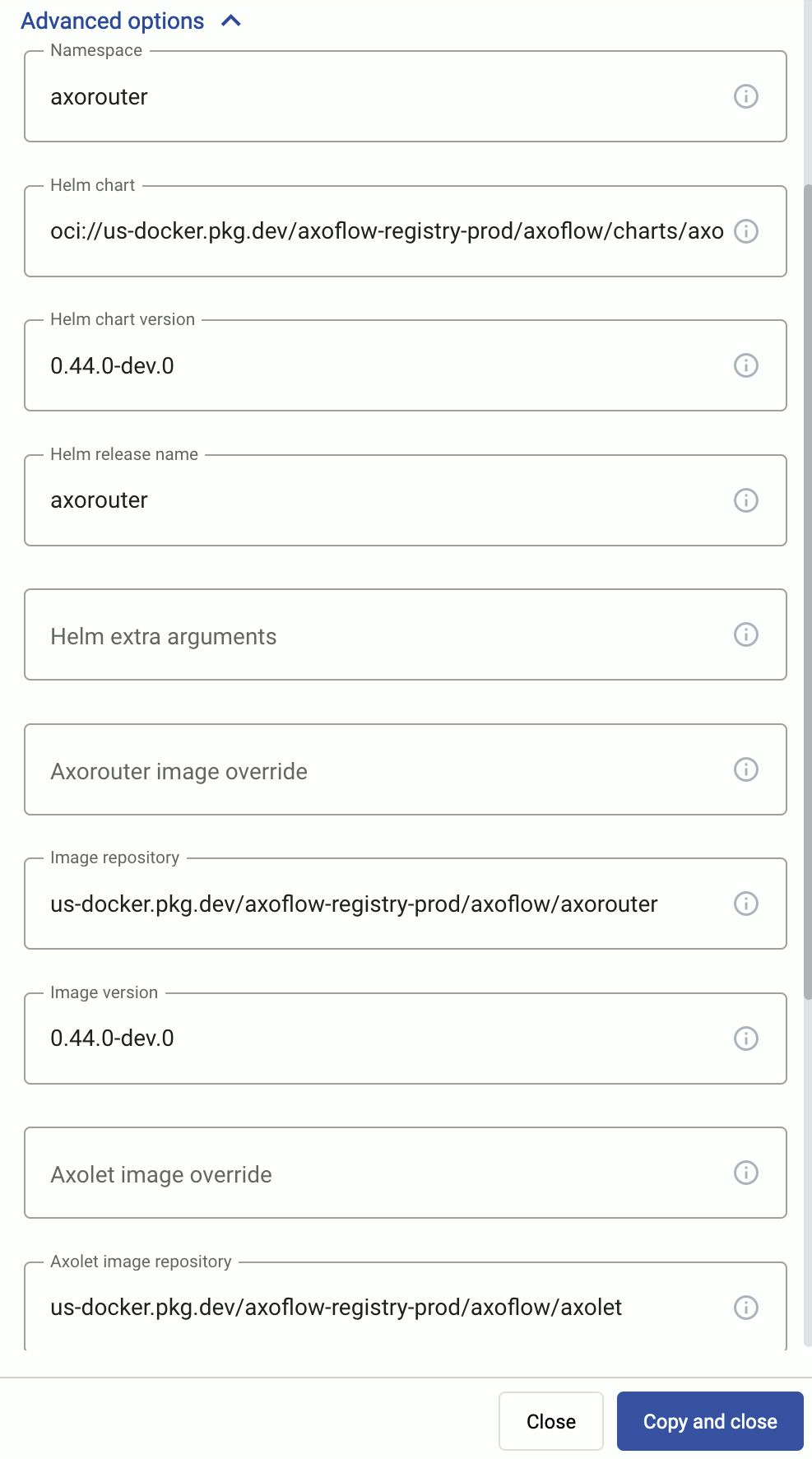
Alternatively, before running the one-liner you can use one of the following methods:
-
Set the related environment variable for the option. For example:
export AXOROUTER_USER=syslogng export AXOROUTER_GROUP=syslogng -
Set the related URL parameter for the option. For example:
curl -fLsH 'X-AXO-TOKEN:random-generated' 'https://<your-tenant-id>.cloud.axoflow.io/setup.sh?type=AXOROUTER&platform=K8S¶meter=value' | sh
Proxy settings
Use the http_proxy=, https_proxy=, no_proxy= parameters to configure HTTP proxy settings for the installer. To configure the Axolet service to use the proxy settings, enable the AXOLET_AVOID_PROXY parameter as well. Lowercase variable names are preferred because they work universally.
Installation options
You can pass the following parameters to the installation script as environment variables, or as URL parameters.
sudo would mask environment variables of the calling shell. Either start the whole procedure from a root shell, or let the install script call sudo when it needs to. In other words: don’t add the sudo command to the provisioning command.
AxoRouter image override
| Default value: | empty string |
| Environment variable | IMAGE |
| URL parameter | image |
Description: Deploy the specified AxoRouter image.
Helm chart
| Default value: | oci://us-docker.pkg.dev/axoflow-registry-prod/axoflow/charts/axorouter-syslog |
| Environment variable | HELM_CHART |
| URL parameter | helm_chart |
Description: The path or URL of the AxoRouter Helm chart.
Helm chart version
| Default value: | Current Axoflow version |
| Environment variable | HELM_CHART_VERSION |
| URL parameter | helm_chart_version |
Description: Deploy the specified version of the Helm chart.
Helm extra arguments
| Default value: | empty string |
| Environment variable | HELM_EXTRA_ARGS |
| URL parameter | helm_extra_args |
Description: Additional arguments passed to Helm during the installation.
Helm release name
| Default value: | axorouter |
| Environment variable | HELM_RELEASE_NAME |
| URL parameter | helm_release_name |
Description: Name of the Helm release.
Image repository
| Default value: | us-docker.pkg.dev/axoflow-registry-prod/axoflow/axorouter |
| Environment variable | IMAGE_REPO |
| URL parameter | image_repo |
Description: Deploy AxoRouter from a custom image repository.
Image version
| Default value: | Current Axoflow version |
| Environment variable | IMAGE_VERSION |
| URL parameter | image_version |
Description: Deploy the specified AxoRouter version.
Namespace
| Default value: | axorouter |
| Environment variable | NAMESPACE |
| URL parameter | namespace |
Description: The namespace where AxoRouter is installed.
Axolet parameters
API server host
| Default value: | |
| Environment variable | |
| URL parameter | api_server_host |
Description: Override the host part of the API endpoint for the host.
Axolet executable path
| Default value: | |
| Environment variable | AXOLET_EXECUTABLE |
| URL parameter | axolet_executable |
Description: Path to the Axolet executable.
Axolet image override
| Default value: | empty string |
| Environment variable | AXOLET_IMAGE |
| URL parameter | axolet_image |
Description: Deploy the specified Axolet image.
Axolet image repository
| Default value: | us-docker.pkg.dev/axoflow-registry-prod/axoflow/axolet |
| Environment variable | AXOLET_IMAGE_REPO |
| URL parameter | axolet_image_repo |
Description: Deploy Axolet from a custom image repository.
Axolet image version
| Default value: | Current Axoflow version |
| Environment variable | AXOLET_IMAGE_VERSION |
| URL parameter | axolet_image_version |
Description: Deploy the specified Axolet version.
Initial GUID
| Default value: | |
| Environment variable | |
| URL parameter | initial_guid |
Description: Set a static GUID.
2 - Install AxoRouter on Linux
AxoRouter is a key building block of Axoflow that collects, aggregates, transforms and routes all kinds of telemetry and security data automatically. AxoRouter for Linux includes a Podman container running AxoSyslog, Axolet, and other components.
To install AxoRouter on a Linux host, complete the following steps. For other platforms, see AxoRouter.
What the install script does
When you deploy AxoRouter, you run a command that installs the required software packages, configures them and sets up the connection with Axoflow.
The installer script installs the axolet packages, then executes the configure-axolet command with the right parameters. (If the packages are already installed, the installer will update them unless the none package format is selected when generating the provisioning command.)
The install script is designed to be run as root (sudo), but you can configure AxoRouter to run as a non-root user.
The installer script performs the following main steps:
- Executes prerequisite checks:
- Tests the network connection with the console endpoints.
- Checks if the operating system is supported.
- Checks if
podmanis installed.
- Checks if
- Downloads and installs the
axorouterRPM or DEB package.- The package contains the
axorouter-ctlandsetup-axoroutercommands and theaxorouter.containerunit files for podman-systemd.
- The package contains the
CAUTION:
The package uses docker and standard service units. On older systems (e.g. Ubuntu 22.04 or older) this results in the following limitations:
- AxoWec, AxoStore services are not supported.
- Some
axorouter-ctlcommands are not fully supported. - Proxy environment variables need to be added to the docker systemctl configuration manually.
- Executes the
setup-axoroutercommand, which- Updates the environment variables used by the axorouter service.
- Enables and starts the AxoRouter service.
- Downloads and installs the
axoletRPM or DEB package.- The package contains the
axoletandconfigure-axoletcommands, and theaxolet.servicesystemd unit file.
- The package contains the
- The
configure-axoletcommand is executed with a configuration snippet on its standard input which contains a token required for registering into the management platform. The command:-
Writes the initial
/etc/axolet/config.jsonconfiguration file.Note: if the file already exists it will only be overwritten if the Overwrite config option is enabled when generating the provisioning command.
-
Enables and starts the
axoletservice.
-
axolet performs the following main steps on its first execution:
- Generates and persists a unique identifier (GUID).
- Initiates a cryptographic handshake process to AxoConsole.
- AxoConsole issues a client certificate to AxoRouter, which will be stored in the above mentioned
config.jsonfile. - The service waits for an approval on AxoConsole. Once you approve the host registration request, axolet starts to manage the local services and send telemetry data to AxoConsole. It keeps doing so as long as the agent is registered.
Prerequisites
-
AxoRouter should work on most Red Hat and Debian compatible Linux distributions. For production environments, we recommend using Red Hat 9.
- Podman must be installed on the host (
sudo yum install podman) - When using AxoRouter with an on-premises AxoConsole deployment, you must prepare the AxoRouter host
Resource requirements
Minimal requirements for testing
- CPU: at least
100m - Memory:
256MB - Storage:
8Gi
Resource requirements for AxoStore
If you want to enable AxoStore on the node, you’ll need:
1TBstorage for the free tier, or- the storage limit of your AxoStore subscription.
Memory and CPU requirements depend on the incoming data volume, the Config profile you want to use for your AxoStores, as well as the number and complexity of the queries you’ll be running.
- For occasional access to the data, when you’re mostly using the storage as a data warehouse, we recommend 1:80 memory to storage ratio and 6:1 GiB of memory to number of CPU cores ratio. That is, 12GiB memory and 2 CPU cores per 1TB of storage. At least 8GiB of RAM is recommended.
- If you’re running frequent analytics and several concurrent queries on the stored data, we recommend 1:60 memory to storage ratio and 4:1 GiB of memory to CPU core ratio. That is, 16GiB memory and 4 CPU cores per 1TB of storage.
For detailed sizing recommendations, contact our support team.
The storage must be available on the volume storing the /var/lib/clickhouse folder. Alternatively, you can set a different directory to store your AxoStores using the AXOSTORE_MOUNT environment variable.
Network access
The hosts must be able to access the following domains related to the AxoConsole:
-
When using AxoConsole SaaS:
<your-tenant-id>.cloud.axoflow.io: HTTPS traffic on TCP port 443, needed to download the binaries for Axoflow software (like Axolet and AxoRouter).kcp.<your-tenant-id>.cloud.axoflow.io: HTTPS (mutual TLS) traffic on TCP port 443 for management traffic.telemetry.<your-tenant-id>.cloud.axoflow.io: HTTPS (mutual TLS) traffic on TCP port 443, where Axolet sends the metrics of the host.us-docker.pkg.dev: HTTPS traffic on TCP port 443, for pulling container images (AxoRouter only).
-
When using an on-premise AxoConsole:
-
The following domains should point to AxoConsole IP address to access Axoflow from your desktop and AxoRouter hosts:
your-host.your-domain: The main domain of your AxoConsole deployment.authenticate.your-host.your-domain: A subdomain used for authentication.idp.your-host.your-domain: A subdomain for the identity provider.
-
The AxoConsole host must have the following Open Ports:
- Port 80 (HTTP)
- Port 443 (HTTPS)
-
-
When installing Axoflow agent for Windows or Linux:
github.com: HTTPS traffic on TCP port 443, for downloading installer packages.
Install AxoRouter
-
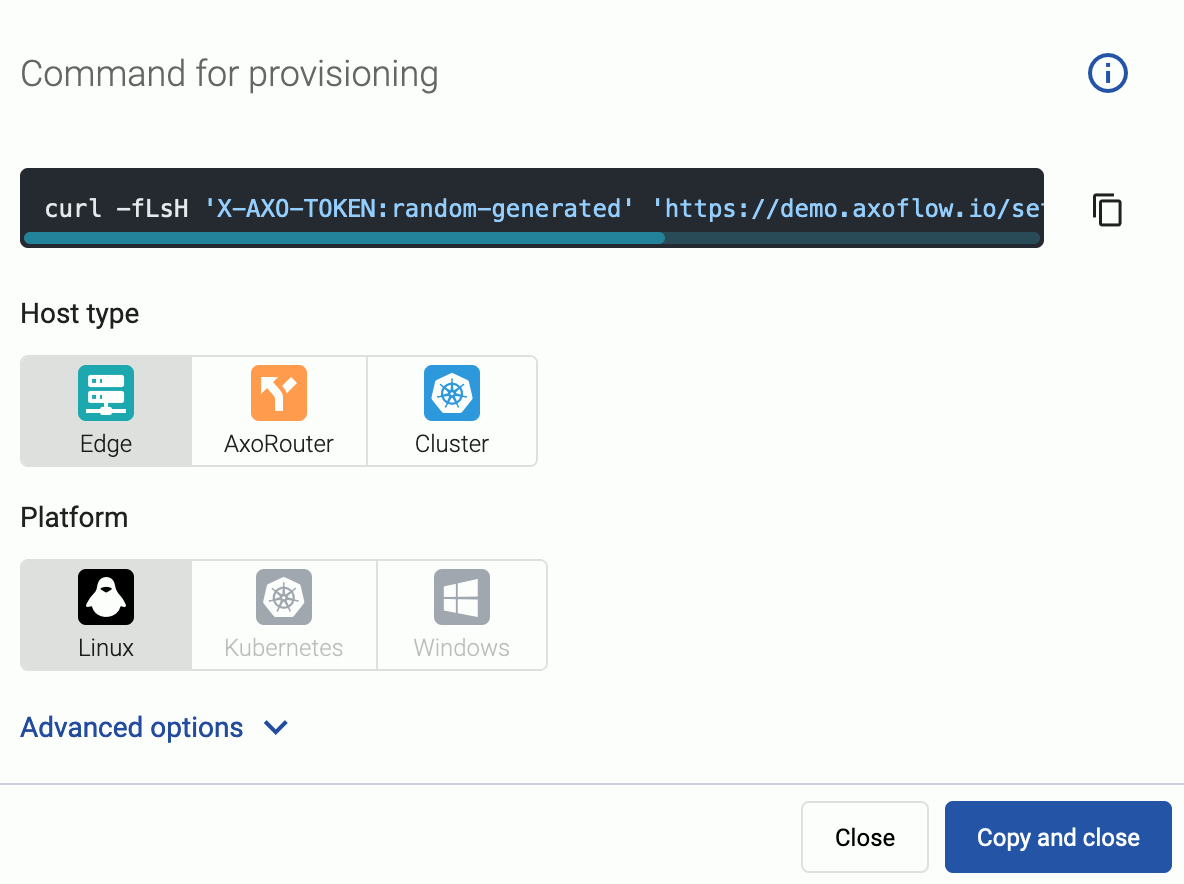
Select Routers > Add Router.

-
Select the platform (Linux). The one-liner installation command is displayed.
-
(Optional) If you don’t want to store any logs locally on AxoRouter, disable AxoStore, select Advanced options, scroll down, and deselect Enable AxoStore.
-
(Optional)
If needed, set the Advanced options (for example, proxy settings) to modify the installation parameters. Usually, you don’t have to use advanced options unless the Axoflow support team instructs you to do so.
-
Open a terminal on the host where you want to install AxoRouter.
-
Run the one-liner, then follow the on-screen instructions.
Note Running the provisioning command withsudowould mask environment variables of the calling shell. Either start the whole procedure from a root shell, or let the install script call sudo when it needs to. In other words: don’t add thesudocommand to the provisioning command.Example output:
Do you want to install AxoRouter now? [Y] % Total % Received % Xferd Average Speed Time Time Time Current Dload Upload Total Spent Left Speed 100 5480 100 5480 0 0 32076 0 --:--:-- --:--:-- --:--:-- 33414 Selecting previously unselected package axorouter. (Reading database ... 17697 files and directories currently installed.) Preparing to unpack axorouter.deb ... Unpacking axorouter (0.66.0) ... Setting up axorouter (0.66.0) ... Low maximum socket receive buffer size value detected: 7500000 bytes (7.2MB). Do you you want to permanently set the net.core.rmem_max sysctl value to 33554432 bytes (32MB) on this system? [Y] net.core.rmem_max = 33554432 Created symlink '/etc/systemd/system/multi-user.target.wants/axostore.path' → '/etc/systemd/system/axostore.path'. Created symlink '/etc/systemd/system/multi-user.target.wants/axorouter-wec.path' → '/etc/systemd/system/axorouter-wec.path'. % Total % Received % Xferd Average Speed Time Time Time Current Dload Upload Total Spent Left Speed 100 42.9M 100 42.9M 0 0 28.1M 0 0:00:01 0:00:01 --:--:-- 28.2M Selecting previously unselected package axolet. (Reading database ... 17707 files and directories currently installed.) Preparing to unpack axolet.deb ... Unpacking axolet (0.66.0) ... Setting up axolet (0.66.0) ... Created symlink '/etc/systemd/system/multi-user.target.wants/axolet.service' → '/usr/lib/systemd/system/axolet.service'. Now continue with onboarding the host on the Axoflow web UI. -
Register the host.
-
Reload the Provisioning page. There should be a registration request for the new AxoRouter deployment. Select ✓.
-
Select Register to register the host. You can add a description and labels (in
label:valueformat) to the host. -
If the primary IP address (the first IP address shown in the Network addresses section on the Routers page for each AxoRouter) is not accessible from your edge hosts, set a Network address override (IP address or an FQDN) that’s accessible. Otherwise, data forwarding from edge hosts will fail.
-
Select the Topology page. The new AxoRouter instance is displayed.
-
Create a flow
- If you haven’t already done so, create a new destination. If you’ve enabled AxoStore on the node and want to send data into AxoStore, see AxoStore.
-
Create a flow to connect the new AxoRouter to the destination.
-
Select Flows.
-
Select Add Flow.
-
Enter a name for the flow, for example,
my-test-flow. -
In the Router Selector field, enter an expression that matches the router(s) you want to apply the flow. To select a specific router, use a name selector, for example,
name = my-axorouter-hostname.You can use any labels and metadata of the AxoRouter hosts in the Router selectors, for example, the hostname of the AxoRouter, or any custom labels.
- If you leave the Router Selector field empty, the selector will match every AxoRouter instance.
- To select only a specific AxoRouter instance, set the
namefield to the name of the instance as selector. For example,name = my-axorouter. - If you set multiple fields in the selector, the selector will match only AxoRouter instances that match all elements of the selector. (There in an AND relationship between the fields.)
-
Select the Destination where you want to send your data. If you don’t have any destination configured, you can select + Add in the destination section to create a new destination now. For details on the different destinations, see Destinations.
- If you don’t have any destination configured, see Destinations.
- If you’ve already created a store, it automatically available as a destination. Note that the Router Selector of the flow must match only AxoRouters that have the selected store available, otherwise you’ll get an error message.
- If you want to send data to another AxoRouter, enable the Show all destinations option, and select the connector of the AxoRouter where you want to send the data.
-
(Optional) To process the data transferred in the flow, select Add New Processing Step. For details, see Processing steps. For example:
- Add a Classify, a Parse, and a Reduce step, in that order, to automatically remove redundant and empty fields from your data.
- To select which messages are processed by the flow, add a Select Messages step, and enter a filter into the AQL Expression field. For example, to select only the messages received from Fortinet FortiGate firewalls, use the
meta.vendor = fortinet AND meta.product = fortigatequery. - Save the processing steps.
-
Select Add.
-
The new flow appears in the Flows list.
-
Send logs to AxoRouter
Configure your hosts to send data to AxoRouter.
-
For appliances that are specifically supported by Axoflow, see Sources.
-
For other appliances and generic Linux devices, see Generic tips.
-
For a quick test without an actual source, you can also do the following (requires
ncto be installed on the AxoRouter host):-
Open the AxoConsole, select Topology, then select the AxoRouter instance you’ve deployed.
-
Select ⋮ > Tap log flow > Input log flow. Select Start.
-
Open a terminal on your AxoRouter host.
-
Run the following command to send 120 test messages (2 per second) in a loop to AxoRouter:
for i in `seq 1 120`; do echo "<165> fortigate date=$(date -u +%Y-%m-%d) time=$(date -u +"%H:%M:%S%Z") devname=us-east-1-dc1-a-dmz-fw devid=FGT60D4614044725 logid=0100040704 type=event subtype=system level=notice vd=root logdesc=\"System performance statistics\" action=\"perf-stats\" cpu=2 mem=35 totalsession=61 disk=2 bandwidth=158/138 setuprate=2 disklograte=0 fazlograte=0 msg=\"Performance statistics: average CPU: 2, memory: 35, concurrent sessions: 61, setup-rate: 2\""; sleep 0.5; done | nc -v 127.0.0.1 514Alternatively, you can send logs in an endless loop:
while true; do echo "<165> fortigate date=$(date -u +%Y-%m-%d) time=$(date -u +"%H:%M:%S%Z") devname=us-east-1-dc1-a-dmz-fw devid=FGT60D4614044725 logid=0100040704 type=event subtype=system level=notice vd=root logdesc=\"System performance statistics\" action=\"perf-stats\" cpu=2 mem=35 totalsession=61 disk=2 bandwidth=158/138 setuprate=2 disklograte=0 fazlograte=0 msg=\"Performance statistics: average CPU: 2, memory: 35, concurrent sessions: 61, setup-rate: 2\""; sleep 1; done | nc -v 127.0.0.1 514
-
Manage AxoRouter
This section describes how to start, stop and check the status of the AxoRouter service on Linux.
Start AxoRouter
To start AxoRouter, execute the following command. For example:
systemctl start axorouter
If the service starts successfully, no output will be displayed.
The following message indicates that AxoRouter cannot start (see Check AxoRouter status):
Job for axorouter.service failed because the control process exited with error code. See `systemctl status axorouter.service` and `journalctl -xe` for details.
Stop AxoRouter
To stop AxoRouter
-
Execute the following command.
systemctl stop axorouter -
Check the status of the AxoRouter service (see Check AxoRouter status).
Restart AxoRouter
To restart AxoRouter, execute the following command.
systemctl restart axorouter
Reload the configuration without restarting AxoRouter
To reload the configuration file without restarting AxoRouter, execute the following command.
systemctl reload axorouter
Check the status of AxoRouter service
To check the status of AxoRouter service
-
Execute the following command.
systemctl --no-pager status axorouter -
Check the
Active:field, which shows the status of the AxoRouter service. The following statuses are possible:-
active (running)-axorouterservice is up and running -
inactive (dead)-axorouterservice is stopped
-
Upgrade AxoRouter
AxoConsole raises an alert for the host when a new AxoRouter version is available. To upgrade to the new version, re-run the one-liner installation command you used to install AxoRouter, or select Provisioning > Select type and platform to create a new one.
2.1 - Advanced installation options
When installing AxoRouter, you can set a number of advanced options if needed for your environment. Setting the advanced options in the AxoConsole automatically updates the one-liner command that you can copy and run.
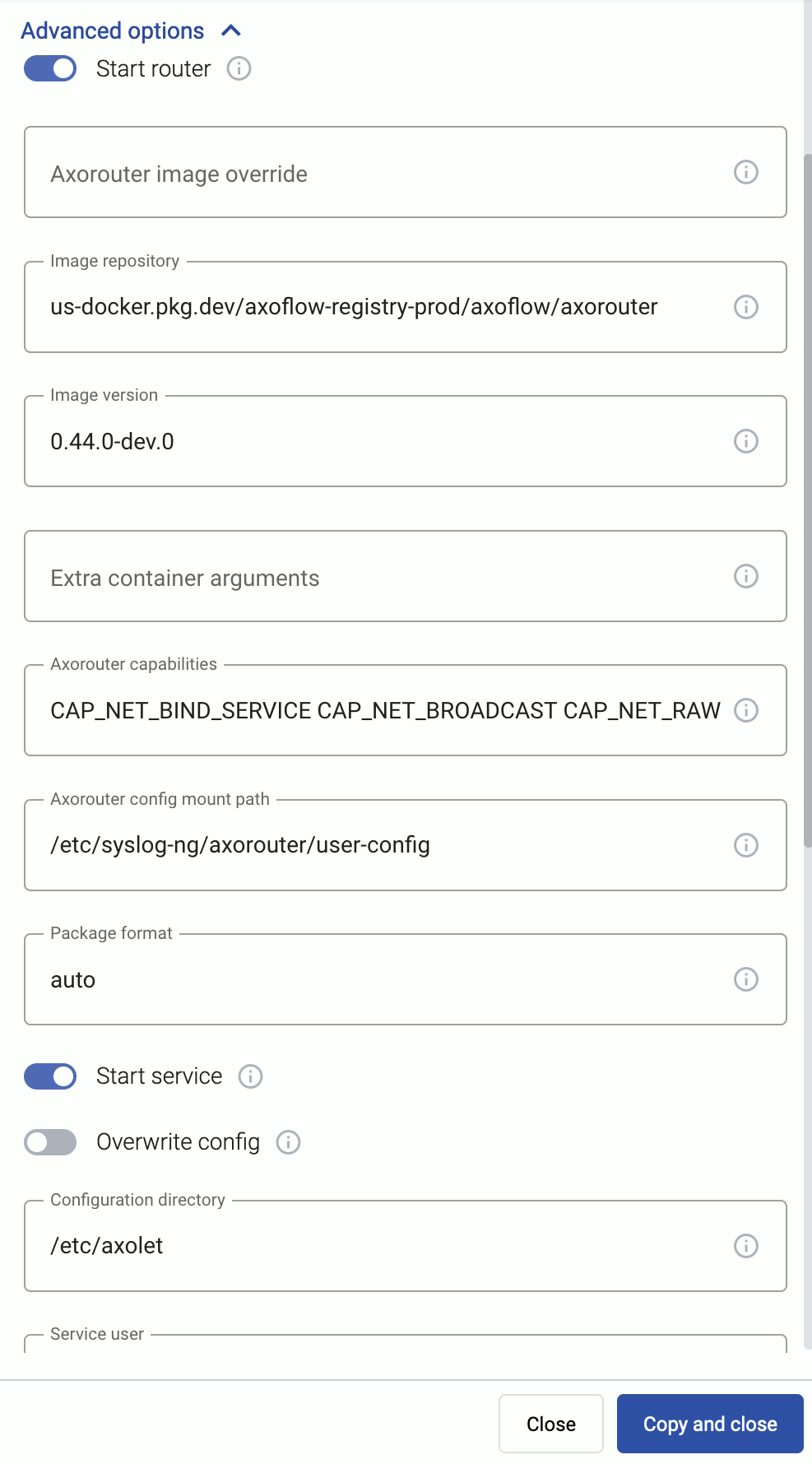
Alternatively, before running the one-liner you can use one of the following methods:
-
Set the related environment variable for the option. For example:
export AXO_USER=syslogng export AXO_GROUP=syslogng -
Set the related URL parameter for the option. For example:
curl -fLsH 'X-AXO-TOKEN:random-generated' 'https://<your-tenant-id>.cloud.axoflow.io/setup.sh?type=AXOROUTER&platform=LINUX&user=syslogng&group=syslogng' | sh
Proxy settings
Use the HTTP proxy, HTTPS proxy, No proxy parameters to configure HTTP proxy settings for the installer. To avoid using the proxy for the Axolet service, enable the Avoid proxy parameter as well. Lowercase variable names are preferred because they work universally.
Installation options
You can pass the following parameters to the installation script as environment variables, or as URL parameters.
sudo would mask environment variables of the calling shell. Either start the whole procedure from a root shell, or let the install script call sudo when it needs to. In other words: don’t add the sudo command to the provisioning command.
AxoRouter capabilities
| Default value: | CAP_NET_BIND_SERVICE CAP_NET_BROADCAST CAP_NET_RAW CAP_SYSLOG CAP_BPF |
| Environment variable | AXO_AXOROUTER_CAPS |
| URL parameter | axorouter_caps |
Description: Capabilities added to the AxoRouter container.
AxoRouter config mount path
| Default value: | /etc/axorouter/user-config |
| Environment variable | AXO_AXOROUTER_CONFIG_MOUNT_INSIDE |
| URL parameter | axorouter_config_mount_inside |
Description: Mount path for custom user configuration.
AxoRouter image override
| Default value: | us-docker.pkg.dev/axoflow-registry-prod/axoflow/axorouter |
| Environment variable | AXO_IMAGE |
| URL parameter | image |
Description: Deploy the specified AxoRouter image.
Extra container arguments
| Default value: | empty string |
| Environment variable | AXO_PODMAN_ARGS |
| URL parameter | extra_args |
Description: Additional arguments passed to the AxoRouter container.
Image repository
| Default value: | us-docker.pkg.dev/axoflow-registry-prod/axoflow/axorouter |
| Environment variable | AXO_IMAGE_REPO |
| URL parameter | image_repo |
Description: Deploy AxoRouter from a custom image repository.
Image version
| Default value: | Current Axoflow version |
| Environment variable | AXO_IMAGE_VERSION |
| URL parameter | image_version |
Description: Deploy the specified AxoRouter version.
Package format
| Default value: | auto |
| Available values: | auto, dep, rpm, tar, none |
| Environment variable | AXO_INSTALL_PACKAGE |
| URL parameter | install_package |
Description: File format of the installer package.
Start router
| Default value: | true |
| Available values: | true, false |
| Environment variable | AXO_START_ROUTER |
| URL parameter | start_router |
Description: Start AxoRouter after installation.
Axolet parameters
API server host
| Default value: | |
| Environment variable | |
| URL parameter | api_server_host |
Description: Override the host part of the API endpoint for the host.
Avoid proxy
| Default value: | false |
| Available values: | true, false |
| Environment variable | AXO_AVOID_PROXY |
| URL parameter | avoid_proxy |
Description: If set to true, the value of the *_proxy variables will only be used for downloading the installer, but not for the axolet service itself. If set to false, the Axolet service will use the variables from the installer.
Axolet capabilities
| Default value: | CAP_SYS_PTRACE CAP_SYS_CHROOT |
| Available values: | Whitespace-separated list of capability names with CAP_ prefix. |
| Environment variable | AXO_CAPS |
| URL parameter | caps |
Description: Ambient Linux capabilities the axolet service will use.
Configuration directory
| Default value: | /etc/axolet |
| Environment variable | AXO_CONFIG_DIR |
| URL parameter | config_dir |
Description: The directory where the configuration files are stored.
HTTP proxy
| Default value: | empty string |
| Environment variable | AXO_HTTP_PROXY |
| URL parameter | http_proxy |
Description: Use a proxy to access AxoConsole from the host.
HTTPS proxy
| Default value: | empty string |
| Environment variable | AXO_HTTPS_PROXY |
| URL parameter | https_proxy |
Description: Use a proxy to access AxoConsole from the host.
Initial labels
| Default value: | ‘product=axorouter,vendor=axoflow’ |
| Environment variable | AXO_INITIAL_LABELS |
| URL parameter | initial_labels |
Description: Comma-separated list of key=value labels. These labels will be suggested for the host when you add the source to AxoConsole. For example, product=windows,team=windows,vendor=microsoft
No proxy
| Default value: | empty string |
| Environment variable | AXO_NO_PROXY |
| URL parameter | no_proxy |
Description: Comma-separated list of hosts that shouldn’t use proxy to access AxoConsole from the host.
Overwrite config
| Default value: | false |
| Available values: | true, false |
| Environment variable | AXO_CONFIG_OVERWRITE |
| URL parameter | config_overwrite |
Description: If set to true, the configuration process will overwrite existing configuration (/etc/axolet/config.json). This means that the agent will get a new GUID and it will require approval on the AxoConsole.
Service group
| Default value: | root |
| Environment variable | AXO_GROUP |
| URL parameter | group |
Description: Name of the group and Axolet will be running as. It should be either root or the group syslog-ng is running as.
Service user
| Default value: | root |
| Environment variable | AXO_USER |
| URL parameter | user |
Description: Name of the user Axolet will be running as. It should be either root or the user syslog-ng is running as. See also Run axolet as non-root.
Start service
| Default value: | true |
| Available values: | true, false |
| Environment variable | AXO_START |
| URL parameter | start |
Description: Start axolet agent at the end of installation. Use false for preparing golden images. In this case axolet will generate a new GUID on the first boot after cloning the image.
WEC parameters
These parameters are related to the Windows Event Collector server that can be run on AxoRouter. For details, see Windows Event Collector (WEC).
WEC image override
| Default value: | `` |
| Environment variable | WEC_IMAGE |
| URL parameter | wec_image |
Description: Deploy the specified WEC image.
WEC Image repository
| Default value: | us-docker.pkg.dev/axoflow-registry-prod/axoflow/axorouter-wec |
| Environment variable | AXO_WEC_IMAGE_REPO |
| URL parameter | wec_image_repo |
Description: Deploy the Windows Event Collector server from a custom image repository.
WEC Image version
| Default value: | Current Axoflow version |
| Environment variable | AXO_WEC_IMAGE_VERSION |
| URL parameter | wec_image_version |
Description: Deploy the specified Windows Event Collector server version.
AxoStore parameters
These parameters are related to the AxoStore that can be run on AxoRouter. For details, see Storage.
AxoStore enable
| Default value: | true |
| Available values: | true, false |
| Environment variable | AXO_AXOSTORE_ENABLED |
| URL parameter | axostore_enabled |
Description: Install AxoStore for this AxoRouter deployment.
AxoStore Image repository
| Default value: | us-docker.pkg.dev/axoflow-registry-prod/axoflow/axostore |
| Environment variable | AXO_AXOSTORE_IMAGE_REPO |
| URL parameter | axostore_image_repo |
Description: Deploy the AxoStore from a custom image repository.
AxoStore Image version
| Default value: | Current Axoflow version |
| Environment variable | AXO_AXOSTORE_IMAGE_VERSION |
| URL parameter | axostore_image_version |
Description: Deploy the specified AxoStore version.
AxoStore storage directory
| Default value: | /var/lib/clickhouse |
| Environment variable | AXOSTORE_MOUNT |
| URL parameter | N/A |
Description: The directory where the AxoStores are stored. Make sure that there’s sufficient disk space, especially for long-time retention and/or high data volume.
2.2 - Run AxoRouter as non-root
To run AxoRouter as a non-root user, set the AXO_USER and AXO_GROUP environment variables to the user’s username and groupname on the host you want to deploy AxoRouter. For details, see Advanced installation options.
Operators must have access to the following commands:
-
/usr/bin/systemctl * axolet.service: Controls theaxolet.servicesystemd unit. Usually*isstart,stop,restart,enable, andstatus. Used by the operators for troubleshooting. -
/usr/local/bin/configure-axolet: Creates initialaxoletconfiguration and enables/starts theaxoletservice. Executed by the bootstrap script. -
Command to install and upgrade the
axoletpackage. Executed by the bootstrap script if the packages aren’t already installed.- On RPM-based Linux distributions:
/usr/bin/rpm -Uv axo*.rpm - On DEB-based Linux distributions:
/usr/bin/dpkg -i axo*.deb
- On RPM-based Linux distributions:
-
/usr/bin/systemctl * axorouter.service: Controls theaxorouter.servicesystemd unit. Usually*isstart,stop,restart,enable, andstatus. Used by the operators for troubleshooting. -
/usr/local/bin/configure-axorouter: Creates the initial axorouter configuration and enables/starts the axorouter service. Executed by the bootstrap script. -
Command to install and upgrade the axorouter and the axolet package. Executed by the bootstrap script if the packages aren’t already installed.
- On RPM-based Linux distributions:
/usr/bin/rpm -Uv axo*.rpm - On DEB-based Linux distributions:
/usr/bin/dpkg -i axo*.deb
- On RPM-based Linux distributions:
You can permit the syslogng user to run these commands by running on of the following:
sudo tee /etc/sudoers.d/configure-axoflow <<A
syslogng ALL=(ALL) NOPASSWD: /usr/local/bin/configure-axolet
syslogng ALL=(ALL) NOPASSWD: /bin/systemctl * axolet.service
# for rpm installation:
syslogng ALL=(ALL) NOPASSWD: /usr/bin/rpm -Uv axo*.rpm
A

sudo tee /etc/sudoers.d/configure-axorouter <<A
syslogng ALL=(ALL) NOPASSWD: /usr/local/bin/configure-axorouter
syslogng ALL=(ALL) NOPASSWD: /bin/systemctl * axorouter.service
# for rpm installation:
syslogng ALL=(ALL) NOPASSWD: /usr/bin/rpm -Uv axo*.rpm
A
sudo tee /etc/sudoers.d/configure-axorouter <<A
syslogng ALL=(ALL) NOPASSWD: /usr/local/bin/configure-axorouter
syslogng ALL=(ALL) NOPASSWD: /bin/systemctl * axorouter.service
# for deb installation:
syslogng ALL=(ALL) NOPASSWD: /usr/bin/dpkg -i axo*.deb
A

sudo tee /etc/sudoers.d/configure-axorouter <<A
syslogng ALL=(ALL) NOPASSWD: /usr/local/bin/configure-axorouter
syslogng ALL=(ALL) NOPASSWD: /bin/systemctl * axorouter.service
# for deb installation:
syslogng ALL=(ALL) NOPASSWD: /usr/bin/rpm -Uv axo*.deb
A