This is the multi-page printable view of this section.
Click here to print.
Return to the regular view of this page.
Deployment scenarios
Thanks to its flexible deployment modes, you can quickly insert an Axoflow and its processing node (called AxoRouter) transparently into your data pipeline and gain instant benefits:
- Data reduction
- Improved SIEM accuracy
- Configuration UI for routing data
- Automatic data classification
- Metrics about log ingestion, processing, and data drops
- Analytics about the transported data
- Health check, highlighting anomalies
Note
Note that AxoRouter and Axoflow agent collects detailed, real-time metrics about the data-flows – giving you observability over the health of the security data pipeline and its components. Your security data remains in your self-managed cloud or in your on-prem instance where your sources, destinations, Axoflow agents, and AxoRouters are running, only metrics are forwarded to AxoConsole.
After the first step, you can further integrate your pipeline, by deploying Axoflow agents to collect and manage your security data, or onboarding your existing log collector agents (for example, syslog-ng). Let’s see what these scenarios look like in detail.
1 - AxoConsole deployment
You can use AxoConsole:
We also support hybrid environments.
The AxoConsole provides the UI for accessing metrics and analytics, deploying and configuring AxoRouter instances, configuring data flows, and so on.
2 - Transparent router mode
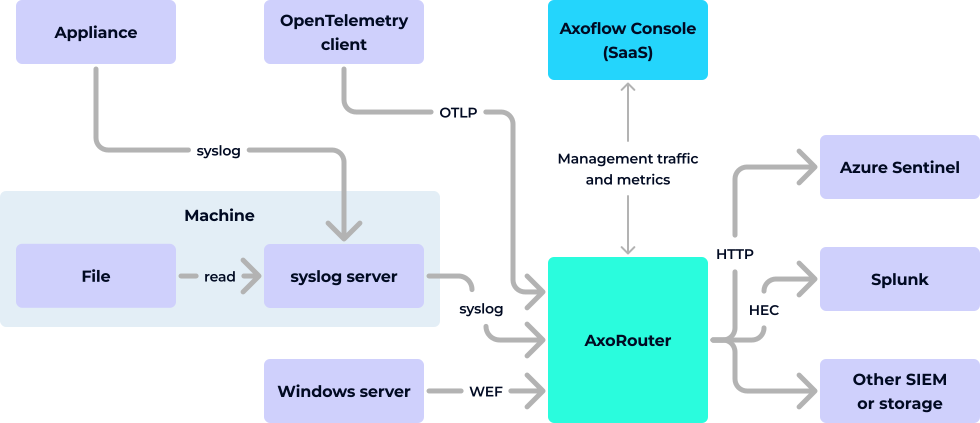
AxoRouter is a powerful aggregator and data processing engine that can receive data from a wide variety of sources, including:
- OpenTelemetry,
- syslog,
- Windows Event Forwarding, or HTTP.
In transparent mode, you deploy AxoRouter in front of your SIEM and configure your sources or aggregators to send the logs to AxoRouter instead of the SIEM. The transparent deployment method is a quick, minimally invasive way to get instant benefits and value from Axoflow, and:
Note
Note that AxoRouter and Axoflow agent collects detailed, real-time metrics about the data-flows – giving you observability over the health of the security data pipeline and its components. Your security data remains in your self-managed cloud or in your on-prem instance where your sources, destinations, Axoflow agents, and AxoRouters are running, only metrics are forwarded to AxoConsole.
3 - Router and edge deployment
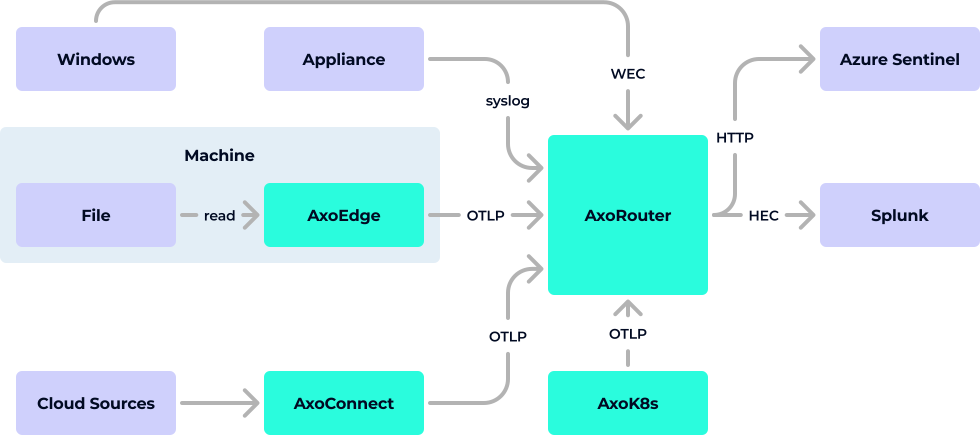
Axoflow provides agents to collect data from all kinds of sources:
- Kubernetes clusters,
- cloud sources,
- security appliances,
- Linux servers,
- Microsoft Windows hosts.
(If you’d prefer to keep using your existing syslog infrastructure instead of the Axoflow agents, see Onboard existing syslog/syslog-ng infrastructure).
You can deploy the AxoRouter data aggregator on Linux and Kubernetes.
Using the Axoflow collector agents gives you:
- Reliable transport: Between its components, Axoflow transports security data using the reliable OpenTelemetry protocol (OTLP) for high performance, and to avoid losing messages.
- Managed components: You can configure, manage, monitor, and troubleshoot all these components from the AxoConsole. For example, you can sample the data flowing through each component.
- Metrics: Detailed metrics from every collector provide unprecedented insight into the status of your data pipeline.
4 - AxoRouter high availability
Deploy multiple AxoRouter instances in a high availability cluster, either behind a load balancer or sharing a virtual IP managed by keepalived.
You can deploy multiple AxoRouter instances as a high availability cluster so the data pipeline keeps accepting logs even when an AxoRouter host fails. There are two main approaches: a load balancer in front of the cluster, or a shared virtual IP managed by keepalived.
Load balancer in front of the cluster
Sources connect to a load balancer, which forwards traffic to one of the AxoRouter hosts. If a host fails, the load balancer routes traffic to the remaining healthy hosts.
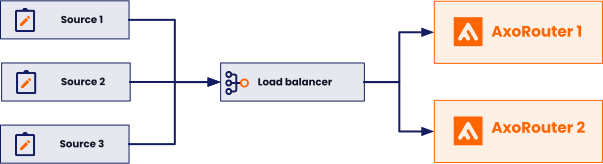
This approach reuses an existing load balancer if you already have one, but requires the load balancer to support all relevant protocols (for example, syslog over TCP or TLS).
Virtual IP managed by keepalived
Sources connect to a virtual IP address that floats across the AxoRouter hosts. keepalived uses VRRP to elect a primary node, which holds the virtual IP. If the primary node fails, keepalived moves the virtual IP to a backup node, and the sources keep reaching AxoRouter without changing their destination address.
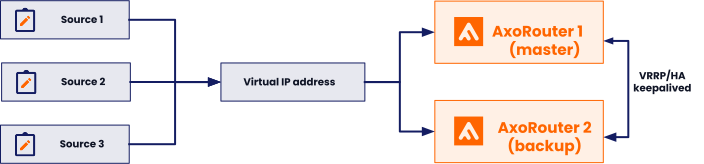
This approach doesn’t depend on external load balancer infrastructure and suits on-prem deployments well.
Cluster sizing and topology
The hosts running AxoRouter can be physical or virtual machines. The recommended layout depends on which you choose:
- Physical machines: Install two machines with a dedicated HA link between them to keep the HA traffic separate from the production traffic.
- Virtual machines: Set up three VMs with a dedicated (and guaranteed bandwidth) HA link (HA VLAN) spanning across them, to keep the HA traffic separate from the production traffic.
Note
A cluster targeting highly reliable services should ideally consist of at least three nodes to avoid split-brain situations. In a split-brain situation, both nodes think that they are the last surviving node (for example, during a network failure) and bring up their services, leading to several problems.
The setups described here use fewer than the ideal number of nodes for cost reasons. Dedicated HA links provide an additional channel for HA communication independently of the production traffic, and significantly reduce the risk of split-brain scenarios.
For step-by-step instructions to deploy a keepalived-based cluster with a VRRP-managed virtual IP, see Set up AxoRouter high availability with keepalived.
5 - Onboard existing syslog/syslog-ng infrastructure
If your organization already has a syslog architecture in place, Axoflow provides ways to reuse it. This allows you to integrate your existing infrastructure with Axoflow, and optionally – in a later phase – replace your log collectors with the agents provided by Axoflow.
Managed AxoRouter deployments
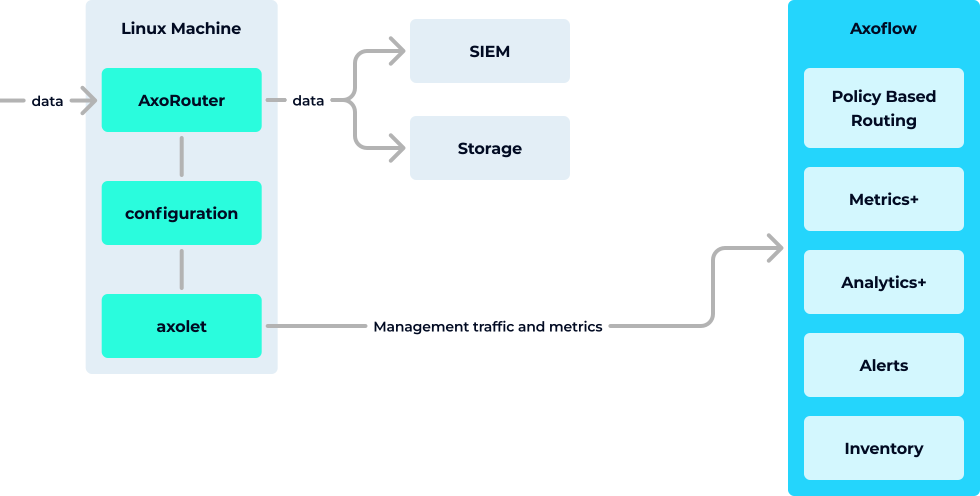
In this deployment mode you use the centralized management UI of AxoConsole to manage your AxoRouter instances. This provides the tightest integration and the most benefits, including:
Unmanaged AxoRouter deployments
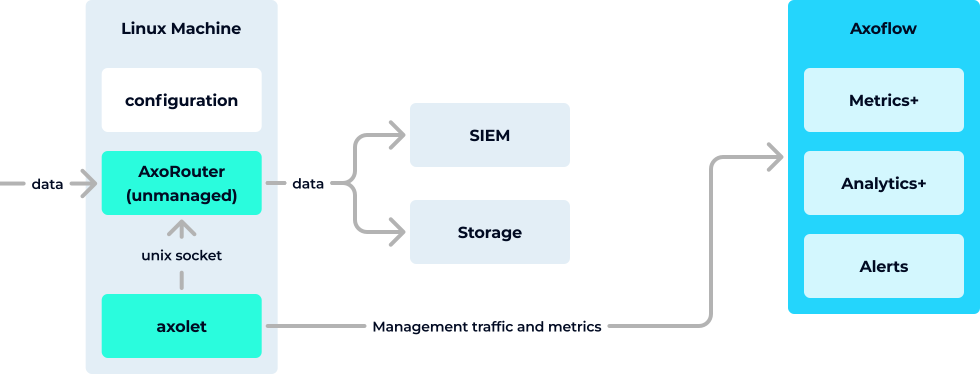
In this mode, you install AxoRouter on the data source to replace its local collector agent, and manage it manually. That way you get the functional benefits of using AxoRouter as an aggregator and data curation engine to collect and classify your data, but can manage its configuration as you see fit. This gives you all the benefits of the read-only mode (since AxoRouter includes Axolet as well), and in addition, it provides:
Read-only mode with syslog-ng™
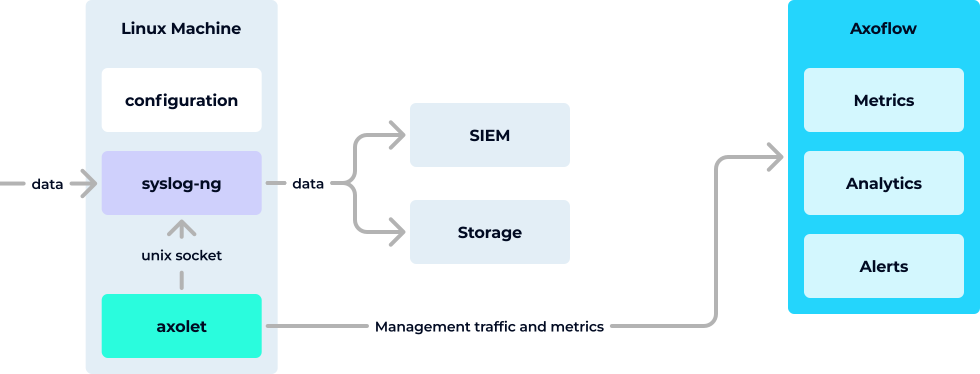
In this scenario, you install Axolet on the data source. Axolet is a monitoring (and management) agent that integrates with the local log collector and sends detailed metrics about the host and its data traffic to the AxoConsole. This allows you to use the AxoConsole to:
Axoflow integrates with existing syslog-ng (AxoSyslog, Splunk Connect for Syslog (SC4S), or syslog-ng) deployments by running the Axolet agent besides the syslog-ng process on the host. The agent gathers metrics from syslog-ng through the control socket. To extend the built-in metrics, the agent can be instrumented with a minimal configuration change to provide additional metrics about the log flow. With some additional instrumentation, syslog-ng can be extended with log tapping functionality as well.
6 - Multi-cloud and multi-datacenter scenario
Organizations running workloads across multiple cloud providers (AWS, Azure, GCP) and private datacenters face a common challenge: each environment produces security and observability data in different formats, volumes, and locations, making it hard to collect, normalize, and route it consistently.
Axoflow is designed for exactly this scenario. You deploy Axoflow agent agents and Axoflow Cloud Connectors close to your data sources in each cloud and datacenter. The agents forward data to one or more AxoRouter nodes, which you can place per region to minimize egress costs, or centralize for simpler operations.
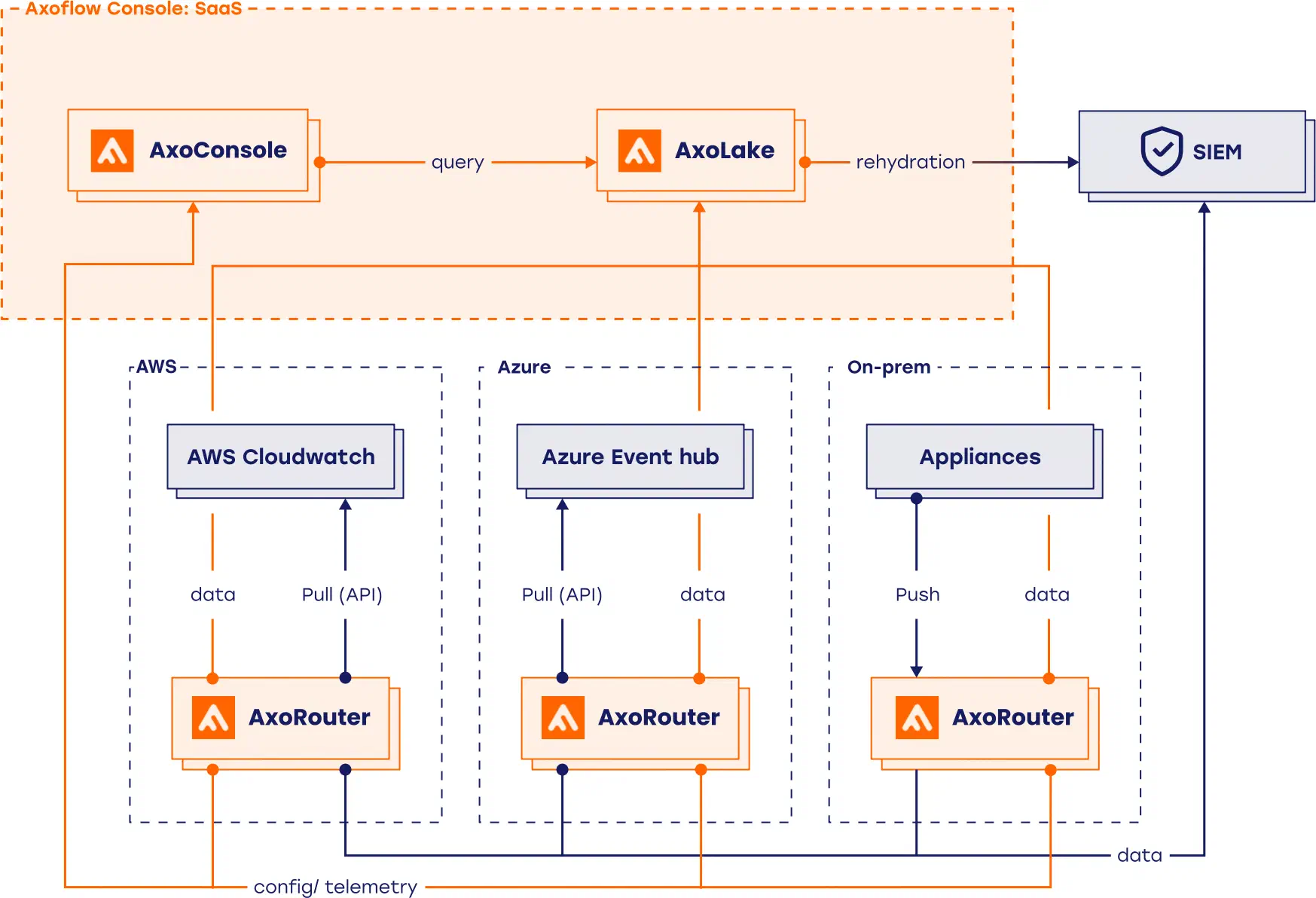
This approach gives you:
- Single management plane: You configure and monitor all Axoflow agent agents and AxoRouter nodes from the AxoConsole, regardless of which cloud or datacenter they run in.
- Local aggregation: AxoRouters automatically filter, enrich, and reduce data before forwarding it, so you only pay cross-cloud or cross-datacenter egress for the data that matters.
- Reliable transport: Axoflow uses the OpenTelemetry protocol (OTLP) between components (Axoflow agent to AxoRouter and Axoflow Cloud Connector to AxoRouter), so no messages are lost when crossing network boundaries between environments.
- Unified metrics: Every agent and router emits detailed per-component metrics, so you have end-to-end visibility into your data pipeline across all environments.
- Flexible routing: You can route data to environment-specific destinations (for example, a regional SIEM or local archive) or aggregate it centrally — or both — using policy-based routing.
7 - On-prem or air-gapped deployment
Regulated industries — finance, healthcare, government — and security-sensitive organizations often cannot send data outside their own infrastructure and cannot install software from the internet. In these environments, routing logs and telemetry through a cloud service is not an option, and internet connectivity may be restricted or entirely unavailable.
Axoflow supports fully on-premises deployments, when the AxoConsole, AxoRouter nodes, and Axoflow agent agents all run inside your own datacenter. No data reaches external infrastructure, and the AxoConsole that manages the entire pipeline is also hosted on your own hardware. Air-gapped environments with no internet access are supported.
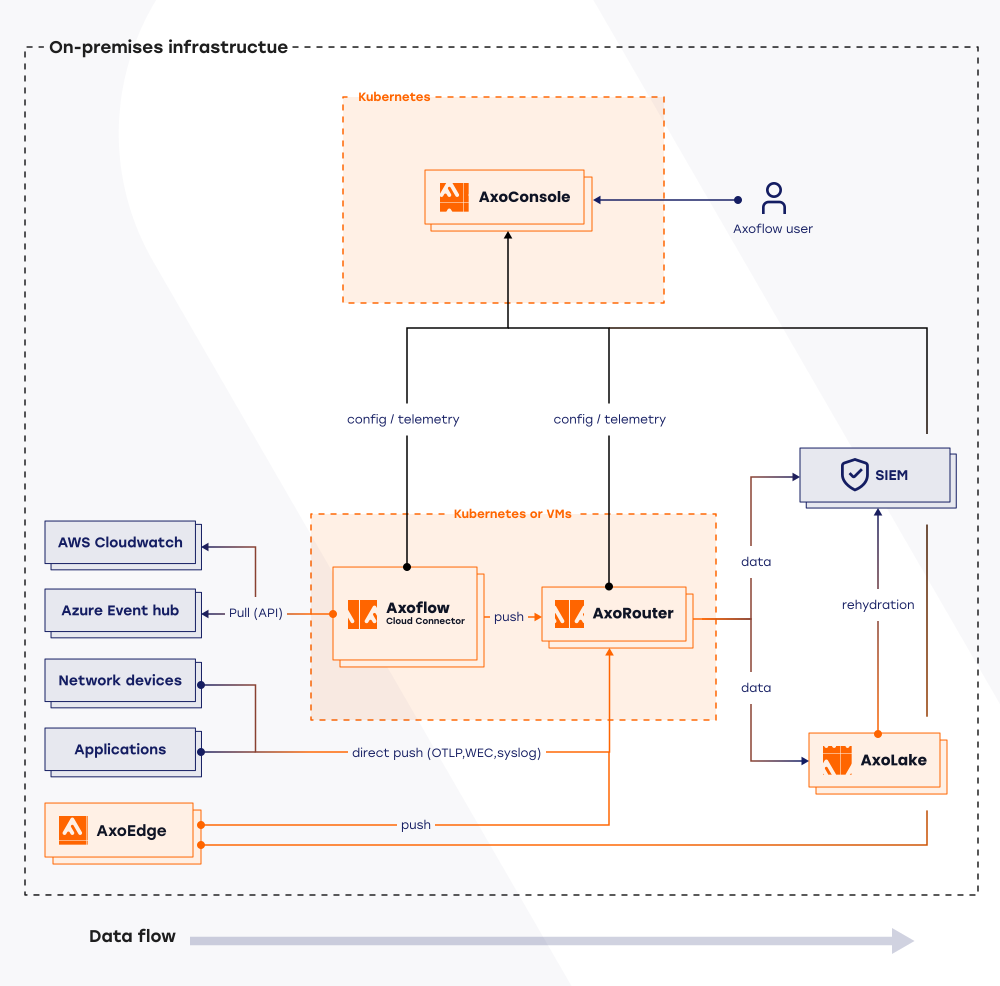
This approach gives you:
- Data sovereignty: all security data stays within your infrastructure. No component in the pipeline requires connectivity to Axoflow’s cloud services.
- Air-gapped support: you can deploy and operate Axoflow in environments with no internet access.
- Single management plane: the on-premises AxoConsole configures and monitors all Axoflow agent agents and AxoRouter nodes, giving you the same visibility and control as the SaaS offering.
- Local aggregation: AxoRouters filter, enrich, and reduce data before it moves between segments of your network, minimizing internal traffic.
- Reliable transport: Axoflow uses the OpenTelemetry protocol (OTLP) between Axoflow agent and AxoRouter, so no messages are lost even under network instability.
- Unified metrics: every agent and router emits detailed per-component metrics, giving you end-to-end visibility into your data pipeline without leaving your perimeter.
For deployment instructions, see On-premise.