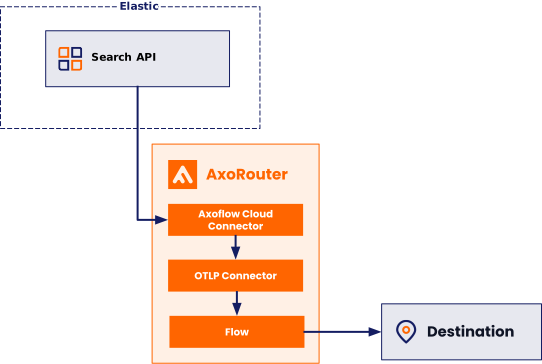
Axoflow can collect data from Elasticsearch using an Axoflow Cloud Connector. At a high level, the process looks like this:
- Deploy an Axoflow Cloud Connector that will collect the data from Elastic. Axoflow Cloud Connector is a simple container that you can deploy into your cloud provider, or on-prem.
- The connector polls the Elasticsearch
_searchAPI and forwards the collected data to the OpenTelemetry connector of an AxoRouter instance. This AxoRouter can be deployed within the cloud, or on-prem. You can deploy Axoflow Cloud Connector on the same host as AxoRouter. - Configure a Flow on AxoConsole that processes and routes the collected data to your destination (for example, Splunk or another SIEM).
Prerequisites
- An Elastic Cloud or Elastic Stack account with an active subscription.
- A virtual machine or Kubernetes node to deploy Axoflow Cloud Connector on. This can be the same host that’ll run AxoRouter.
- An AxoRouter instance that can receive data from the connector. Verify that it has an OpenTelemetry Connector (it’s enabled by default). This can be the same host that’ll run Axoflow Cloud Connector.
-
You know the IP address the AxoRouter. To find it:
- Open the AxoConsole.
- Select the Routers or the Topology page.
- Select on AxoRouter instance that is going to receive the logs.
- Check the Networks > Address field.
- The Axoflow Cloud Connector must be able to access the AxoRouter on the port the OpenTelemetry Connector is listening on (by default, port 4317). Depending on where the Axoflow Cloud Connector and AxoRouter are deployed, you might need to adjust firewall and ingress/egress rules in your environment.
- API key for Axoflow Cloud Connector to authenticate to your Elastic instance.
Axoflow Cloud Connector and AxoRouter on the same host
To collect data from Elastic when Axoflow Cloud Connector and AxoRouter are running on the same host, complete the following steps.
-
Deploy AxoRouter on a Linux virtual machine: select Provisioning > AxoRouter > Linux, then run the one-liner provisioning command on the host.
-
Download the Axoflow Cloud Connector image. The host must be able to access
ghcr.ioon TCP port 443 for this step.sudo podman pull ghcr.io/axoflow/axocloudconnectors:latest -
Ensure that Axoflow Cloud Connector can access the Elastic APIs. (For Elastic Cloud, Axoflow Cloud Connector uses HTTPS over port 443).
-
Install the Axoflow Cloud Connector.
-
Create the
/etc/axorouter/cloudconnectors-elastic.envfile with the following content:AXOCLOUDCONNECTORS_UID=0 AXOCLOUDCONNECTORS_GID=0 AXOCLOUDCONNECTORS_CAPS=CAP_NET_BIND_SERVICE CAP_NET_BROADCAST CAP_NET_RAW CAP_SYSLOG CAP_BPF AXOCLOUDCONNECTORS_IMAGE=ghcr.io/axoflow/axocloudconnectors:latest AXOCLOUDCONNECTORS_PODMAN_ARGS=--log-level=warn STORAGE_DIRECTORY=/var/lib/axocloudconnectors-elastic AXOROUTER_ENDPOINT=127.0.0.1:4317 http_proxy= https_proxy= no_proxy= AXOCLOUDCONNECTOR_DEVICE_ID=8f6c3653 AXOROUTER_TLS_INSECURE=true ELASTICSEARCH_ENDPOINT=<YOUR_ELASTICSEARCH_ENDPOINT> ELASTICSEARCH_API_KEY=<YOUR_ELASTICSEARCH_API_KEY> ELASTICSEARCH_INDEX=<YOUR_INDEX_NAME> # ELASTICSEARCH_START_AT=beginningReplace:
<YOUR_ELASTICSEARCH_ENDPOINT>with the URL of your Elasticsearch instance (for Elastic Cloud, it looks something likehttps://my-elasticsearch-project-3784re.es.us-east-1.aws.elastic.cloud:443for Elastic Cloud)<YOUR_ELASTICSEARCH_API_KEY>with your actual API key<YOUR_INDEX_NAME>with the name of the Elasticsearch index from which you want to retrieve data
By default, Axoflow Cloud Connector collects only data that arrived into the index after Axoflow Cloud Connector started for the first time. If you want to fetch all data from the index, uncomment the
# ELASTICSEARCH_START_AT=beginningline. -
Create the
/etc/containers/systemd/axorouter-cloudconnectors-elastic.containerfile with the following content:[Unit] Description=CloudConnectors Elastic Container Wants=network-online.target After=network.target network-online.target StartLimitIntervalSec=0 StartLimitBurst=0 [Install] WantedBy=multi-user.target default.target [Container] User=${AXOCLOUDCONNECTORS_UID} Group=${AXOCLOUDCONNECTORS_GID} # Passing envvars into the container EnvironmentFile=/etc/axorouter/cloudconnectors-elastic.env Environment=AXO_SYSTEMD_UNIT_NAME=%n ContainerName=axorouter-cloudconnectors-elastic AddCapability=${AXOCLOUDCONNECTORS_CAPS} Image=${AXOCLOUDCONNECTORS_IMAGE} Volume=${STORAGE_DIRECTORY}:${STORAGE_DIRECTORY}:z PodmanArgs=${AXOCLOUDCONNECTORS_PODMAN_ARGS} Exec= LogDriver=journald Network=host SecurityLabelDisable=true [Service] # for `podman run` (e.g. AXOCLOUDCONNECTORS_IMAGE) EnvironmentFile=/etc/axorouter/cloudconnectors-elastic.env RestartSec=2 Restart=always -
Run the following commands to load and start the service and create the required data directory (for persistent position pointer and data buffer):
sudo mkdir -p /var/lib/axocloudconnectors-elastic sudo systemctl daemon-reload sudo systemctl start axorouter-cloudconnectors-elastic -
Check the logs of the newly created service to verify it’s running and there are no errors:
sudo journalctl -f -u axorouter-cloudconnectors-elasticThe Axoflow Cloud Connector starts forwarding logs to the AxoRouter instance.
-
-
Add the appliance to AxoConsole.
-
Open the AxoConsole and select Topology.
-
Select Add Item > Source.
-
If the Axoflow Cloud Connector is already sending logs to an AxoRouter instance that is registered in the AxoConsole, select Detected, then select the source.
-
Enter the IP address and the FQDN of the Axoflow Cloud Connector instance.
-
Select Add.
-
-
Create a Flow to route the data from the AxoRouter instance to a destination. You can use the Labels of this source to select messages from this source.
Labels
Axoflow automatically adds the following labels to data collected from this source:
| Analytics label | Message field | Value |
|---|---|---|
vendor |
meta.vendor |
elastic |
product |
meta.product |
elasticsearch |
You can use the labels as:
- Filter labels on the Analytics page,
- in the Filter By Label field during log tapping.
You can use the message fields
- in Flow Processing steps, for example, in the Query field of Select Messages steps,
- in AQL expressions in the search bars.