

10x search improvement? Optimize Splunk fields with Axoflow
In our whitepaper, where we discuss the integration of Axoflow with Splunk Technology Add-ons, we briefly touched on the value of the selective use indexed fields in addition to the (more common) “Schema on the Fly” (or schema-at-read) when using the very powerful Splunk Processing Language (SPL). Here, we will take a deeper look into this topic and highlight how Axoflow makes the process of setting up indexed fields far easier, making this Splunk capability far more accessible.
Though the benefits of indexed fields are well-documented, many do not take advantage of these search improvements because of the complexity of setting up indexed fields in the first place. But before we dig in too far, let’s take a look at some background on how searches are performed in Splunk, the differences of the different kinds of field extractions, and how they affect different aspects of the overall Splunk architecture.
How can you make a search run 10 times (or more) as fast?
Before we get into the details, let's start with a pretty stark comparison:
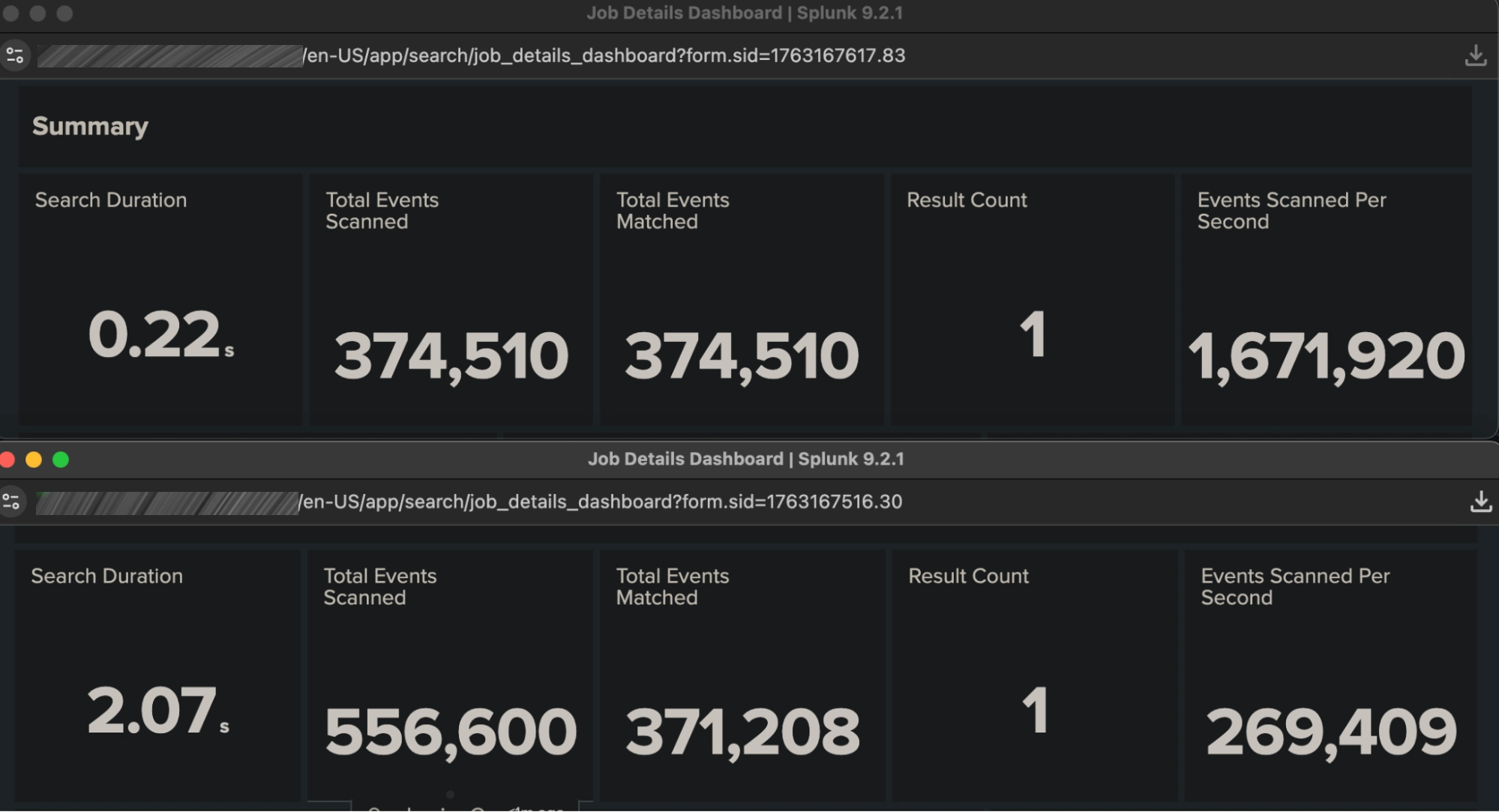
The above screenshots highlight the output from the Splunk Job Inspector, which offers a great deal of insight into the inner workings of any given search (including the resources used for each search subcomponent, which is useful for tracking execution costs that affect resource-driven licensing models such as SVC). The two panels represent two very simple searches, each delivering identical results, which differ only slightly in appearance but in a significant way architecturally:
sourcetype=generic_auth:auth_indexed NOT country::US | stats count
sourcetype=generic_auth:auth_raw NOT country=US | stats count
These searches operate on identical raw datasets, the sourcetypes differ only in that one is using an indexed field for the country field – namely one that is recorded at index time (write) rather than at search time (read). Though the “Schema on the Fly” (schema at read) is a hallmark of Splunk flexibility, it can incur a significant performance penalty when used with certain kinds of searches. For example, it is well known in Splunk that “NOT” searches can be expensive when you’re trying to exclude the most common value of a field. In the example above, most of the events have the country field set to the value US; we want to see the few that don’t. Using the search-time field extraction to inspect every event just to see those that don’t match can be very time-consuming; that is highlighted in the first panel shown above. Instead, if the field “country” is indexed, you can determine which ones don’t match without having to inspect every event.
Expanding the Scope of Indexed Fields
To be fair, these use cases are uncommon and the Splunk GDI “Getting Started” guide (rightly) advises that unless strictly necessary, indexed fields should be avoided. This is largely due to “index bloat” that occurs if too many fields are indexed – adding unnecessary storage overhead, I/O and decompression cycles at search, and CPU resources at index time. However, there is one very important situation that is not highlighted in the Splunk documentation, because it has been traditionally very difficult to implement – and this centers around metadata. Using a data pipeline ahead of Splunk ingest allows you to forward details about the data events being sent – and this can be very useful in analytics.
Splunk’s default indexed fields
Splunk has a set of indexed fields that are created by default for every event:
- index
- timestamp
- sourcetype
- source
- punct
Each of these are, indeed, fields that tell you about the event – and are considered metadata. However, this is quite a limited list, and it is easy to envision a much richer metadata set (such as that which can be derived from a CMDB). Examples include:
- Location (rack, datacenter, city)
- Team (networking, applications)
- Environment (production, dev, testing)
- Access level
and many more. Traditionally, adding these extra fields has been challenging, and in many cases, it is required to add the metadata to the event payload itself (“tainting” the original event in many compliance settings). Using the HTTP Event Collector (HEC) makes this substantially easier, but the configuration of the HEC payload is still up to the event originator if an adequate data pipeline is not in place to handle this task.
Axoflow makes this easy!
Since Axoflow uses HEC to send data to Splunk, the configuration on the Splunk side is largely automatic. Given Axoflow’s tight integration with the HEC API, the “sender-side” configuration of indexed fields (both those contained in the payload and metadata fields ancillary to it) becomes far simpler. Let’s take a look at an example of both of these.
Payload-based Indexed Fields
Let’s examine a common data source – a Palo Alto Firewall, it has a CSV-defined event structure, and includes a field called type that indicates what kind of event this is – TRAFFIC, THREAT, etc. This field can take on one of about 15 values – a small number, which makes sense for an indexed field. In most Splunk installations, this field is extracted at search time – again sufficient for many but can become “expensive” with certain use cases/searches (such as “negation” or rare-term searches described above). Here is an example of a raw event:
<190>Jan 28 01:28:35 PA-VM300-device1 1,2014/01/28 01:28:35,007200001056,TRAFFIC,end,1,2014/01/28 01:28:34,192.168.41.30,
192.168.41.255,10.193.16.193,192.168.41.255,allow-all,,,netbios-ns,vsys1,Trust,Untrust,ethernet1/1,ethernet1/2,To-Panorama,2014/01/28 01:28:34,8720,1,137,137,11637,137,0x400000,udp,allow,276,276,0,3,2014/01/28 01:28:02,2,any,0,2076326,0x0,192.168.0.0-192.168.255.255,192.168.0.0-192.168.255.255,0,3,0
Again, a lookup table can be very easily implemented to determine the field name for all of these values at search time; indeed, a CSV is one of the most efficient ways of getting data into Splunk. However, even with this approach, every event must be inspected for, say, a simple search such as:
index=netfw sourcetype=pan:logs type=TRAFFICA common way to optimize this search is to refine one of the existing indexed fields – in this case sourcetype. Many TAs, including the Palo Alto TA, does this at ingest time, and rewrites the more generic pan:logs to pan:traffic for this particular event. Axoflow’s automatic classification does exactly the same thing, and is fully compatible with the Splunk TA.
Arbitrary Indexed Fields (metadata)
In many cases, it is not always desirable to change the original sourcetype – the desired metadata field may apply to all of the events of a given data source, or has nothing to do with the contents of the event payload (such as the datacenter in which a firewall is installed). This is a very useful capability, and lends itself well to indexed fields (especially when such fields are low cardinality, in which they take on a limited set of values). In such cases, a mechanism to send one or more arbitrary indexed fields to Splunk is needed. Though this capability has been a part of HEC since its inception, it (as well as HEC itself in many cases) is often not used for traditional data sources such as syslog, which is often still collected from files on disk (the UF can send metadata, but the mechanism is complicated and difficult to set up globally). But these are exactly the kind of data source where this can be useful, as operational metadata (e.g. rack/datacenter location) is not part of a syslog message emitted from the device.
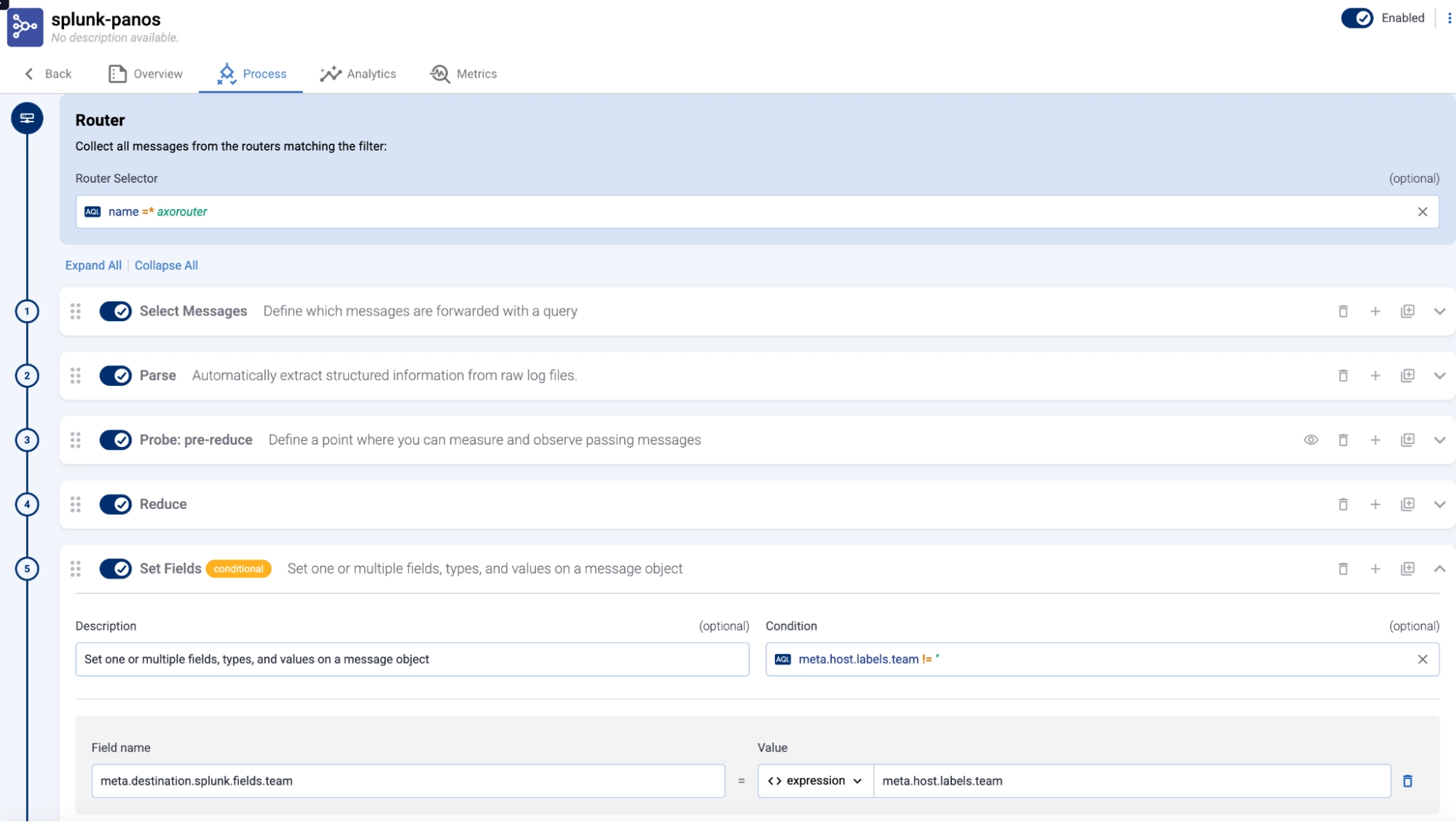
The HEC API accommodates this with the fields JSON object, but care must be taken to ensure the format of the payload is correct. This, again, is where a pipeline that guides the user can be very helpful. Here is a sample flow from the Axoflow Platform for Palo Alto data, where a specific flow processing step (#5) is used to send the field team to Splunk, with the value determined by the value of the label assigned to the sending host (which is itself set when the data source is initially registered with the Axoflow Platform).
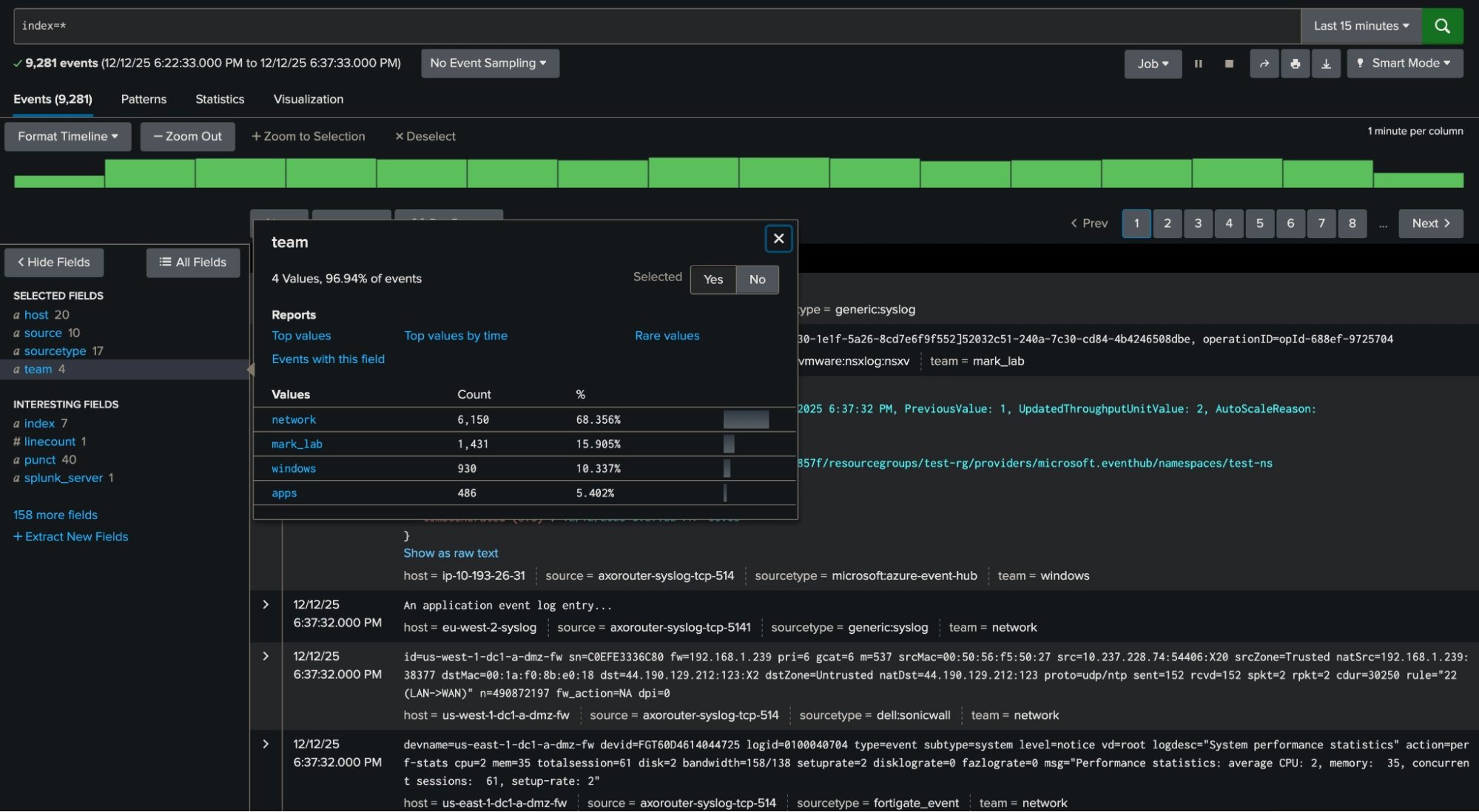
This field can easily be searched for in Splunk (below), and is a great example of a candidate for an “exclusion” search highlighted at the beginning of this blog (e.g. index=* NOT team=network). In this case, it will exclude all of the most prevalent network events very efficiently.
Conclusion
Sending indexed fields is not something that should be overused, but in the right circumstances can make your Splunk instance run far more efficiently. The above examples highlight how easy it is to configure both payload- and externally-derived metadata and send it to Splunk (as well as other destinations in a format appropriate to each). Axoflow’s role as an intelligent pipeline is to optimize the data flow to all destinations, and do so seamlessly, simultaneously, and at scale.
Happy GDI!


Follow Our Progress!
We are excited to be realizing our vision above with a full Axoflow product suite.
Sign Me UpFighting data Loss?

Book a free 30-min consultation with syslog-ng creator Balázs Scheidler