# Onboard existing syslog/syslog-ng infrastructure
If your organization already has a syslog architecture in place, Axoflow provides ways to reuse it. This allows you to integrate your existing infrastructure with Axoflow, and optionally – in a later phase – replace your log collectors with the agents provided by Axoflow.
### Managed AxoRouter deployments
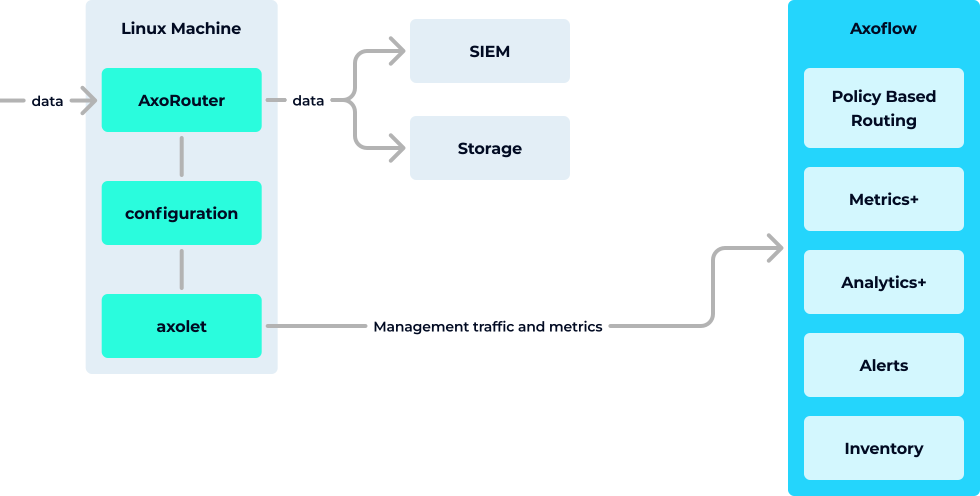
In this deployment mode you use the centralized management UI of AxoConsole to manage your AxoRouter instances. This provides the tightest integration and the most benefits, including:
* [Configuration management](../../docs/axoflow/data-management/index.md) from the UI
* Automatic [host inventory and host attribution](../../docs/axoflow/concepts/inventory/index.md)
* Automatic [classification and enrichment](../../docs/axoflow/concepts/classify-reduce-security-data/index.md) of incoming data
* Advanced [routing based on labels](../../docs/axoflow/concepts/policy-based-routing/index.md)
* Advanced and more detailed [metrics about the log ingestion, processing, data drops, delays](../../docs/axoflow/metrics/host-metrics/index.md)
* Detailed [analytics about the transported data](../../docs/axoflow/metrics/analytics/index.md)
* Access to the [FilterX data processing engine]()
* Ability to [receive OpenTelemetry data](../../docs/axoflow/data-sources/opentelemetry/index.md)
* Acts as a [Windows Event Collector server, allowing you to collect Windows events](<>)
* [Optimized and normalized output](../../docs/axoflow/concepts/normalization/index.md) for the specific SIEMs
* [Data reduction](../../docs/axoflow/concepts/classify-reduce-security-data/index.md)
* Get notifications about [alerts and anomalies](../../docs/axoflow/onboard-hosts/alerts/index.md)
### Unmanaged AxoRouter deployments
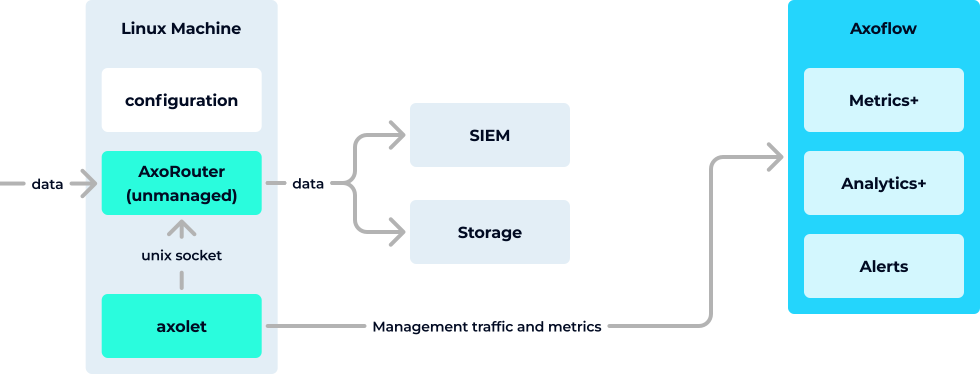
In this mode, you install AxoRouter on the data source to replace its local collector agent, and manage it manually. That way you get the functional benefits of using AxoRouter as an aggregator and data curation engine to collect and classify your data, but can manage its configuration as you see fit. This gives you all the benefits of the read-only mode (since AxoRouter includes Axolet as well), and in addition, it provides:
* Detailed [metrics about the log ingestion, processing, data drops, delays](../../docs/axoflow/metrics/host-metrics/index.md)
* Detailed [analytics about the transported data](../../docs/axoflow/metrics/analytics/index.md)
* Access to the [FilterX data processing engine]()
* Ability to [receive OpenTelemetry data](../../docs/axoflow/data-sources/opentelemetry/index.md)
* Optimized output for the specific SIEMs
* [Data reduction](../../docs/axoflow/concepts/classify-reduce-security-data/index.md)
* Get notifications about [alerts and anomalies](../../docs/axoflow/onboard-hosts/alerts/index.md)
### Read-only mode with syslog-ng™
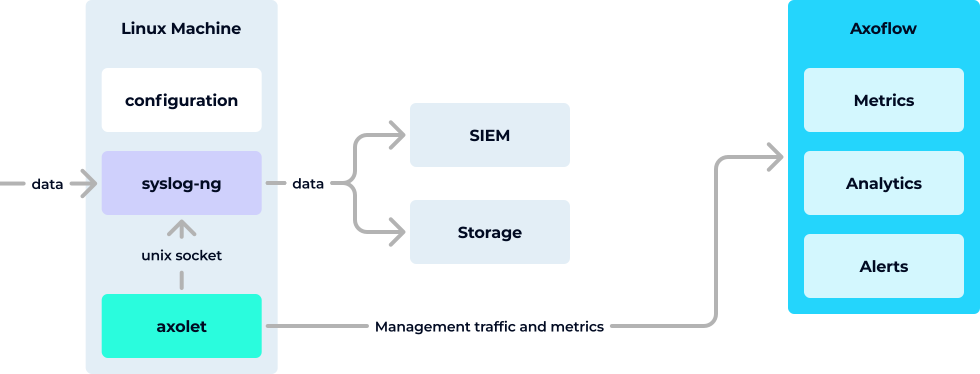
In this scenario, you install Axolet on the data source. Axolet is a monitoring (and management) agent that integrates with the local log collector and sends detailed metrics about the host and its data traffic to the AxoConsole. This allows you to use the AxoConsole to:
* Get a visual overview of your [security data pipeline topology](../../docs/axoflow/onboard-hosts/topology/index.md)
* Check the [metrics](../../docs/axoflow/metrics/index.md) about the log ingestion, processing, and data drops
* Browse [data analytics and health checks](../../docs/axoflow/metrics/analytics/index.md)
* Get notifications about [alerts and anomalies](../../docs/axoflow/onboard-hosts/alerts/index.md)
Axoflow integrates with existing syslog-ng ([AxoSyslog](../../docs/axoflow/provisioning/axosyslog/index.md), [Splunk Connect for Syslog (SC4S)](../../docs/axoflow/provisioning/sc4s/index.md), or [syslog-ng](../../docs/axoflow/provisioning/syslog-ng/index.md)) deployments by running the [Axolet agent](../../docs/axoflow/architecture/index.md#axolet) besides the syslog-ng process on the host. The agent gathers metrics from syslog-ng through the control socket. To extend the built-in metrics, the agent can be instrumented with a minimal configuration change to provide [additional metrics about the log flow](). With some additional instrumentation, syslog-ng can be extended with [log tapping functionality](../../docs/axoflow/onboard-hosts/log-tapping/index.md) as well.
Note Axoflow can manage the configuration of AxoRouter and [Axoflow agent](../../docs/axoflow/architecture/index.md#axoedge) deployments using AxoConsole. AxoSyslog, SC4S, syslog-ng, or syslog-ng Premium Edition configurations are available centrally in read-only mode. To centrally manage these configurations from AxoConsole upgrade the agents to AxoRouter. (See the [Why Enterprises Choose Axoflow Platform vs. syslog‑ng™ Premium Edition?]() comparison page for details.)